

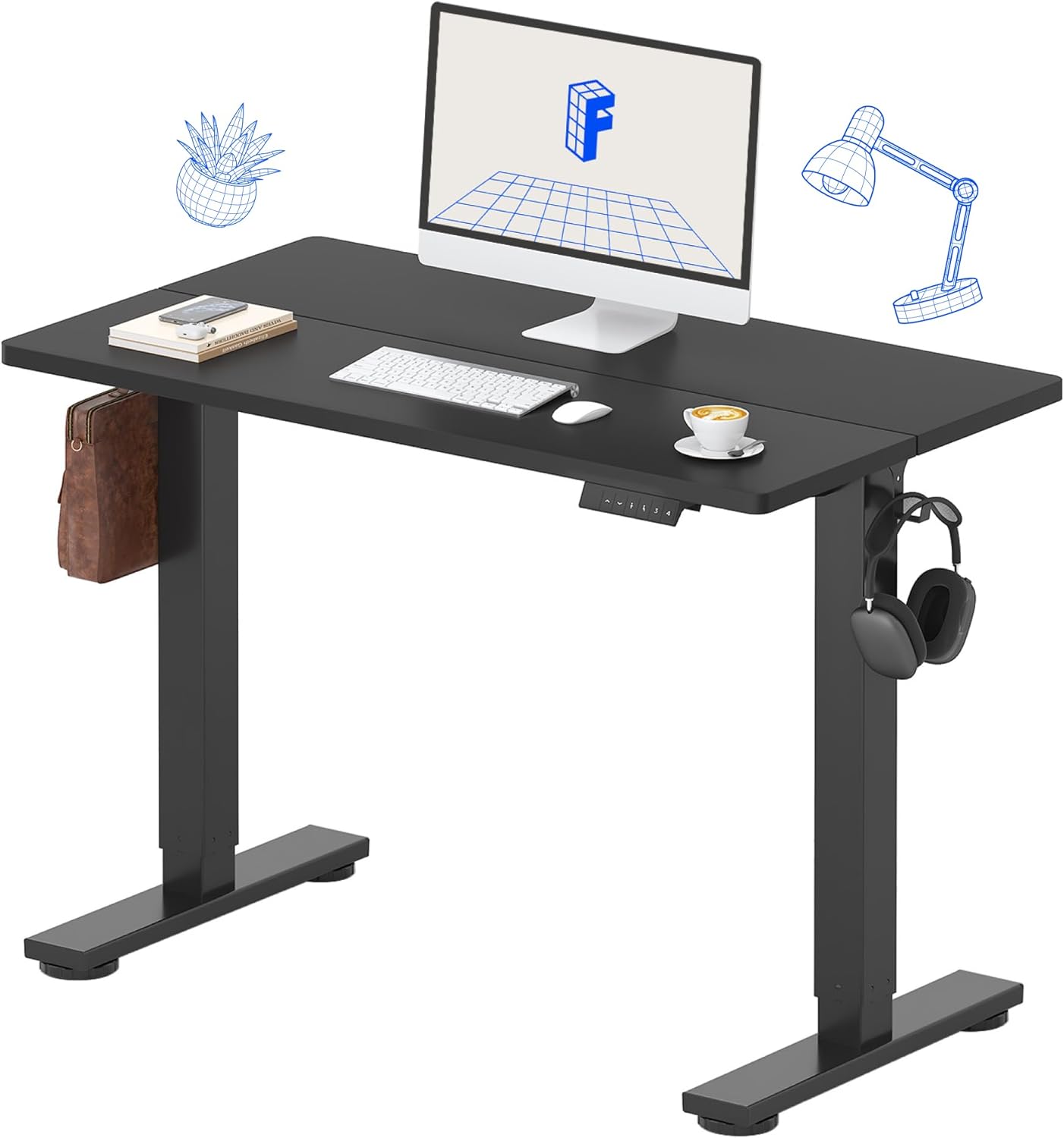
FLEXISPOT 63x32 Inch Electric Standing Desk
Bottom line: The FLEXISPOT 63x32 Inch Electric Standing Desk: 63 x 32 inch desktop fits multiple monitors plus a laptop; main trade-off: electronics covered for only 2 years, not the full 5.
As an Amazon Associate, SpecPicks earns from qualifying purchases. Full disclosure →
Pros & Cons
Pros
- ✓ 63 x 32 inch desktop fits multiple monitors plus a laptop
- ✓ 4 programmable memory presets for one-touch sit/stand changes
- ✓ 28.9 to 46.5 inch height range on a quiet motor
- ✓ Steel frame with wide feet limits wobble at standing height
- ✓ 5-year frame/mechanical warranty, built-in cable management
Cons
- ✗ Electronics covered for only 2 years, not the full 5
- ✗ Assembly may require a power drill, which is not included
- ✗ No weight capacity stated in the listing
- ✗ 28.9 inch minimum height may sit high for shorter users
Manufacturer description
The FlexiSpot 63x32 Inch Electric Standing Desk gives you a 63 x 32 inch desktop. That is wide enough for a multi-monitor setup, a laptop and your desk essentials without crowding. The 32-inch depth lets you push monitors back toward eye level, which helps reduce neck strain over long sessions. The height adjusts from 28.9 to 46.5 inches on a quiet motor. Four programmable memory presets let you switch between sitting and standing with one touch. If you share the desk or change position during the day, each preset saves a height so you are not hunting for the right setting. A steel frame…
SpecPicks Verdict
SpecPicks has no buyer-rating or benchmark data for FLEXISPOT 63x32 Inch Electric Standing Desk, so this read rests on the manufacturer's listed specs (how we evaluate). Compare with similarly-priced alternatives in the gaming desks category before committing. On the listing's own facts, the case for it is "63 x 32 inch desktop fits multiple monitors plus a laptop"; the main trade-off is "Electronics covered for only 2 years, not the full 5". If those two points fit how you will use it, put it beside one or two close alternatives in the Compare tool to confirm the price.
Common buyer scenarios for gaming desks: matching surface dimensions to the room footprint and monitor count, checking height-adjustment range for sit-stand setups, verifying cable-management channels for a clean multi-monitor build, and confirming weight capacity for a full tower + dual-monitor load. Review the spec sheet for assembly difficulty before ordering.
Frequently Asked Questions
What is the height range of the FlexiSpot 63x32 standing desk?
The desk adjusts from 28.9 inches at its lowest setting to 46.5 inches at its highest, using an electric motor.
How many height presets can I save?
The control panel has 4 programmable memory presets. Several users can share the desk, or you can save separate sitting and standing heights.
Is the desk big enough for a dual or triple monitor setup?
The desktop measures 63 x 32 inches, which the manufacturer says is sized for multiple monitors, a laptop and office essentials. Check your monitor stand or arm footprints against those dimensions before buying.
What does the warranty cover?
FlexiSpot provides a 5-year warranty on the frame and mechanical parts and 2 years of coverage on the electronics. Check the product listing for full warranty terms.
Do I need tools to assemble it?
Instructions are included, but FlexiSpot notes a power drill may be needed, and it is not included in the box.
Key Features
Quoted from the manufacturer's listing. Where it differs from the pros and cons above, those note the conditions the listing leaves out.
- SPACIOUS WORK AREA: The 63"x32" desktop offers plenty of room for multiple monitors, laptops, and office essentials, keeping everything within reach and at eye level to reduce neck strain.
- EASY HEIGHT MEMORY CONTRO: Switch from sitting to standing in one touch with 4 programmable memory presets – perfect for multiple users or daily routines.
- SMOOTH & QUIET ADJUSTMENT: Height range from 28.9" to 46.5" with smooth, whisper-quiet motor movement. Maintain focus in both home and office settings.
- STABLE AND SHAKE-FREE: Strong steel frame and wide feet deliver reliable stability at all heights – no wobble during typing, drawing, or heavy use.
- FAST SETUP, LASTING SUPPORT: Simple instructions make assembly quick (power drill may be needed, not included). 5-year frame/mechanical warranty, 2-year electronics coverage.
Full Specifications
| Base | Alloy Steel |
|---|---|
| Size | 63"x32" |
| Brand | FLEXISPOT |
| Color | Black |
| Shape | Rectangular |
| Style | Modern |
| Base Type | Leg |
| Room Type | Classroom, Dormitory, Living Room, Office, Study Room |
| Top Color | Black |
| Base Color | Black |
| Item Depth | 28 inches |
| Style Name | Modern |
| Desk Design | Computer Desk, Standing Desk |
| Desk design | Computer Desk, Standing Desk |
| Drawer Type | No Drawer |
| Finish Type | Powder Coated |
| Finish Types | Powder Coated |
| Model Number | MAH0002392 |
| Base Material | Alloy Steel |
| Compatibility | Switch |
| Full listing title | FLEXISPOT 63x32 Inch Electric Standing Desk, Black | Large Workspace, Cable Management & Organizer, Cup Holder & Hook, Home Office, Multi-Monitor Setup |
Ready to buy?
FLEXISPOT 63x32 Inch Electric Standing Desk, Black | Large Workspace, Cable Management & Organizer, Cup Holder & Hook, Home Office, Multi-Monitor Setup is listed on Amazon. Price, availability, shipping and returns are set by Amazon and its sellers — check the listing for current terms. SpecPicks earns a small commission on qualifying purchases — thank you for supporting independent review work.
Related Gaming Desks




More guides & deep dives from the SpecPicks archive
Browse all articles & guides →- Emulation Hardware in 2026: FPGA, Software, and Cart-Reader Ecosystems
- The Complete Voodoo5 5500 AGP Driver Guide (2026 Edition)
- How to Build a Windows 98 Retro PC in 2026
- Best Budget Gaming PC Build 2026 — ~$1,000 Parts List
- Best Retro Handhelds in 2026: Pocket, Mid-Tier and FPGA Picks
- Best 1440p Gaming GPUs in 2026
- RTX 4070 Super vs RX 7800 XT — Which to Buy in 2026
More reviews from the SpecPicks archive
Browse all reviews →- Best SSD for PS4 Pro: SATA Upgrades That Actually Help
- Steam Deck Sleep Mode: Should You Leave It Plugged In?
- Best Budget GPU for 1080p Gaming in 2026: Is the RTX 3060 12GB Still the Pick?
- Best CPU Cooler for the Ryzen 7 5800X: Air vs 120mm vs 240mm AIO
- Best 1440p 240Hz Gaming Monitors for Competitive FPS in 2026
- Open Weights Are Reshaping Agentic Coding: A 2026 Local-Rig Reality Check
- Glide on Modern PCs: dgVoodoo2 + nGlide for 3dfx-Era Games (2026)
- Best Gaming Monitor for 1440p in 2026
- Building a MAME Fighting Setup: Fight Stick + CF Storage for an Arcade Corner
- RTX 5080 vs RTX 4090: Is the Future-Proofing Worth It?
- Imaging Vintage IDE Drives with a CompactFlash + USB Adapter
- Best Budget SSD for Gaming and PC Upgrades in 2026
- Best Raspberry Pi for a Touchscreen Home Dashboard in 2026
- Expanding the SNES Classic and Genesis Mini Library in 2026
- HiDream-O1-Image on an RTX 3060 12GB: Does It Fit?
- Can a Raspberry Pi 4 Run the Oomwoo Open-Source Robot Vacuum Brain?
- Gemma 4 26B-A4B (NVFP4) vs Qwen 3.6 27B: Local Speed vs Quality (Nov 2026)
- Best Gaming SSD in 2026: 5 Picks for PS5, Steam Deck, and Custom Builds
- Raspberry Pi 4 8GB as a Jellyfin Media Server: Real Limits
- llama.cpp on Snapdragon Hexagon NPU: First Real Benchmarks and What Actually Works
- RTX PRO 6000 vs RTX 5090 for Local 70B LLMs: 96GB vs 32GB
- Imaging Vintage Hard Drives in 2026: SATA/IDE-to-USB Adapters Compared (FIDECO vs Unitek vs Vantec)
- Ryzen 5600G vs 5700X vs 5800X: Best CPU for a 1080p Gaming Build (2026)
- Using Claude to Hunt PCI Device IDs on Win98: Voodoo, Audigy, GeForce 4 Ti
Earliest SpecPicks reviews
Browse full archive →- Best GPU for Llama 3.1 8B (2026)
- Best GPU for Qwen 3 14B (2026)
- Best GPU for Qwen 3 32B (2026)
- Best GPU for Llama 3.1 70B (2026)
- Best GPU for DeepSeek-R1 32B (2026)
- Best GPU for Llama 3.1 405B (2026)
- How to run Llama 3.1 8B on NVIDIA GeForce RTX 5090
- How to run Qwen 3 14B on NVIDIA GeForce RTX 5090
- How to run Qwen 3 32B on NVIDIA GeForce RTX 5090
- How to run Llama 3.1 70B on NVIDIA GeForce RTX 5090
- How to run DeepSeek-R1 32B on NVIDIA GeForce RTX 5090
- How to run Llama 3.1 8B on NVIDIA GeForce RTX 4090