

FLEXISPOT
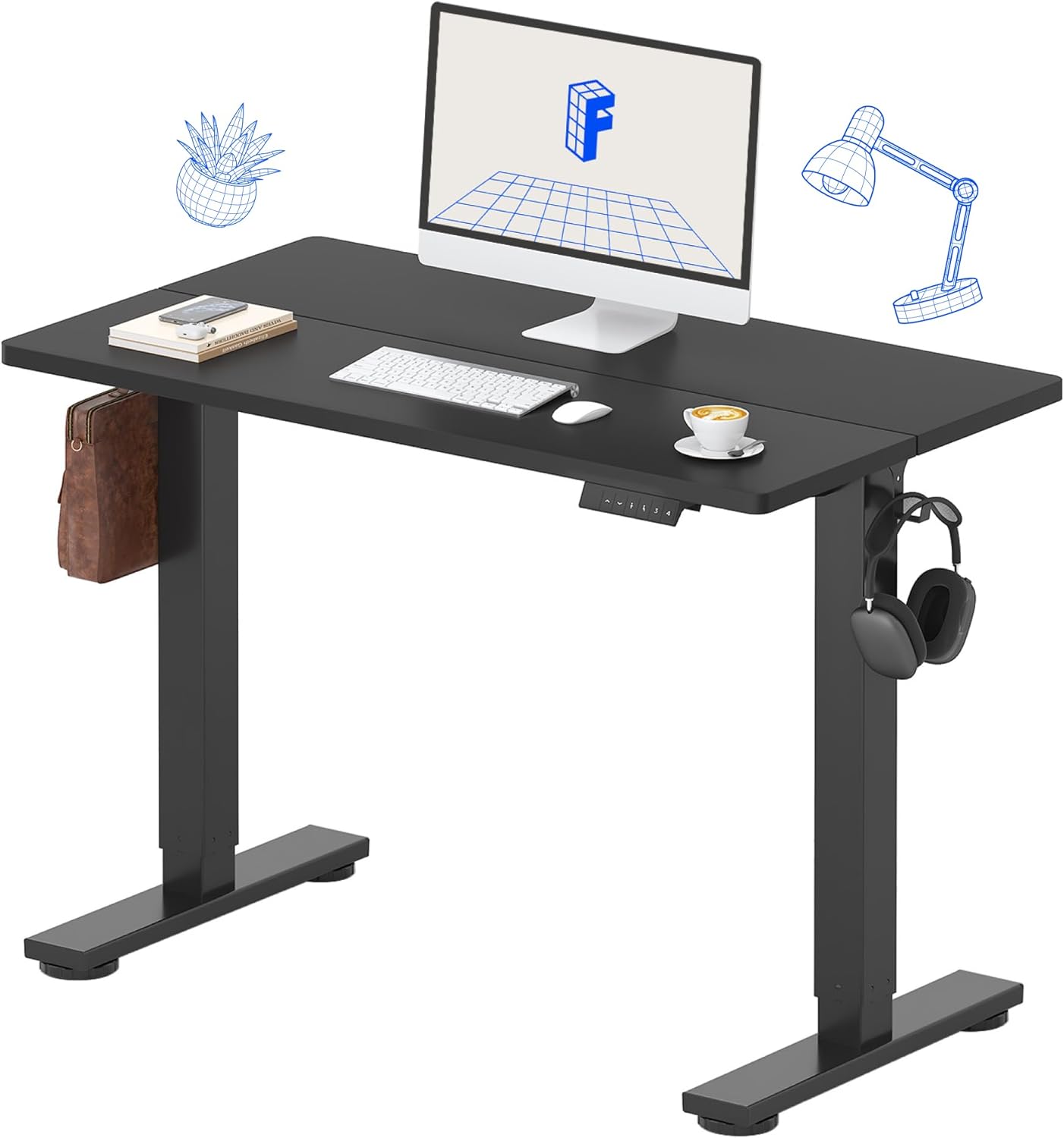
FLEXISPOT 63x32 Inch Electric Standing Desk
Bottom line: The FLEXISPOT 63x32 Inch Electric Standing Desk: 63 x 32 inch top fits multiple monitors, a laptop and desk essentials; main trade-off: power drill may be needed for assembly and is not included.
As an Amazon Associate, SpecPicks earns from qualifying purchases. Full disclosure →
Pros & Cons
Pros
- ✓ 63 x 32 inch top fits multiple monitors, a laptop and desk essentials
- ✓ 4 programmable memory presets for one-touch sit-to-stand switching
- ✓ 28.9 to 46.5 inch height range with a quiet motor
- ✓ Steel frame and wide feet built to resist wobble at every height
- ✓ Built-in cable management, organizer, cup holder and headset hook
Cons
- ✗ Power drill may be needed for assembly and is not included
- ✗ 28.9 inch minimum height may sit high for shorter users when seated
- ✗ 46.5 inch maximum may fall short for very tall users when standing
- ✗ Electronics covered for 2 years vs 5 years for frame and mechanics
Manufacturer description
The FlexiSpot 63x32 Inch Electric Standing Desk gives you a wide white wood-grain workspace with a motorized frame that moves between sitting and standing. The 63" x 32" desktop fits a multi-monitor setup, a laptop and your desk essentials, so screens can sit at eye level and everything stays within reach. Height adjusts from 28.9" to 46.5" on a smooth, quiet motor, so it won't break your focus during calls or late gaming sessions. Four programmable memory presets switch you between sitting and standing with one touch, and each person who shares the desk can save their own heights. The steel…
SpecPicks Verdict
SpecPicks has no buyer-rating or benchmark data for FLEXISPOT 63x32 Inch Electric Standing Desk, so this read rests on the manufacturer's listed specs (how we evaluate). Compare with similarly-priced alternatives in the gaming desks category before committing. On the listing's own facts, the case for it is "63 x 32 inch top fits multiple monitors, a laptop and desk essentials"; the main trade-off is "Power drill may be needed for assembly and is not included". If those two points fit how you will use it, put it beside one or two close alternatives in the Compare tool to confirm the price.
Common buyer scenarios for gaming desks: matching surface dimensions to the room footprint and monitor count, checking height-adjustment range for sit-stand setups, verifying cable-management channels for a clean multi-monitor build, and confirming weight capacity for a full tower + dual-monitor load. Review the spec sheet for assembly difficulty before ordering.
Frequently Asked Questions
What is the height range of the FlexiSpot 63x32 standing desk?
The desk adjusts from 28.9 inches at its lowest to 46.5 inches at its highest, using a motor that moves smoothly and quietly.
How big is the desktop, and will it fit a dual or triple monitor setup?
The desktop measures 63 x 32 inches, sized for multiple monitors plus a laptop and office essentials. Check your monitor stands' footprint against the 32 inch depth before you buy.
Can more than one person save their preferred heights?
Yes. The controller has 4 programmable memory presets, so several users can each save a sitting or standing height and recall it with one touch.
Do I need tools to assemble it?
It comes with simple instructions, but FlexiSpot notes you may need a power drill, which is not included. Have one ready before you start.
What warranty comes with this desk?
FlexiSpot covers the frame and mechanical parts for 5 years and the electronics for 2 years. Check the product listing for the full warranty terms.
Key Features
Quoted from the manufacturer's listing. Where it differs from the pros and cons above, those note the conditions the listing leaves out.
- SPACIOUS WORK AREA: The 63"x32" desktop offers plenty of room for multiple monitors, laptops, and office essentials, keeping everything within reach and at eye level to reduce neck strain.
- EASY HEIGHT MEMORY CONTRO: Switch from sitting to standing in one touch with 4 programmable memory presets – perfect for multiple users or daily routines.
- SMOOTH & QUIET ADJUSTMENT: Height range from 28.9" to 46.5" with smooth, whisper-quiet motor movement. Maintain focus in both home and office settings.
- STABLE AND SHAKE-FREE: Strong steel frame and wide feet deliver reliable stability at all heights – no wobble during typing, drawing, or heavy use.
- FAST SETUP, LASTING SUPPORT: Simple instructions make assembly quick (power drill may be needed, not included). 5-year frame/mechanical warranty, 2-year electronics coverage.
Full Specifications
| Base | Alloy Steel |
|---|---|
| Size | 63"x32" |
| Brand | FLEXISPOT |
| Color | White Wood Grain |
| Shape | Rectangular |
| Style | Modern |
| Base Type | Leg |
| Room Type | Classroom, Dormitory, Living Room, Office, Study Room |
| Top Color | White Wood Grain |
| Item Depth | 32 inches |
| Style Name | Modern |
| Unit Count | 1.0 Count |
| Desk Design | Computer Desk, Standing Desk |
| Desk design | Computer Desk, Standing Desk |
| Finish Type | Powder Coated |
| Finish Types | Powder Coated |
| Base Material | Alloy Steel |
| Compatibility | Switch |
| Material Type | Alloy Steel |
| Mounting Type | Freestanding |
| Full listing title | FLEXISPOT 63x32 Inch Electric Standing Desk, White Wood Grain | Large Workspace, Cable Management & Organizer, Cup Holder & Hook, Home Office, Multi-Monitor Setup |
Ready to buy?
FLEXISPOT 63x32 Inch Electric Standing Desk, White Wood Grain | Large Workspace, Cable Management & Organizer, Cup Holder & Hook, Home Office, Multi-Monitor Setup is listed on Amazon. Price, availability, shipping and returns are set by Amazon and its sellers — check the listing for current terms. SpecPicks earns a small commission on qualifying purchases — thank you for supporting independent review work.
Related Gaming Desks




More guides & deep dives from the SpecPicks archive
Browse all articles & guides →- Best 1440p Gaming GPUs in 2026
- Best Budget Gaming PC Build 2026 — ~$1,000 Parts List
- Emulation Hardware in 2026: FPGA, Software, and Cart-Reader Ecosystems
- RTX 4070 Super vs RX 7800 XT — Which to Buy in 2026
- How to Build a Windows 98 Retro PC in 2026
- The Complete Voodoo5 5500 AGP Driver Guide (2026 Edition)
- Best Retro Handhelds in 2026: Pocket, Mid-Tier and FPGA Picks
More reviews from the SpecPicks archive
Browse all reviews →- Run Qwen 3.6 27B Locally: What Fits on 12GB in 2026
- Can You Build an $800 Gaming PC in 2026? Parts + Cost
- Xbox Mode's PC Performance Boost Favors Nvidia GPUs
- Local LLM Image Generators: Best AMD GPUs in 2025
- Best Game Controller for PC and PS5 in 2026
- Best AMD CPU for Gaming in 2026: Our Top 5 Ryzen Picks
- 48GB DDR5 or 12GB VRAM? What Actually Speeds Up Local LLMs
- Memory Prices Climb as Samsung and SK Hynix Pour $590B Into Chips
- Adding a Manual Shifter to Your Sim Rig: Is the Thrustmaster TH8A Worth It for the G29?
- Best CPU Cooler for AM4 + Ryzen 5000 in 2026
- Best Gaming GPUs for 1080p High-Refresh Rate (2026)
- Best Streaming Starter Kits in 2026: Mic, Light, Capture, and the One-Box Builds
- DIY Handheld Tricorder Build Guide 2026
- Best Cooling Solutions for Modern Gaming PCs (2026)
- How Fast Is Local LLM Inference on a Ryzen 7 5800X (CPU-Only, No GPU)?
- Qwen3.6 35B-A3B on a 12GB GPU: 95 tok/s on 4070 Super, 34 on 3060
- Build a DualSense PC Dongle with a Raspberry Pi Pico: Adaptive Triggers and Haptics on Windows
- Build a Silent Windows 98 Gaming PC With a CompactFlash IDE Drive
- AMD Radeon RX 9070 GRE Review: Thoroughly Midrange
- DualSense vs GameSir G7 SE for PC Sim Racing: Which Controller Wins in 2026
- How to Install Windows 98 SE on a CompactFlash Boot Drive in 2026 (Retro PC Build Guide)
- RetroArch PS2 Emulation: Setup, BIOS & Performance Guide
- JADEPUFFER Agentic Ransomware: Why a Local AI Rig Changes Your Threat Model
- Can You Run Local TTS on an RTX 3060 12GB in 2026?
Earliest SpecPicks reviews
Browse full archive →- Best GPU for Llama 3.1 8B (2026)
- Best GPU for Qwen 3 14B (2026)
- Best GPU for Qwen 3 32B (2026)
- Best GPU for Llama 3.1 70B (2026)
- Best GPU for DeepSeek-R1 32B (2026)
- Best GPU for Llama 3.1 405B (2026)
- How to run Llama 3.1 8B on NVIDIA GeForce RTX 5090
- How to run Qwen 3 14B on NVIDIA GeForce RTX 5090
- How to run Qwen 3 32B on NVIDIA GeForce RTX 5090
- How to run Llama 3.1 70B on NVIDIA GeForce RTX 5090
- How to run DeepSeek-R1 32B on NVIDIA GeForce RTX 5090
- How to run Llama 3.1 8B on NVIDIA GeForce RTX 4090