
LinksTek
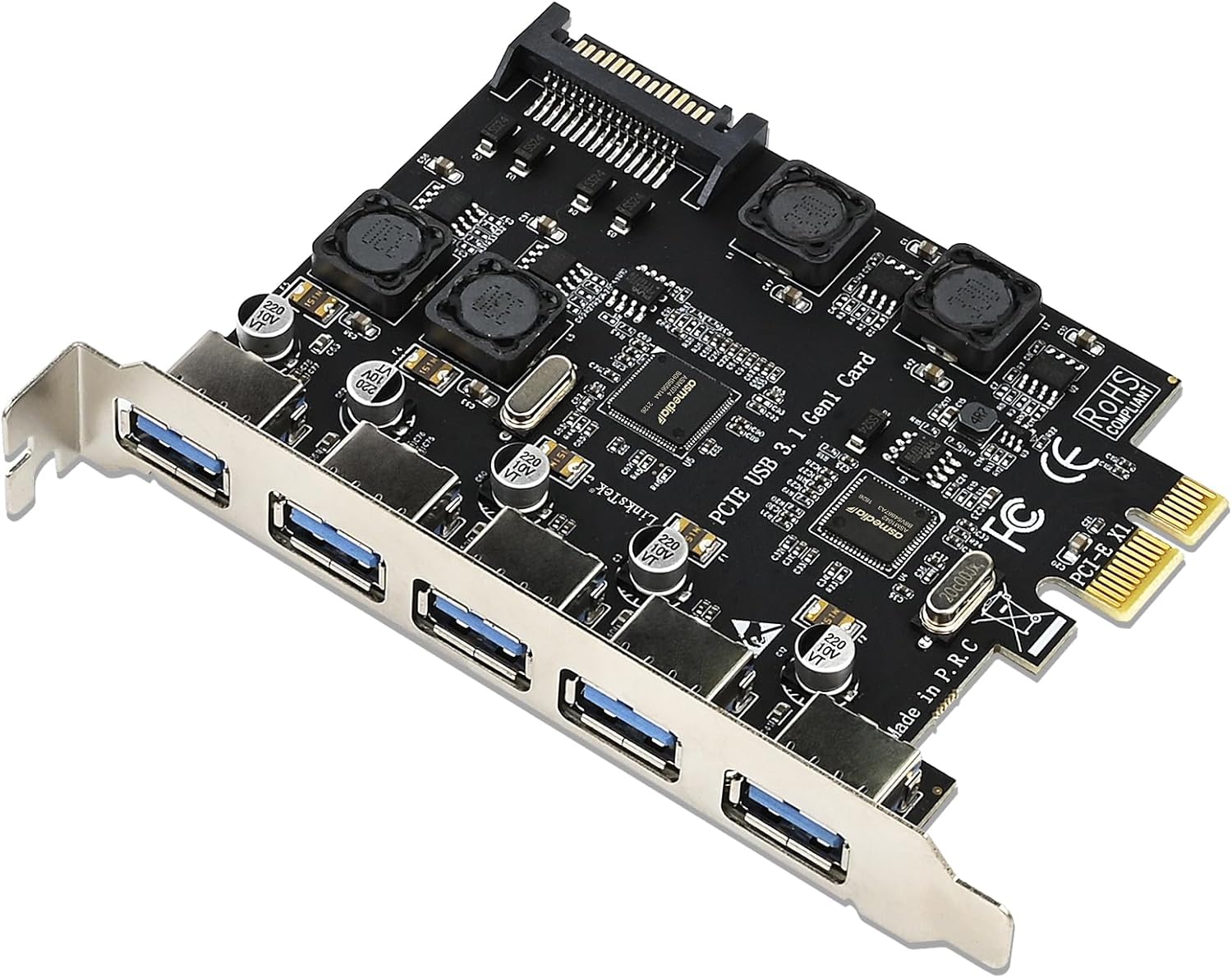
LinksTek PCIE-U305A 5-Ports PCIE USB 3.0 5Gbps Expansion Card for Desktop PCs
Bottom line: The PCIE-U305A 5-Ports PCIE USB 3.0 5Gbps Expansion Card for Desktop PCs is a specs-and-price decision rather than a crowd-consensus one in the expansion cards category, priced around $25.99 on Amazon as of 2026-11-22 11:27 UTC. Check the specification table below against one or two close alternatives — on price and spec fit, not on star ratings.
As an Amazon Associate, SpecPicks earns from qualifying purchases. Full disclosure →
*Price sourced from Amazon.com. Last updated 2026-11-22. Product prices and availability are accurate as of the date/time indicated and are subject to change. Any price and availability information displayed on Amazon.com at the time of purchase will apply to the purchase of this product.
Before you buy
- Needs a free PCIe slot — check which of your board's slots are wired for it
SpecPicks Verdict
SpecPicks has no buyer-rating or benchmark data for PCIE-U305A 5-Ports PCIE USB 3.0 5Gbps Expansion Card for Desktop PCs, so this read rests on the manufacturer's listed specs and the current price in the expansion cards category (how we evaluate). Compare with similarly-priced alternatives in the expansion cards category before committing. Judge it on the specification table and the price rather than on sentiment: check the figures that decide your use case, then put it side-by-side with two or three close alternatives in the Compare tool before clicking through.
Before ordering, confirm the board side: this card needs a free PCIe slot of the width the card uses. Your motherboard manual lists which slots share lanes with M.2 sockets or other slots. Prices and stock are set by the retailer and may have moved since this page was last updated.
Key Features
Quoted from the manufacturer's listing. Where it differs from the pros and cons above, those note the conditions the listing leaves out.
- 1. PCIE-U305A allow users add 5X USB 3.0 (USB 3.1 GEN1) Type A 5Gbps max ports on Desktop PCs and Working Stations for USB devices connection. Enjoy super easy installation, plug and play on most main stream Windows PCs.
- 2. Based on ASMedia ASM1042 PCIE USB 3.0 (USB 3.1 GEN1) host controller and ASM1074 USB 3.0 (USB 3.1 GEN1) HUB. Provide 5Gbps total bandwidth on 5X USB-A ports for USB 3.0 (USB 3.1 GEN1) devices data transmission which include USB HDD/SSD enclosure, USB universal docking station, USB Hub, USB KVM switch, VR-System, USB graphic adapters and more USB devices.
- 3. Built in LinksTek Smart Power Distribution Technology, will pick up power supply from motherboard. Users do not need to plug extra power supply cables but get enough power, each USB-A ports will get 5V/2A 10W max for connected high power consumption USB device such as USB NVME SSD enclosure.
- 4. Compatible system: Plug and Play on Windows 11, 10, 8.1, 8 (32/64bit) and Windows Server 2012, 2012R2, 2016, 2019, 2022. Need to install driver on Windows XP, Vista, 7 (32/64bit) and Windows Server 2003, 2003R2, 2008, 2008R2 (32/64bit).
- 5. Dual Mode Power Supply: 1. Users can enjoy plug and play on new motherboard that can provide enough power with LinksTek Smart Power Distribution Technology, no need to installs any power cables. 2. For some old type motherboard cannot provide enough power, users can add power supply from PSU by the SATA power supply.
- 6. PCIE X1 interface design will works on PCIE X1, X2, X4, X8, X16 slot. Packed with low profile bracket and full height bracket, will works on both slim PCs and standard PCs.
Full Specifications
| Brand | LinksTek |
|---|---|
| Style | Standard |
| Style Name | Standard |
| Unit Count | 1 Count |
| 7. ATTENTION | 1. Must make sure mother-board have empty PCIE slot before purchase. 2. PCIE-U305A supports standard size PCs ONLY, not support slim PCs. |
| Connectivity | USB |
| Model Number | PCIE-U305A |
| Compatibility | Switch |
| Number of Items | 1 |
| Compatible Devices | Personal Computer |
| Hardware Interface | PCIE x 1, USB 3.0 |
| Warranty Description | Limited Parts Warranty. |
| Item Dimensions L x W x H | 4.72"L x 3.6"W x 0.8"H |
| Full listing title | PCIE-U305A 5-Ports PCIE USB 3.0 5Gbps Expansion Card for Desktop PCs, 5X USB-A Ports, Built in Smart Power Distribution Technology, No Need Extra Power Supply |
Ready to buy?
PCIE-U305A 5-Ports PCIE USB 3.0 5Gbps Expansion Card for Desktop PCs, 5X USB-A Ports, Built in Smart Power Distribution Technology, No Need Extra Power Supply is listed on Amazon. Price, availability, shipping and returns are set by Amazon and its sellers — check the listing for current terms. SpecPicks earns a small commission on qualifying purchases — thank you for supporting independent review work.
*Price sourced from Amazon.com. Last updated 2026-11-22. Product prices and availability are accurate as of the date/time indicated and are subject to change. Any price and availability information displayed on Amazon.com at the time of purchase will apply to the purchase of this product.
Related Expansion Cards


More guides & deep dives from the SpecPicks archive
Browse all articles & guides →- Emulation Hardware in 2026: FPGA, Software, and Cart-Reader Ecosystems
- Best Retro Handhelds in 2026: Pocket, Mid-Tier and FPGA Picks
- RTX 4070 Super vs RX 7800 XT — Which to Buy in 2026
- The Complete Voodoo5 5500 AGP Driver Guide (2026 Edition)
- Best Budget Gaming PC Build 2026 — ~$1,000 Parts List
- Best 1440p Gaming GPUs in 2026
- How to Build a Windows 98 Retro PC in 2026
More reviews from the SpecPicks archive
Browse all reviews →- Ryzen 7 5800X vs 5700X: Best 8-Core AM4 CPU 2026
- Best Game Controller for Couch & Big-Screen PC Gaming in 2026
- Local AI Video After Seedance 2.5: What GPU Generates 30-Second Clips
- Best Raspberry Pi for a Retro Console Build in 2026: Pi 4 8GB vs Pi Zero 2 W
- RTX 3060 12GB vs RTX 3060 Ti 8GB for Local LLMs: VRAM Beats Bandwidth Every Time
- Best SATA SSD for Gaming and Console Upgrades in 2026
- The Sound Blaster Monopoly: How Creative Still Shapes Retro PC Audio in 2026
- Best CPU Cooler for AMD Ryzen in 2026
- Build a Self-Hosted AI Home Lab on a Raspberry Pi 4 8GB in 2026
- Best Budget GPU for Local LLMs in 2026: RTX 3060 12GB
- Windows 98 SE on >512MB RAM: The vcache Fix Explained (2026)
- 48GB vs 64GB DDR5 for Gaming and AI: Worth It?
- LattePanda Sigma GPU: What Its Graphics Really Offer
- CompactFlash as a Boot Drive: Silent Storage for a Period-Correct Retro PC (2026)
- vLLM on Windows in 2026: What Actually Works on a 12GB Card
- NVIDIA's AI Servers Run on Hot Tub Coolant — No Evaporators Neede
- Qwen 3.6 27B vs Llama 3.1 70B on Local Hardware: tok/s, VRAM, and Quality (2026)
- Building a Sim Racing Cockpit Under $500: Logitech G29 + Thrustmaster TH8A Shifter
- Best Budget SATA SSD for Everyday Upgrades (2026)
- AMD EXPO Ultra-Low Latency BIOS Updates: 600-Series Guide
- Open-WebUI vs LM Studio: Best Local LLM Front-End in 2026
- Fable 5 as Manager: The Delegate-to-Sonnet-5 Cost Pattern
- CPU Offload for Local LLMs: Does a Ryzen 7 5800X Help?
- Expanding the SNES Classic and Genesis Mini Library in 2026
Earliest SpecPicks reviews
Browse full archive →- Best GPU for Llama 3.1 8B (2026)
- Best GPU for Qwen 3 14B (2026)
- Best GPU for Qwen 3 32B (2026)
- Best GPU for Llama 3.1 70B (2026)
- Best GPU for DeepSeek-R1 32B (2026)
- Best GPU for Llama 3.1 405B (2026)
- How to run Llama 3.1 8B on NVIDIA GeForce RTX 5090
- How to run Qwen 3 14B on NVIDIA GeForce RTX 5090
- How to run Qwen 3 32B on NVIDIA GeForce RTX 5090
- How to run Llama 3.1 70B on NVIDIA GeForce RTX 5090
- How to run DeepSeek-R1 32B on NVIDIA GeForce RTX 5090
- How to run Llama 3.1 8B on NVIDIA GeForce RTX 4090