
NFHK
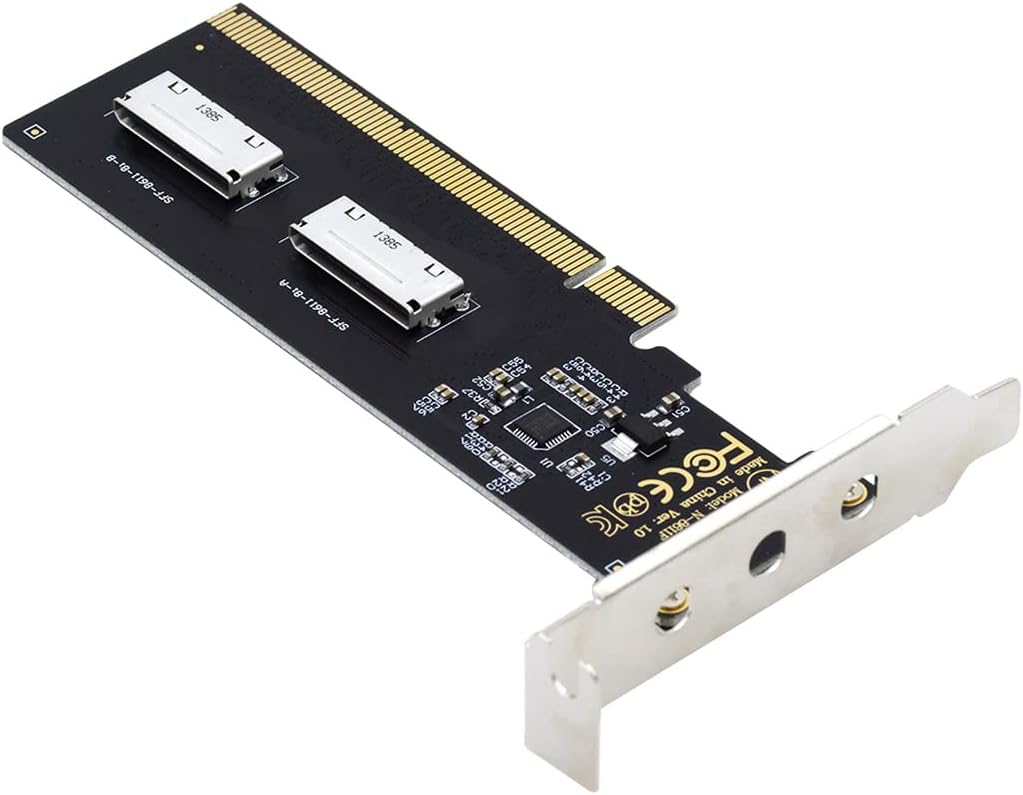
NFHK Adapter PCIE4.0 PCI-Express 16x to Dual Oculink SFF-8612 SFF-8611 8X VROC Adapter
Bottom line: The Adapter PCIE4.0 PCI-Express 16x to Dual Oculink SFF-8612 SFF-8611 8X is a specs-and-price decision rather than a crowd-consensus one in the expansion cards category. Check the specification table below against one or two close alternatives — on price and spec fit, not on star ratings.
As an Amazon Associate, SpecPicks earns from qualifying purchases. Full disclosure →
Before you buy
- Needs a free PCIe slot — check which of your board's slots are wired for it
Manufacturer description
PCIE PCI-Express 16x to Dual Oculink SFF-8612 SFF-8611 8x VROC Adapter for Mainboard SSD Graphics CardOculink 8x connectors are internal and external small form factor PCI-E connectors and cables optimized for the client and market.This oculink pci-e converter enables belowing applications.One detachable PCIE PCI-Express 16x motherboard can be connected,The converter can be installed into the system internally through the SFF-8611/8612 oculink interface.Only supports motherboards with detachable PCI-E channels.Control the operation of four disks based on the motherboard PCIE channel,The…
SpecPicks Verdict
SpecPicks has no buyer-rating or benchmark data for Adapter PCIE4.0 PCI-Express 16x to Dual Oculink SFF-8612 SFF-8611 8X…, so this read rests on the manufacturer's listed specs (how we evaluate). Compare with similarly-priced alternatives in the expansion cards category before committing. Judge it on the specification table and the price rather than on sentiment: check the figures that decide your use case, then put it side-by-side with two or three close alternatives in the Compare tool before clicking through.
Before ordering, confirm the board side: this card needs a free PCIe slot of the width the card uses. Your motherboard manual lists which slots share lanes with M.2 sockets or other slots. Prices and stock are set by the retailer and may have moved since this page was last updated.
Key Features
Quoted from the manufacturer's listing. Where it differs from the Before you buy notes above, those note the conditions the listing leaves out.
- Oculink 8x connectors are internal and external small form factor PCI-E connectors and cables optimized for the client and market.This oculink pci-e converter enables belowing applications.
- One detachable PCIE PCI-Express 16x motherboard can be connected,The converter can be installed into the system internally through the SFF-8611/8612 oculink interface.
- Only supports motherboards with detachable PCI-E channels.Control the operation of four disks based on the motherboard PCIE channel,The motherboard without PCIE signal split can only recognize one disk.
- Built-in multiple sets of high-power DC modules for sustainable and stable work.The innovative design can accommodate Four PCIEs of the chassis, and can support simultaneous operation.
- Dual Oculink SFF-8612 8X design, Stable installation, Can run 4 PCIE disks at full speed at the same time.
Full Specifications
| Brand | NFHK |
|---|---|
| Style | PCI-E 16X to Dual Oculink 8x Internal |
| Style Name | PCI-E 16X to Dual Oculink 8x Internal |
| Model Number | NF-SF-057-LIST |
| Mfr Part Number | NF-SF-057-OC02 |
| Compatible Devices | Personal Computer |
| Hardware Interface | PCI Express x16 |
| Full listing title | Adapter PCIE4.0 PCI-Express 16x to Dual Oculink SFF-8612 SFF-8611 8X VROC Adapter for Mainboard SSD Graphics Card |
Ready to buy?
Adapter PCIE4.0 PCI-Express 16x to Dual Oculink SFF-8612 SFF-8611 8X VROC Adapter for Mainboard SSD Graphics Card is listed on Amazon. Price, availability, shipping and returns are set by Amazon and its sellers — check the listing for current terms. SpecPicks earns a small commission on qualifying purchases — thank you for supporting independent review work.
Related Expansion Cards


More guides & deep dives from the SpecPicks archive
Browse all articles & guides →- The Complete Voodoo5 5500 AGP Driver Guide (2026 Edition)
- Best 1440p Gaming GPUs in 2026
- How to Build a Windows 98 Retro PC in 2026
- Best Budget Gaming PC Build 2026 — ~$1,000 Parts List
- RTX 4070 Super vs RX 7800 XT — Which to Buy in 2026
- Best Retro Handhelds in 2026: Pocket, Mid-Tier and FPGA Picks
- Emulation Hardware in 2026: FPGA, Software, and Cart-Reader Ecosystems
More reviews from the SpecPicks archive
Browse all reviews →- Local LLMs on Refurb M4 Max vs New M5 Max: What the LocalLLaMA Numbers Show
- Self-Host Jellyfin on the Raspberry Pi 4 8GB: Transcoding Limits
- Build a Home AI Assistant on a Raspberry Pi 4 8GB in 2026
- 'Count Anything' AI Model Does Object Counting — Harder Than It Sounds
- Building a Period-Correct 1998 Voodoo2 SLI Win98 Gaming PC in 2026: Parts, Boot Media, and Glide Setup
- GTX 1050 Ti 4GB vs Ryzen 5 5600G iGPU: Which Actually Runs Qwen3 4B?
- Qualcomm Enters the Data-Center Market With Its Own AI Processor
- Best Gaming CPUs Under $400 for 2026: Ryzen, X3D, and Intel Picks
- Run Qwen 3.6 27B Locally: VRAM, Quant & tok/s on a 12GB RTX 3060
- RTX 3060 12GB vs RTX 4060 for 1080p Gaming: Which Wins in 2026?
- RX 7900 XTX 24GB vs RTX 4080 16GB for Local LLM Inference (2026)
- Best GPU for Gaming in 2026: Top 5 Picks by Budget
- Run a Local LLM on a Raspberry Pi 4 8GB: What Works in 2026
- Best Single-Board Computer Project Kits for Beginners (2026)
- CompactFlash as an IDE Boot Drive for Your Win98 Retro PC in 2026
- AVX-512 Lifts Linux RAID Up to 41% on AMD Ryzen Chips
- Best PC Streaming Starter Kit in 2026: 5 Picks
- The Hackaday Europe 2026 Retro PC Build: What They Actually Built and Why It Matters
- CompactFlash-to-IDE Boot Drive: The Silent Win98 Build Upgrade
- Best RGB Lighting for a Gaming PC Desk: LED Strips and Case Fans Done Right
- Best 24GB GPU for Local LLM Inference in 2026
- Imaging Vintage IDE Drives to Preserve 90s Game CDs
- Best GPU for Local LLMs Under $350: Why the RTX 3060 12GB Still Wins
- Intel Panther Lake on Linux: First Core Ultra X7 Numbers Land
Earliest SpecPicks reviews
Browse full archive →- Best GPU for Llama 3.1 8B (2026)
- Best GPU for Qwen 3 14B (2026)
- Best GPU for Qwen 3 32B (2026)
- Best GPU for Llama 3.1 70B (2026)
- Best GPU for DeepSeek-R1 32B (2026)
- Best GPU for Llama 3.1 405B (2026)
- How to run Llama 3.1 8B on NVIDIA GeForce RTX 5090
- How to run Qwen 3 14B on NVIDIA GeForce RTX 5090
- How to run Qwen 3 32B on NVIDIA GeForce RTX 5090
- How to run Llama 3.1 70B on NVIDIA GeForce RTX 5090
- How to run DeepSeek-R1 32B on NVIDIA GeForce RTX 5090
- How to run Llama 3.1 8B on NVIDIA GeForce RTX 4090