

LEOBOG
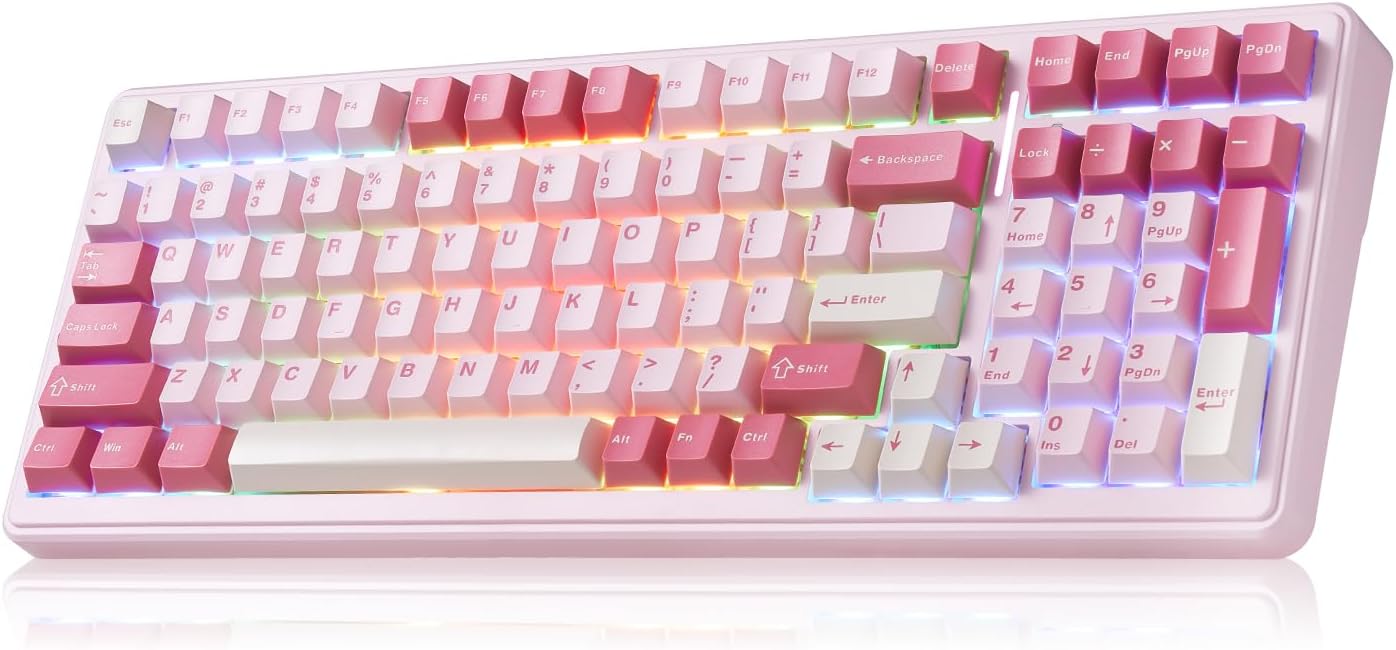
LEOBOG Aula F99 Keyboard Gaming
Bottom line: The LEOBOG Aula F99 Keyboard Gaming: Tri-mode connectivity: Bluetooth 5.0, 2.4GHz, and USB-C wired across up to 5 devices; main trade-off: listing brands it LEOBOG while the product name is Aula F99, muddying support channels.
As an Amazon Associate, SpecPicks earns from qualifying purchases. Full disclosure →
Pros & Cons
Pros
- ✓ Tri-mode connectivity: Bluetooth 5.0, 2.4GHz, and USB-C wired across up to 5 devices
- ✓ 8000mAh battery, far above typical wireless mechanical keyboard capacity
- ✓ Hot-swappable PCB accepts both 3-pin and 5-pin switches, no soldering
- ✓ 96% layout keeps numpad, function row, and arrow keys in a compact footprint
Cons
- ✗ Listing brands it LEOBOG while the product name is Aula F99, muddying support channels
- ✗ Music-sync and macro recording need the driver, which is Windows-oriented
- ✗ Pre-lubed linear switches only; no tactile or clicky option stated at purchase
- ✗ 96% layout crowds arrow and navigation keys versus a true full-size board
SpecPicks Verdict
SpecPicks has no buyer-rating or benchmark data for LEOBOG Aula F99 Keyboard Gaming, so this read rests on the manufacturer's listed specs (how we evaluate). Compare with similarly-priced alternatives in the gaming peripherals category before committing. On the listing's own facts, the case for it is "Tri-mode connectivity: Bluetooth 5.0, 2.4GHz, and USB-C wired across up to 5 devices"; the main trade-off is "Listing brands it LEOBOG while the product name is Aula F99, muddying support channels". If those two points fit how you will use it, put it beside one or two close alternatives in the Compare tool to confirm the price.
Before ordering, check the listed dimensions, ports, power requirements and supported devices or systems in the spec table below against how you plan to use it, and confirm them on the retailer's listing. Prices and stock are set by the retailer and may have moved since this page was last updated.
Key Features
Quoted from the manufacturer's listing. Where it differs from the pros and cons above, those note the conditions the listing leaves out.
- Mechanical Keyboards: This Aula F99 mechanical keyboard wireless work with bluetooth-bt5.0, 2.4GHz wireless mode and usb wired 3 connections,can connect up to five devices at the same time.AULA F99 keyboard bluetooth computer keyboard is suitable for PC, laptops, tablets, mobile phones, PS, XBOX etc,no limits about your keyboard connection to meet all the needs of users like work, gaming, and study ect.
- Wireless Computer Gaming Keyboards: This Gaming Keyboard Friendly Top-Mount Design - Offers a superior tactile consistency, firm feeling, and better noice reducing creamy keyboard.Keys support macro customization, which allows macro recording and editing, customize key function and 16.8 million light colors, and supports cool music rhythm lighting effects with driver.
- Hot Swappable Keyboard & Pre-lubed Linear Switch: Enjoy the fun of making your own unique keyboard.The switches and keycaps can be freely replaced(keycap/switch puller are included in the package).Hot-swap PCB allows you to replace 3 pins/5 pins switches freely without soldering issue.
- Tri-mode Connect Cool Keyboard: The aula f99 keyboard wireless mechanical gaming keyboards supports bluetooth, 2.4Ghz wireless and stable wired connection. Built-in 8000mah high-capacity battery, this mechanical bluetooth keyboard wireless delivers extended usage times in a wireless setup. This large battery capacity ensures that the wireless gaming keyboard is always ready for long work or intense gaming mode.
- 96% Layout Compact Full Size Keyboard:The aula f99 is a compact keyboard with 99 keys full size mechanical keyboard. The aula keyboard has number keys, function keys and arrow keys at the same time. The multi-function 96% compact mechanical keyboard enables you to adjust the sound level and backlit fast. Long press the multifunctional fn+↑/↓ of this RGB keyboard can switch between gaming and office modes, also can adjust the keyboard's rgb backlit effects.
Full Specifications
| Brand | LEOBOG |
|---|---|
| Color | Gradient Grey |
| Style | Contemporary |
| Theme | creamy keyboard, gaming keyboards, keyboard, keyboard gaming, mechanical gaming keyboard, mechanical keyboard wireless, mechanical keyboards, pc keyboard, rgb keyboard, wireless gaming keyboard |
| Generation | 2st Generation |
| Model Name | F99 |
| Style Name | Contemporary |
| Unit Count | 1 Count |
| Switch Type | Linear |
| Connectivity | Bluetooth, USB, 2.4GHz |
| Model Number | F99 |
| Power Source | Battery Powered |
| Compatibility | PC, Xbox, Switch |
| Series Number | 1 |
| Number of Keys | 99 |
| Button Quantity | 99 |
| Connection Type | Wired |
| Keyboard Layout | QWERTY |
| Mfr Part Number | F99 |
| Number of Items | 1 |
| Full listing title | Aula F99 Keyboard Gaming,Wireless Mechanical Keyboards Creamy Sound | Computer Bluetooth Keyboard Full Size Hot Swappable RGB Backlit w/8000mAh Battery,Gradient Grey Tri-Mode BT/2.4GHz/USB |
Ready to buy?
Aula F99 Keyboard Gaming,Wireless Mechanical Keyboards Creamy Sound | Computer Bluetooth Keyboard Full Size Hot Swappable RGB Backlit w/8000mAh Battery,Gradient Grey Tri-Mode BT/2.4GHz/USB is listed on Amazon. Price, availability, shipping and returns are set by Amazon and its sellers — check the listing for current terms. SpecPicks earns a small commission on qualifying purchases — thank you for supporting independent review work.
Related Gaming Peripherals




More guides & deep dives from the SpecPicks archive
Browse all articles & guides →- Emulation Hardware in 2026: FPGA, Software, and Cart-Reader Ecosystems
- RTX 4070 Super vs RX 7800 XT — Which to Buy in 2026
- How to Build a Windows 98 Retro PC in 2026
- Best Retro Handhelds in 2026: Pocket, Mid-Tier and FPGA Picks
- Best 1440p Gaming GPUs in 2026
- The Complete Voodoo5 5500 AGP Driver Guide (2026 Edition)
- Best Budget Gaming PC Build 2026 — ~$1,000 Parts List
More reviews from the SpecPicks archive
Browse all reviews →- Zhipu ZCode vs Claude Code: Cheaper Agentic Coding, and the Rig to Run It
- Step 3.7 Flash vs Gemma 4 12B: Which Local Model Wins on a 12GB GPU?
- RTX 3060 12GB Local LLM Guide: Which Models Actually Fit (2026)
- Kimi K3 vs Qwen 3.8 for Local Coding Agents in 2026
- Best 1440p Monitor for the RTX 3060 in 2026: Picks That Actually Match
- WoW Mythic+ 3500 on Steam Deck: Is It Possible?
- Mount a 90s Big-Box CD-ROM ISO on Win98 Without a CD Drive
- How to run Llama 3.1 8B on Apple M3 Ultra
- Adafruit Ships a Triple LED Matrix Bonnet for the Raspberry Pi
- Forza Horizon 6: Is 8GB VRAM Enough or Do You Need an RTX 3060 12GB?
- Best GPUs for Mixtral 8x22B Local Inference in 2026
- Can a Raspberry Pi Zero W Run a Local LLM in 2026? A Tiny-Model Reality Check
- Samsung Winds Down Chip Production Six Days Before Strike: What Memory Buyers Should Do Right Now
- Ryzen 5 5600G APU for Local LLM Inference in 2026: What You Can Actually Run
- Do You Even Need a Graphics Card? Ryzen 5 5600G iGPU vs RTX 3060 for 1080p
- Windows 98 SE on >512MB RAM: The vcache Fix Explained (2026)
- Best Game Controllers for PC in 2026
- Best Controller for Fighting Games on PC in 2026: HORI HORIPAD vs 8BitDo Pro 2 vs DualSense
- Microsoft's SkillOpt Boosts Models With Just a Markdown File — What It Means for Your Local RTX 3060 Rig
- Best Plug-and-Play Retro Gaming Consoles in 2026: 5 Picks
- Sound Blaster Audigy 2 ZS Won't Install on Windows XP: Driver Hunt + Fix
- Best Gaming SSD in 2026: 5 Picks for PS5, Steam Deck, and Custom Builds
- Qwen 3.6 27B vs Sonnet 4.6: Local Agentic Benchmarks
- Best 4K Monitor for PS5 (4K/120Hz) in 2026
Earliest SpecPicks reviews
Browse full archive →- Best GPU for Llama 3.1 8B (2026)
- Best GPU for Qwen 3 14B (2026)
- Best GPU for Qwen 3 32B (2026)
- Best GPU for Llama 3.1 70B (2026)
- Best GPU for DeepSeek-R1 32B (2026)
- Best GPU for Llama 3.1 405B (2026)
- How to run Llama 3.1 8B on NVIDIA GeForce RTX 5090
- How to run Qwen 3 14B on NVIDIA GeForce RTX 5090
- How to run Qwen 3 32B on NVIDIA GeForce RTX 5090
- How to run Llama 3.1 70B on NVIDIA GeForce RTX 5090
- How to run DeepSeek-R1 32B on NVIDIA GeForce RTX 5090
- How to run Llama 3.1 8B on NVIDIA GeForce RTX 4090