
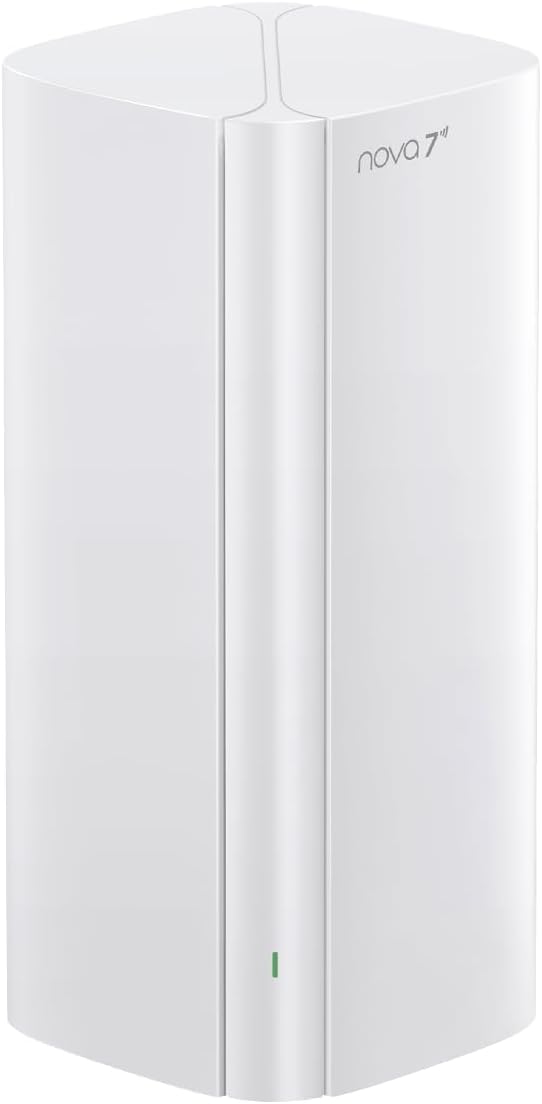
Tenda
Tenda WiFi 7 Mesh System BE5100
Bottom line: The Tenda WiFi 7 Mesh System BE5100: 2.5G auto-sensing WAN/LAN port handles up to 2000Mbps broadband or NAS links; main trade-off: no 6GHz band, so it misses WiFi 7's widest and cleanest spectrum.
As an Amazon Associate, SpecPicks earns from qualifying purchases. Full disclosure →
Pros & Cons
Pros
- ✓ 2.5G auto-sensing WAN/LAN port handles up to 2000Mbps broadband or NAS links
- ✓ Wired Ethernet backhaul option removes wireless interference between mesh nodes
- ✓ Dual-band throughput rated at 4323Mbps on 5GHz plus 688Mbps on 2.4GHz
- ✓ MLO band-combining rated for 160+ simultaneous client devices
- ✓ 5 internal antennas and 5 high-power FEMs cover up to 2,500 sq ft per unit
Cons
- ✗ No 6GHz band, so it misses WiFi 7's widest and cleanest spectrum
- ✗ Not compatible with Tenda's older MW3 or MW6 mesh units
- ✗ Only 2 spare 1G LAN ports once the 2.5G port is used for WAN
- ✗ Single-pack coverage caps at 2,500 sq ft; larger homes need extra nodes
SpecPicks Verdict
SpecPicks has no buyer-rating or benchmark data for Tenda WiFi 7 Mesh System BE5100, so this read rests on the manufacturer's listed specs (how we evaluate). Compare with similarly-priced alternatives in the networking category before committing. On the listing's own facts, the case for it is "2.5G auto-sensing WAN/LAN port handles up to 2000Mbps broadband or NAS links"; the main trade-off is "No 6GHz band, so it misses WiFi 7's widest and cleanest spectrum". If those two points fit how you will use it, put it beside one or two close alternatives in the Compare tool to confirm the price.
Before ordering, check the listed dimensions, ports, power requirements and supported devices or systems in the spec table below against how you plan to use it, and confirm them on the retailer's listing. Prices and stock are set by the retailer and may have moved since this page was last updated.
Key Features
Quoted from the manufacturer's listing. Where it differs from the pros and cons above, those note the conditions the listing leaves out.
- Ultra-Fast WiFi 7: Blazing Speeds for All Devices – Enjoy top-tier WiFi 7 performance with dual-band speeds up to 688Mbps (2.4GHz) and 4323Mbps (5GHz). It’s nearly 60% faster than WiFi 6, so you can easily handle 4K/8K streaming, online gaming, and multi-device connections without lag. (6GHz band not supported on BE5100 models.)
- Wired Ethernet Backhaul: Stable Mesh Coverage Everywhere – Support for wired Ethernet backhaul eliminates wireless interference, delivering faster and more reliable Mesh performance across your entire home. Even in large spaces, you’ll get consistent speeds—no more dead zones for video calls or smart home devices
- Whole-Home Coverage & High Capacity – Built with 5 internal antennas and 5 independent high-power FEMs, this Mesh WiFi system covers up to 2,500 sq. ft.—perfect for large apartments, duplexes. No more weak WiFi in far corners—every room gets reliable connectivity
- 2.5G Auto-Sensing WAN/LAN Port – Supports auto-negotiation for WAN or LAN mode, handling up to 2000Mbps broadband or high-speed NAS and gaming PC connections. Also supports wired backhaul for a faster Mesh network
- MLO for Ultra-Efficient Connectivity – Multi-Link Operation (MLO) intelligently combines multiple bands to deliver lower latency, faster throughput, and smoother connections for 160+ devices, ensuring stable performance for streaming, gaming, and multi-user households
- Smart App Control & Alexa Compatibility – Get your network up and running in minutes with the user-friendly Tenda WiFi App—no complex tech skills needed. From the app, you can manage connected devices , check real-time network status remotely (, and enjoy hands-free control via Amazon Alexa for added ease
Full Specifications
| Brand | Tenda |
|---|---|
| Color | white |
| Weight | 2.5g |
| Coverage | 6600 sq.ft. |
| Frequency | 60 |
| Model Name | ME6 Pro-1 Pack |
| Unit Count | 1 Count |
| Antenna Type | Internal |
| Connectivity | Wireless, WiFi, 2.4GHz |
| Model Number | ME6 Pro-1 Pack |
| Compatibility | PC |
| Built-In Media | MESH wifi system |
| Control Method | App |
| Connection Type | Wired |
| Controller Type | App Control |
| Mfr Part Number | ME6 Pro 1PK |
| Number of Ports | 1 |
| Special Feature | WPS |
| Antenna Location | Indoor |
| Wi-Fi Generation | WiFi 7 |
| Full listing title | Tenda WiFi 7 Mesh System BE5100 – Dual-Band, 1×2.5G & 2×1G Gigabit Ports, Ethernet Backhaul, EasyMesh, MLO, VPN, Seamless Roaming – ME6 Pro (1-Pack) |
Ready to buy?
Tenda WiFi 7 Mesh System BE5100 – Dual-Band, 1×2.5G & 2×1G Gigabit Ports, Ethernet Backhaul, EasyMesh, MLO, VPN, Seamless Roaming – ME6 Pro (1-Pack) is listed on Amazon. Price, availability, shipping and returns are set by Amazon and its sellers — check the listing for current terms. SpecPicks earns a small commission on qualifying purchases — thank you for supporting independent review work.
Related Networking


More guides & deep dives from the SpecPicks archive
Browse all articles & guides →- Best Retro Handhelds in 2026: Pocket, Mid-Tier and FPGA Picks
- How to Build a Windows 98 Retro PC in 2026
- RTX 4070 Super vs RX 7800 XT — Which to Buy in 2026
- The Complete Voodoo5 5500 AGP Driver Guide (2026 Edition)
- Emulation Hardware in 2026: FPGA, Software, and Cart-Reader Ecosystems
- Best Budget Gaming PC Build 2026 — ~$1,000 Parts List
- Best 1440p Gaming GPUs in 2026
More reviews from the SpecPicks archive
Browse all reviews →- Best Budget SSDs for Gaming PC Builds in 2026
- Best Controller for Raspberry Pi Retro Gaming and Emulation in 2026
- Ryzen 7 5700X vs 5800X for 1080p & 1440p Gaming in 2026
- 256GB Samsung microSD Drops to $32 — Storage Prices Slide
- ASUS ROG Crosshair 2006 X870E: A Retro-Styled AM5 Mobo for ROG's 20th Anniversary
- Best Wireless Controller for PC LAN Parties & Couch Co-Op in 2026
- ComfyUI on a 12GB GPU: SDXL and Flux Setup, VRAM Limits, and Real Throughput
- Arc B580 12GB vs Arc A770 16GB: Which Intel GPU Wins at 1440p in 2026?
- Raspberry Pi Locator Website to Shut Down in July 2026
- Best SATA SSDs Under $100 in 2026: 5 Picks for Boot Drives, Upgrades, and Retro PCs
- Steam Deck on 100+ Inch Screens: Big-Screen Setup Guide
- Raspberry Pi AI HAT+ Hits 26 TOPS for On-Device Inference
- Black Friday CPU Deals: 5 Ryzen Picks Worth Buying
- Linux Gaming Keeps Closing the Gap: What the Latest Kernel Work Means
- The Half-Life Mod Era That Built Modern Multiplayer: Counter-Strike, Day of Defeat, TFC, Natural Selection
- Ryzen 9800X3D vs 7800X3D: Best CPU for an RTX 5070 Build
- RTX 5090 and Ryzen 7 9800X3D Benchmark Showdown: 2026 Performance Deep Dive
- Intel Arc B580 & Arc Pro B60 24GB vs RTX 3060 12GB for Local LLMs
- Best Budget Gaming PC Build Parts in 2026: 5 Core Picks
- Raspberry Pi Projects on GitHub: 2025 Guide
- Qwen3.6 the Right Way: Run It Through a Pi Coding Agent
- Sound Blaster X G6 on a Win98 + Voodoo3 Build: Period-Correct Audio That Beats On-Board
- Does Dual-Channel RAM Matter for Local LLM Inference?
- Grok Imagine 1.5 Shipped 720p Video — Run Local Image/Video Gen Instead
Earliest SpecPicks reviews
Browse full archive →- Best GPU for Llama 3.1 8B (2026)
- Best GPU for Qwen 3 14B (2026)
- Best GPU for Qwen 3 32B (2026)
- Best GPU for Llama 3.1 70B (2026)
- Best GPU for DeepSeek-R1 32B (2026)
- Best GPU for Llama 3.1 405B (2026)
- How to run Llama 3.1 8B on NVIDIA GeForce RTX 5090
- How to run Qwen 3 14B on NVIDIA GeForce RTX 5090
- How to run Qwen 3 32B on NVIDIA GeForce RTX 5090
- How to run Llama 3.1 70B on NVIDIA GeForce RTX 5090
- How to run DeepSeek-R1 32B on NVIDIA GeForce RTX 5090
- How to run Llama 3.1 8B on NVIDIA GeForce RTX 4090