

FLEXISPOT
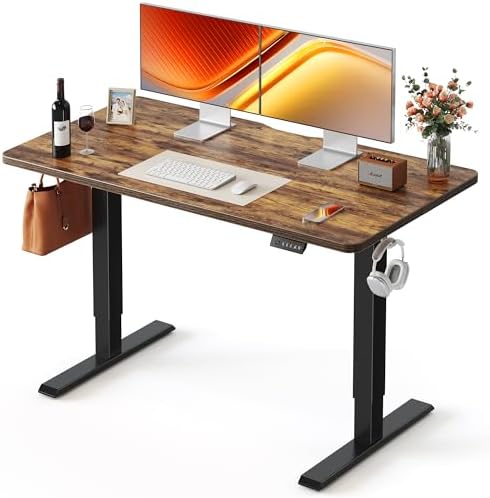
FLEXISPOT EN1 48"x24" One-Piece Standing Desk
Bottom line: The FLEXISPOT EN1 48"x24" One-Piece Standing Desk: One-piece 48x24 in desktop with no center seam under monitors or keyboard; main trade-off: 48 in width gets tight for two large monitors plus speakers.
As an Amazon Associate, SpecPicks earns from qualifying purchases. Full disclosure →
Pros & Cons
Pros
- ✓ One-piece 48x24 in desktop with no center seam under monitors or keyboard
- ✓ Rated for up to 176 lbs, enough for dual monitors and accessories
- ✓ Electric height range of 28.9 to 46.5 inches
- ✓ 4 memory presets save sitting and standing heights
- ✓ Anti-collision protection stops travel when it meets an obstruction
Cons
- ✗ 48 in width gets tight for two large monitors plus speakers
- ✗ 28.9 in minimum height may sit high for shorter users when seated
- ✗ Listing doesn't state motor count, lift speed or noise level
- ✗ No cable tray, drawer or hooks mentioned in the listing
Manufacturer description
The FLEXISPOT EN1 standing desk gives you a 48" x 24" one-piece desktop on an electric frame, so you can move between sitting and standing without the seam or center gap you get on split-top desks. The single-panel surface is built to stay steady under multi-monitor setups, which matters when you're coding, editing, or gaming with two screens in front of you. The black frame supports up to 176 lbs, enough for a pair of monitors, a laptop, speakers, and peripherals. Electric height adjustment runs from 28.9" to 46.5", and 4 memory presets let you save your sitting and standing positions and…
SpecPicks Verdict
SpecPicks has no buyer-rating or benchmark data for FLEXISPOT EN1 48"x24" One-Piece Standing Desk, so this read rests on the manufacturer's listed specs (how we evaluate). Compare with similarly-priced alternatives in the gaming desks category before committing. On the listing's own facts, the case for it is "One-piece 48x24 in desktop with no center seam under monitors or keyboard"; the main trade-off is "48 in width gets tight for two large monitors plus speakers". If those two points fit how you will use it, put it beside one or two close alternatives in the Compare tool to confirm the price.
Common buyer scenarios for gaming desks: matching surface dimensions to the room footprint and monitor count, checking height-adjustment range for sit-stand setups, verifying cable-management channels for a clean multi-monitor build, and confirming weight capacity for a full tower + dual-monitor load. Review the spec sheet for assembly difficulty before ordering.
Frequently Asked Questions
What is the height range of the FLEXISPOT EN1 standing desk?
The EN1 adjusts electrically from 28.9 inches to 46.5 inches, and you can save positions within that range to the 4 memory presets.
Can the FLEXISPOT EN1 hold two monitors?
Yes. The desk is rated for up to 176 lbs, and its 48" x 24" one-piece top is marketed for dual-monitor setups. With two large monitors, check your monitor stands or arm clamp against the 24-inch depth.
Is the desktop one piece or split into two panels?
It's a single, seamless one-piece desktop, so there's no center seam or gap under your keyboard or monitors.
What does the anti-collision feature do?
Anti-collision is designed to stop the desk when it meets an obstruction while raising or lowering, which helps protect the desk, nearby furniture and anything under it. Check the manual for sensitivity settings.
How hard is the FLEXISPOT EN1 to assemble, and what warranty does it have?
FLEXISPOT says assembly has fewer steps and less lifting than typical standing desks, so it suits first-time owners. The listing doesn't state warranty terms, so check the product listing or FLEXISPOT's site for current coverage.
Key Features
Quoted from the manufacturer's listing. Where it differs from the pros and cons above, those note the conditions the listing leaves out.
- ONE-PIECE. ZERO WOBBLE: A seamless, rock-solid desktop built for home offices, creative studios, and designers running multi-monitor setups.
- SPACIOUS WORKSPACE FOR PRODUCTIVITY: Room for laptops, monitors, and accessories, giving writers, coders, or content creators freedom to organize and focus.
- HEAVY-DUTY STABILITY & STRENGTH: Supports up to 176 lbs, giving office workers, architects, and gamers a steady, secure setup even during long, intensive sessions.
- SIT OR STAND. YOUR CALL: Smooth electric height adjustment (28.9″–46.5″) with 4 memory presets keeps remote workers and designers comfortable and energized all day.
- QUICK & EASY ASSEMBLY: Simplified setup with fewer steps and less lifting, ideal for busy professionals or first-time standing desk users who want a hassle-free start.
Full Specifications
| Base | Alloy Steel |
|---|---|
| Size | 47.2 x 23.6 in |
| Brand | FLEXISPOT |
| Color | Black (Black Frame) |
| Shape | Rectangular |
| Style | Modern |
| Set Name | FLEXISPOT EN1 One-Piece Standing Desk |
| Base Type | Leg |
| Room Type | Classroom, Dormitory, Living Room, Office, Study Room |
| Top Color | Black |
| Base Color | Black |
| Item Depth | 24 inches |
| Model Name | FLEXISPOT EN1 Electric Standing Desk |
| Style Name | Modern |
| Unit Count | 1 Count |
| Desk Design | Computer Desk, Standing Desk |
| Desk design | Computer Desk, Standing Desk |
| Finish Type | Powder Coated |
| Finish Types | Powder Coated |
| Base Material | Alloy Steel |
| Full listing title | FLEXISPOT EN1 48"x24" One-Piece Standing Desk, Black (Black Frame) | 176 LBS Capacity, Seamless Desktop, Home Office, 4 Memory Presets, Dual Monitor Setup, Anti-Collision |
Ready to buy?
FLEXISPOT EN1 48"x24" One-Piece Standing Desk, Black (Black Frame) | 176 LBS Capacity, Seamless Desktop, Home Office, 4 Memory Presets, Dual Monitor Setup, Anti-Collision is listed on Amazon. Price, availability, shipping and returns are set by Amazon and its sellers — check the listing for current terms. SpecPicks earns a small commission on qualifying purchases — thank you for supporting independent review work.
Related Gaming Desks



More guides & deep dives from the SpecPicks archive
Browse all articles & guides →- Best Budget Gaming PC Build 2026 — ~$1,000 Parts List
- Best Retro Handhelds in 2026: Pocket, Mid-Tier and FPGA Picks
- Emulation Hardware in 2026: FPGA, Software, and Cart-Reader Ecosystems
- RTX 4070 Super vs RX 7800 XT — Which to Buy in 2026
- How to Build a Windows 98 Retro PC in 2026
- The Complete Voodoo5 5500 AGP Driver Guide (2026 Edition)
- Best 1440p Gaming GPUs in 2026
More reviews from the SpecPicks archive
Browse all reviews →- GLM-5.2 Review: Running the Top Open-Weights LLM on an RTX 3060
- Mini-ITX Gaming PC in a 3D Printed Case: 2026 Builder's Guide
- Claude Now Writes 65% of Anthropic's Code: The Local Coding-Rig Angle
- Best SSD for PS5 and Console-PC Hybrid Setups in 2026
- Silent, SD-Free Retro Storage: CompactFlash + IDE on Win98/XP
- Windows XP Gaming Setup Guide: Hardware & Drivers (2025)
- Best Cheap Raspberry Pi Alternatives in 2025
- Best Monitor for Color Grading Under $500 in 2026
- Best PC Gaming Controller in 2026: GameSir G7 SE vs DualSense vs 8BitDo Pro 2
- IBM Granite 4.1 (3B / 8B / 30B): Local Inference Benchmarks and Hardware Picks
- Best Wireless Controller for PC Gaming in 2026
- International Women in Engineering Day 2026: A Beginner's Pi Starting Point
- PebbleOS Comes to the Raspberry Pi RP2350: What the Port Means for Tinkerers
- Build a Jellyfin Media Server on a Raspberry Pi 4 8GB in 2026
- Transcend CF133 CompactFlash as a Retro PC Boot Drive: Setup + Gotchas
- Best SSD for PS4 Pro: SATA Upgrades That Actually Help
- Self-Host Jellyfin on a Raspberry Pi 4 8GB in 2026: Setup and Real Transcode Limits
- Gemma 4 26B-A4B on a 16GB GPU: RTX 5060 Ti 16GB vs RTX 3060 12GB Quant Table (2026)
- Controlling Windows 98 and XP PCs with AI agents — the retro-agent project
- Best Raspberry Pi Alternatives for AI in 2026
- Hy3-Preview vs DeepSeek V4 Flash: Where the New Open-Weights Model Actually Lands
- Local LLM Inference on the RTX 3060 12GB: 2026 Quantization Playbook
- Best GPU for Stable Diffusion Under $300 (2026): RTX 3060
- Best USB Microphone and Streaming Kit for Creators in 2026
Earliest SpecPicks reviews
Browse full archive →- Best GPU for Llama 3.1 8B (2026)
- Best GPU for Qwen 3 14B (2026)
- Best GPU for Qwen 3 32B (2026)
- Best GPU for Llama 3.1 70B (2026)
- Best GPU for DeepSeek-R1 32B (2026)
- Best GPU for Llama 3.1 405B (2026)
- How to run Llama 3.1 8B on NVIDIA GeForce RTX 5090
- How to run Qwen 3 14B on NVIDIA GeForce RTX 5090
- How to run Qwen 3 32B on NVIDIA GeForce RTX 5090
- How to run Llama 3.1 70B on NVIDIA GeForce RTX 5090
- How to run DeepSeek-R1 32B on NVIDIA GeForce RTX 5090
- How to run Llama 3.1 8B on NVIDIA GeForce RTX 4090