

FLEXISPOT
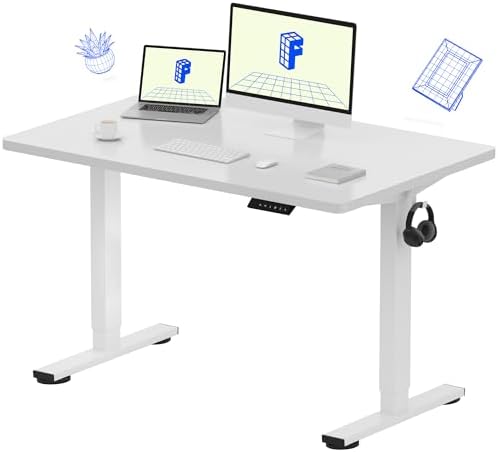
FLEXISPOT EN1 48"x24" One-Piece Standing Desk
Bottom line: The FLEXISPOT EN1 48"x24" One-Piece Standing Desk: One-piece 48" x 24" top with no center seam; main trade-off: 48" width is tight for triple monitors or ultrawide plus laptop.
As an Amazon Associate, SpecPicks earns from qualifying purchases. Full disclosure →
Pros & Cons
Pros
- ✓ One-piece 48" x 24" top with no center seam
- ✓ 176 lb capacity handles dual monitors plus accessories
- ✓ Electric height range of 28.9" to 46.5"
- ✓ 4 memory presets for quick sit-to-stand changes
- ✓ Anti-collision detection while the desk is moving
Cons
- ✗ 48" width is tight for triple monitors or ultrawide plus laptop
- ✗ 46.5" max height may fall short for very tall users
- ✗ No drawers, keyboard tray, or cable tray listed
- ✗ Listing does not state warranty terms
Manufacturer description
The FLEXISPOT EN1 is a 48" x 24" electric standing desk with a one-piece rustic desktop on a black frame. It suits home offices, creative studios, and gaming corners where you want to switch between sitting and standing without the seams and wobble of a split-panel top. The electric lift runs from 28.9" to 46.5", and 4 memory presets let you save your sitting and standing heights and return to them with one press. The frame holds up to 176 lbs. That covers a dual-monitor setup, a laptop, speakers, and desk accessories with room to spare. Anti-collision detection is built in, so the desk…
SpecPicks Verdict
SpecPicks has no buyer-rating or benchmark data for FLEXISPOT EN1 48"x24" One-Piece Standing Desk, so this read rests on the manufacturer's listed specs (how we evaluate). Compare with similarly-priced alternatives in the gaming desks category before committing. On the listing's own facts, the case for it is "One-piece 48" x 24" top with no center seam"; the main trade-off is "48" width is tight for triple monitors or ultrawide plus laptop". If those two points fit how you will use it, put it beside one or two close alternatives in the Compare tool to confirm the price.
Common buyer scenarios for gaming desks: matching surface dimensions to the room footprint and monitor count, checking height-adjustment range for sit-stand setups, verifying cable-management channels for a clean multi-monitor build, and confirming weight capacity for a full tower + dual-monitor load. Review the spec sheet for assembly difficulty before ordering.
Frequently Asked Questions
What is the height range of the FLEXISPOT EN1 standing desk?
The EN1 adjusts electrically from 28.9" at its lowest to 46.5" at its highest, which covers seated and standing positions for most users.
How much weight can the FLEXISPOT EN1 hold?
The frame supports up to 176 lbs, enough for a dual-monitor setup, a laptop, and typical desk accessories.
Will two monitors fit on a 48 x 24 inch desktop?
Yes. The 48" x 24" one-piece top is built for dual-monitor setups and leaves room for a keyboard, mouse, and other gear. Measure your monitor bases or arms to confirm the fit.
How do the memory presets work?
The control panel stores 4 height presets, so you can save your preferred sitting and standing heights and return to them with one button press.
What warranty comes with the FLEXISPOT EN1?
Warranty terms are not stated in this listing. Check the product listing or FLEXISPOT's official site for the current coverage on the frame, motor, and desktop.
Key Features
Quoted from the manufacturer's listing. Where it differs from the pros and cons above, those note the conditions the listing leaves out.
- ONE-PIECE. ZERO WOBBLE: A seamless, rock-solid desktop built for home offices, creative studios, and designers running multi-monitor setups.
- SPACIOUS WORKSPACE FOR PRODUCTIVITY: Room for laptops, monitors, and accessories, giving writers, coders, or content creators freedom to organize and focus.
- HEAVY-DUTY STABILITY & STRENGTH: Supports up to 176 lbs, giving office workers, architects, and gamers a steady, secure setup even during long, intensive sessions.
- SIT OR STAND. YOUR CALL: Smooth electric height adjustment (28.9″–46.5″) with 4 memory presets keeps remote workers and designers comfortable and energized all day.
- QUICK & EASY ASSEMBLY: Simplified setup with fewer steps and less lifting, ideal for busy professionals or first-time standing desk users who want a hassle-free start.
Full Specifications
| Base | Alloy Steel |
|---|---|
| Size | 47.2 x 23.6 in |
| Brand | FLEXISPOT |
| Color | Rustic (Black Frame) |
| Shape | Rectangular |
| Style | Modern |
| Base Type | Leg |
| Room Type | Classroom, Dormitory, Living Room, Office, Study Room |
| Top Color | black |
| Item Depth | 24 inches |
| Model Name | FLEXISPOT EN1 Electric Standing Desk |
| Style Name | Modern |
| Unit Count | 1 Count |
| Desk Design | Computer Desk, Standing Desk |
| Desk design | Computer Desk, Standing Desk |
| Finish Type | Powder Coated |
| Finish Types | Powder Coated |
| Base Material | Alloy Steel |
| Mounting Type | Freestanding |
| Product Grade | New |
| Full listing title | FLEXISPOT EN1 48"x24" One-Piece Standing Desk, Rustic (Black Frame) | 176 LBS Capacity, Seamless Desktop, Home Office, 4 Memory Presets, Dual Monitor Setup, Anti-Collision |
Ready to buy?
FLEXISPOT EN1 48"x24" One-Piece Standing Desk, Rustic (Black Frame) | 176 LBS Capacity, Seamless Desktop, Home Office, 4 Memory Presets, Dual Monitor Setup, Anti-Collision is listed on Amazon. Price, availability, shipping and returns are set by Amazon and its sellers — check the listing for current terms. SpecPicks earns a small commission on qualifying purchases — thank you for supporting independent review work.
Related Gaming Desks


More guides & deep dives from the SpecPicks archive
Browse all articles & guides →- Best Budget Gaming PC Build 2026 — ~$1,000 Parts List
- Best Retro Handhelds in 2026: Pocket, Mid-Tier and FPGA Picks
- Emulation Hardware in 2026: FPGA, Software, and Cart-Reader Ecosystems
- RTX 4070 Super vs RX 7800 XT — Which to Buy in 2026
- How to Build a Windows 98 Retro PC in 2026
- Best 1440p Gaming GPUs in 2026
- The Complete Voodoo5 5500 AGP Driver Guide (2026 Edition)
More reviews from the SpecPicks archive
Browse all reviews →- Best Budget GPU for CNN and Image-Model Training in 2026: The RTX 3060 12GB Deep Dive
- Best NVMe SSD for Gaming PCs in 2026
- Open-Weight Models Caught Up to Frontier: What to Run on a 12GB GPU
- vLLM 0.21 Adds Intel GPU Support: What It Means for Budget AI Rigs
- What Handheld Console Should I Buy in 2026? A Decision Framework
- Best CPU Cooler for a Ryzen 7 5800X (AM4) in 2026
- Best CPU Coolers for Ryzen and Intel Builds in 2026
- Vision LLMs Driving Period-Correct WinXP and Win98 Installers: Field Report from a 4-PC Retro Fleet
- Best Budget Ryzen Gaming PC Parts in 2026: 5 Picks That Punch Up
- Best CPU Cooler for Ryzen 7 5800X Heavy Workloads (2026)
- Claude Fable 5 Burns 117k Tokens/Task: Can a Local RTX 3060 Keep Up?
- Benchmarking Open LLMs for Tool-Use: RTX 3060 12GB vs Ryzen 5800X CPU-Only
- Period-Correct Windows 98 Boot Drive: CompactFlash vs IDE SSD
- Best SSD for Local LLM Model Storage in 2026: NVMe vs SATA
- Best CRT Monitor for Retro Gaming: 2026 Buying Guide
- Intel Arc Pro B70 vLLM Support Lands — vs RTX 3060 12GB
- Self-Host Immich on a Budget Homelab Box: Storage Tiers That Make Sense
- Best Raspberry Pi Alternatives for AI in 2026
- Best SATA SSDs for Gaming and Retro PC Builds in 2026
- CompactFlash vs SATA SSD via IDE Adapter for Retro PC Storage
- How to run Llama 3.1 70B on Apple M4 Pro
- Best Budget PC Gaming Upgrades Under $150 in 2026
- Voodoo5 5500 PCI in a Modern Board: Install, Glide & Win98 Setup
- Run a Local Coding Agent on an RTX 3060 12GB (After Codex Went Autonomous)
Earliest SpecPicks reviews
Browse full archive →- Best GPU for Llama 3.1 8B (2026)
- Best GPU for Qwen 3 14B (2026)
- Best GPU for Qwen 3 32B (2026)
- Best GPU for Llama 3.1 70B (2026)
- Best GPU for DeepSeek-R1 32B (2026)
- Best GPU for Llama 3.1 405B (2026)
- How to run Llama 3.1 8B on NVIDIA GeForce RTX 5090
- How to run Qwen 3 14B on NVIDIA GeForce RTX 5090
- How to run Qwen 3 32B on NVIDIA GeForce RTX 5090
- How to run Llama 3.1 70B on NVIDIA GeForce RTX 5090
- How to run DeepSeek-R1 32B on NVIDIA GeForce RTX 5090
- How to run Llama 3.1 8B on NVIDIA GeForce RTX 4090