
SABLUTE
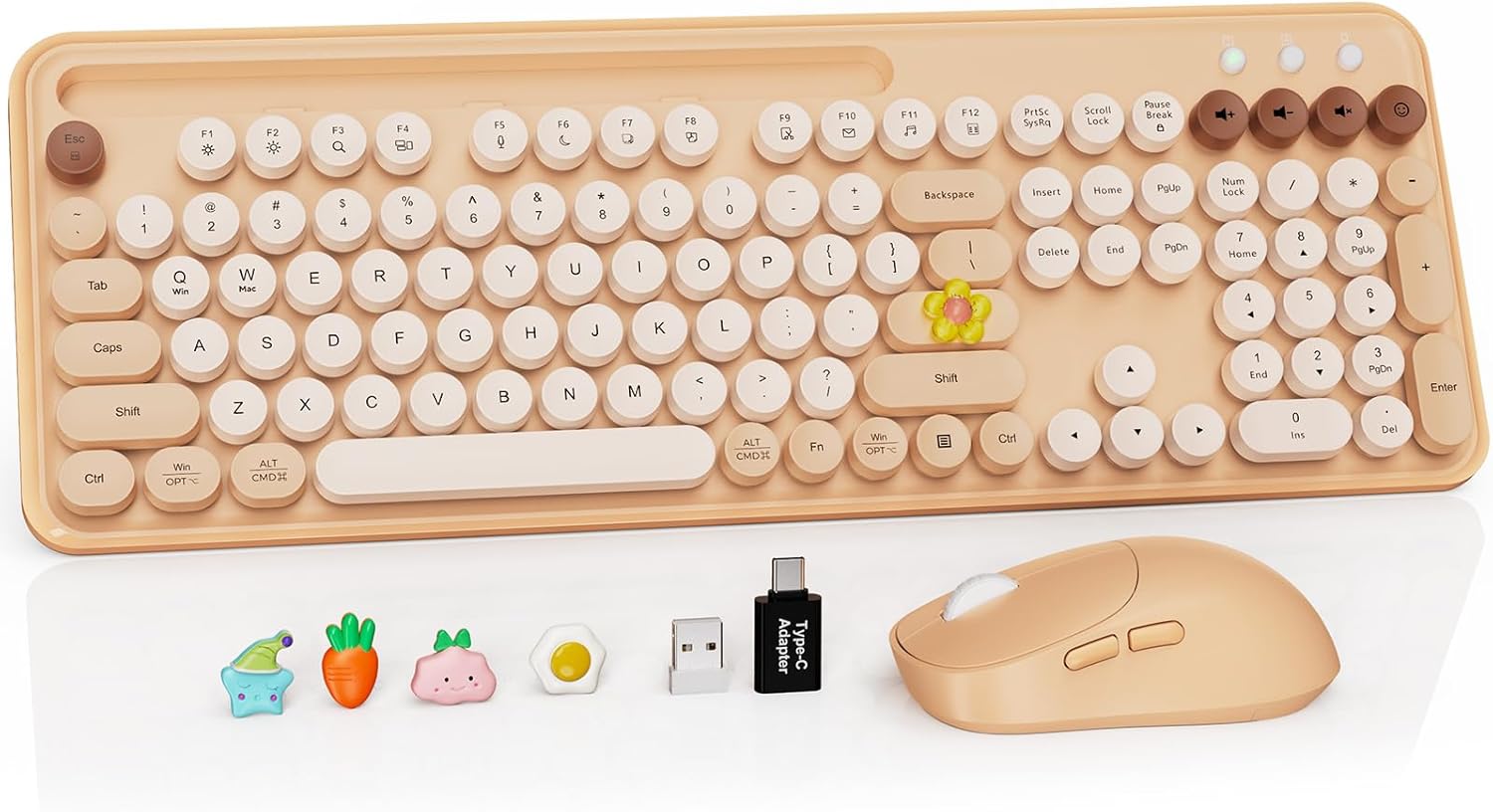
SABLUTE Wireless Keyboard and Mouse Combo
Bottom line: The SABLUTE Wireless Keyboard and Mouse Combo: Full-size 109-key layout keeps a real number pad, unusual at this size; main trade-off: 2.4GHz USB-A receiver only, so no Bluetooth or multi-device pairing.
As an Amazon Associate, SpecPicks earns from qualifying purchases. Full disclosure →
Pros & Cons
Pros
- ✓ Full-size 109-key layout keeps a real number pad, unusual at this size
- ✓ Built-in 9.88 in x 0.63 in slot holds a phone or tablet upright while you type
- ✓ Removable, washable round keycaps plus a splash-resistant surface for deep cleaning
- ✓ Two-stage tilt legs give 6 and 8.8 degree typing angles for wrist posture
- ✓ Mouse adds 3 DPI levels and forward/back thumb buttons for faster browsing
Cons
- ✗ 2.4GHz USB-A receiver only, so no Bluetooth or multi-device pairing
- ✗ Not compatible with Mac, per the manufacturer's listed system support
- ✗ Both AA batteries are sold separately, not included in the box
- ✗ Requires a free USB-A port, which rules out USB-C-only laptops without a hub
Manufacturer description
The SABLUTE Wireless Keyboard and Mouse Combo brings typewriter-style round keycaps to a full-size 109-key layout with a number pad, finished in beige colorful trim that suits an aesthetic desk setup without sacrificing everyday utility. A built-in 9.88 in by 0.63 in slot props your phone or tablet upright, so video calls, class streams, and recipes stay visible while you type. The floating retro keycaps are removable and washable, and the splash-resistant surface wipes clean when crumbs or spills reach your desk. Foldable tilt legs give you two typing angles, 6 degrees and 8.8 degrees, to…
SpecPicks Verdict
SpecPicks has no buyer-rating or benchmark data for SABLUTE Wireless Keyboard and Mouse Combo, so this read rests on the manufacturer's listed specs (how we evaluate). Compare with similarly-priced alternatives in the keyboards & mice category before committing. On the listing's own facts, the case for it is "Full-size 109-key layout keeps a real number pad, unusual at this size"; the main trade-off is "2.4GHz USB-A receiver only, so no Bluetooth or multi-device pairing". If those two points fit how you will use it, put it beside one or two close alternatives in the Compare tool to confirm the price.
Before ordering, check the listed dimensions, load rating and mounting or device compatibility in the spec table below against how you plan to use it, and confirm them on the retailer's listing. Prices and stock are set by the retailer and may have moved since this page was last updated.
Frequently Asked Questions
Does this SABLUTE keyboard work with a Mac?
No. The manufacturer lists compatibility as Windows, PC, and laptops with a USB-A port, and specifically notes Mac is not supported.
Is it Bluetooth, or does it need a USB dongle?
It is 2.4GHz wireless, not Bluetooth. One shared USB-A receiver connects both the keyboard and the mouse, plug and play.
Does the keyboard have a number pad?
Yes. It is a full-size layout with 109 keys including the number pad, so spreadsheet and data entry work is covered.
What size phone or tablet fits in the built-in holder?
The slot measures 9.88 in by 0.63 in and holds a phone or tablet upright for video calls, classes, or messages while you type.
Do I need to buy batteries, and how long before it sleeps?
Yes, batteries are not included: the keyboard takes 1 AA and the mouse takes 1 AA. Both auto-sleep after about 10 minutes idle.
Key Features
Quoted from the manufacturer's listing. Where it differs from the pros and cons above, those note the conditions the listing leaves out.
- Beige Colorful Typewriter Style Keyboard & Mouse Combo: Cute and cozy beige colorful typewriter-style wireless keyboard and mouse set made for girls, teens, and aesthetic desk lovers. Retro candy-like round keycaps and vintage vibes upgrade your workspace and make everyday typing feel fun, tidy, and productive.
- Built-In Phone/Tablet Holder for Easy Multitasking: The full-size keyboard includes a 9.88 in × 0.63 in slot to hold your phone or tablet upright—great for video calls, online classes, recipes, and messages while you type without taking up extra desk space.
- Splash-Resistant, Easy-Clean Retro Round Keycaps: Small splashes or dust? No stress. The splash-resistant surface wipes clean fast, and the floating round keycaps feel comfortable for long typing sessions. Removable keycaps help you deep-clean crumbs and dust to keep your setup fresh.
- Two-Stage Tilt Legs & Comfy Mouse Control: Foldable tilt legs offer two typing angles to help you find a more natural wrist posture for work or study. The ergonomic mouse fits comfortably in your hand for smooth clicking and scrolling, with 3 adjustable DPI levels plus forward/back buttons for faster browsing.
- Stable 2.4GHz Wireless Connection & Reliable Support: Enjoy a steady 2.4GHz wireless connection with one shared USB receiver for both keyboard and mouse. Note: Not Bluetooth. Need help with setup, connection, or a missing receiver? Our customer support team responds within 24 hours, and this keyboard mouse combo includes 2 years of product warranty for added peace of mind.
- Auto-Sleep Mode & Battery Info: To help save power, both the keyboard and mouse automatically enter sleep mode after about 10 minutes of inactivity. Wake the keyboard by pressing any key and wake the mouse by moving or clicking it. Keyboard requires 1 AA battery, and mouse requires 1 AA battery. Batteries not included.
Full Specifications
| Brand | SABLUTE |
|---|---|
| Color | Beige Colorful |
| Unit Count | 1.0 Count |
| Connectivity | Bluetooth, USB, 2.4GHz |
| Power Source | Battery Powered (battery not included) |
| Compatibility | PC |
| Number of Keys | 109 |
| Connection Type | Wireless |
| Keyboard Layout | QWERTY |
| Mfr Part Number | B60517 |
| Special Feature | Removable Floated Round Keycaps & Foldable Tilt Legs, Wireless Typewriter Keyboard & Auto Sleep Mode, with Phone/Tablet Holder & Splash-Resistant Design |
| Antenna Location | Indoor, office desk accessories, must-have for classroom, suitable business trips and travel, a special, romantic and practical surprise on any anniversaries or festivals |
| Compatible Devices | Personal Computer |
| Movement Detection | Optical |
| Number of Batteries | 2 AA batteries required. |
| Keyboard Description | Cute Retro Typewriter Keyboard with Phone/Tablet Holder & Tilt Legs, US-QWERTY (Beige Colorful) |
| Warranty Description | Provide 24 months after-sales service |
| Are Batteries Required | Yes |
| Connectivity Technology | Advanced Wireless (uses ONE USB receiver) |
| Other Special Features of the Product | Removable Floated Round Keycaps & Foldable Tilt Legs, Wireless Typewriter Keyboard & Auto Sleep Mode, with Phone/Tablet Holder & Splash-Resistant Design |
| Full listing title | Wireless Keyboard and Mouse Combo, Retro Round Keycaps, Full-Size Typewriter Keyboard with Phone/Tablet Holder, Ergonomic Mouse with 3-Level DPI, 2.4GHz Connection for Windows/PC (Beige Colorful) |
Ready to buy?
Wireless Keyboard and Mouse Combo, Retro Round Keycaps, Full-Size Typewriter Keyboard with Phone/Tablet Holder, Ergonomic Mouse with 3-Level DPI, 2.4GHz Connection for Windows/PC (Beige Colorful) is listed on Amazon. Price, availability, shipping and returns are set by Amazon and its sellers — check the listing for current terms. SpecPicks earns a small commission on qualifying purchases — thank you for supporting independent review work.
Related Keyboards & Mice


More guides & deep dives from the SpecPicks archive
Browse all articles & guides →- Emulation Hardware in 2026: FPGA, Software, and Cart-Reader Ecosystems
- Best Budget Gaming PC Build 2026 — ~$1,000 Parts List
- RTX 4070 Super vs RX 7800 XT — Which to Buy in 2026
- Best 1440p Gaming GPUs in 2026
- Best Retro Handhelds in 2026: Pocket, Mid-Tier and FPGA Picks
- How to Build a Windows 98 Retro PC in 2026
- The Complete Voodoo5 5500 AGP Driver Guide (2026 Edition)
More reviews from the SpecPicks archive
Browse all reviews →- MicroPython Now Runs on the Super Nintendo — Here's What That Means
- Intel Arc B50 for Stable Diffusion vs RTX 3060 12GB: Which Wins in 2026
- Intel Optane DIMMs Run 1-Trillion-Parameter LLM on One Workstation
- Heterogeneous GPU Weighting and Layer Splitting: Mixed-GPU LLM Inference on Consumer Hardware
- Forza Horizon 6 Advanced Shader Delivery: 4-Second Loads vs 90 Seconds Explained
- Ollama on a 12GB RTX 3060: Best Models and tok/s in 2026
- Ryzen 9 3900X vs Ryzen 5 5600G for CPU-Only Local LLM Inference (2026)
- Self-Host Jellyfin on a Ryzen 5 5600G Mini Build in 2026: Measured Power and Transcoding
- Best CompactFlash and SATA/IDE Adapter for a Retro PC Boot Drive in 2026
- Best AM4 CPU Cooler in 2026: 5 Picks for Ryzen Builds
- RTX 5090 vs Mac Studio M4 Max for AI — which wins in 2026?
- Intel Arc vs NVIDIA 2026: Local LLM Tokens per Dollar
- Sound BlasterX G6 on a Retro Windows XP Rig: USB Audio for Period-Correct Builds
- CompactFlash to IDE Adapter Won't Boot on Windows 98: Troubleshooting Guide 2026
- Qwen 3.6 27B GGUF: BF16 vs Q4_K_M vs Q8_0 Compared
- Best IDE & CompactFlash to USB Adapters for Retro PCs 2026
- Best SSD for the PS4 Pro in 2026: SATA Upgrade Guide
- BOSGAME VTA-439: AMD Ryzen AI 9 HX 470 Mini PC for Linux
- Raspberry Pi 4 8GB vs Ryzen 5 2600 for Gemma 3 4B: Which Cheap Box Wins?
- Jensen Huang Heads to Tokyo as Sega's 1996 Bet on Nvidia Is Remembered
- How to Find and Join Active Retro Multiplayer Servers in 2026 (Quake 3, UT99, CS 1.6, Diablo II)
- How to run Llama 3.1 70B on Apple M4
- RTX 5090 vs RTX 6000: Specs, Gaming, AI Compared
- GPT-5.6 Sol Ultra Shipped: Cloud vs Local Coding Rig
Earliest SpecPicks reviews
Browse full archive →- Best GPU for Llama 3.1 8B (2026)
- Best GPU for Qwen 3 14B (2026)
- Best GPU for Qwen 3 32B (2026)
- Best GPU for Llama 3.1 70B (2026)
- Best GPU for DeepSeek-R1 32B (2026)
- Best GPU for Llama 3.1 405B (2026)
- How to run Llama 3.1 8B on NVIDIA GeForce RTX 5090
- How to run Qwen 3 14B on NVIDIA GeForce RTX 5090
- How to run Qwen 3 32B on NVIDIA GeForce RTX 5090
- How to run Llama 3.1 70B on NVIDIA GeForce RTX 5090
- How to run DeepSeek-R1 32B on NVIDIA GeForce RTX 5090
- How to run Llama 3.1 8B on NVIDIA GeForce RTX 4090