

MSI MAG A1000PLS PCIE5
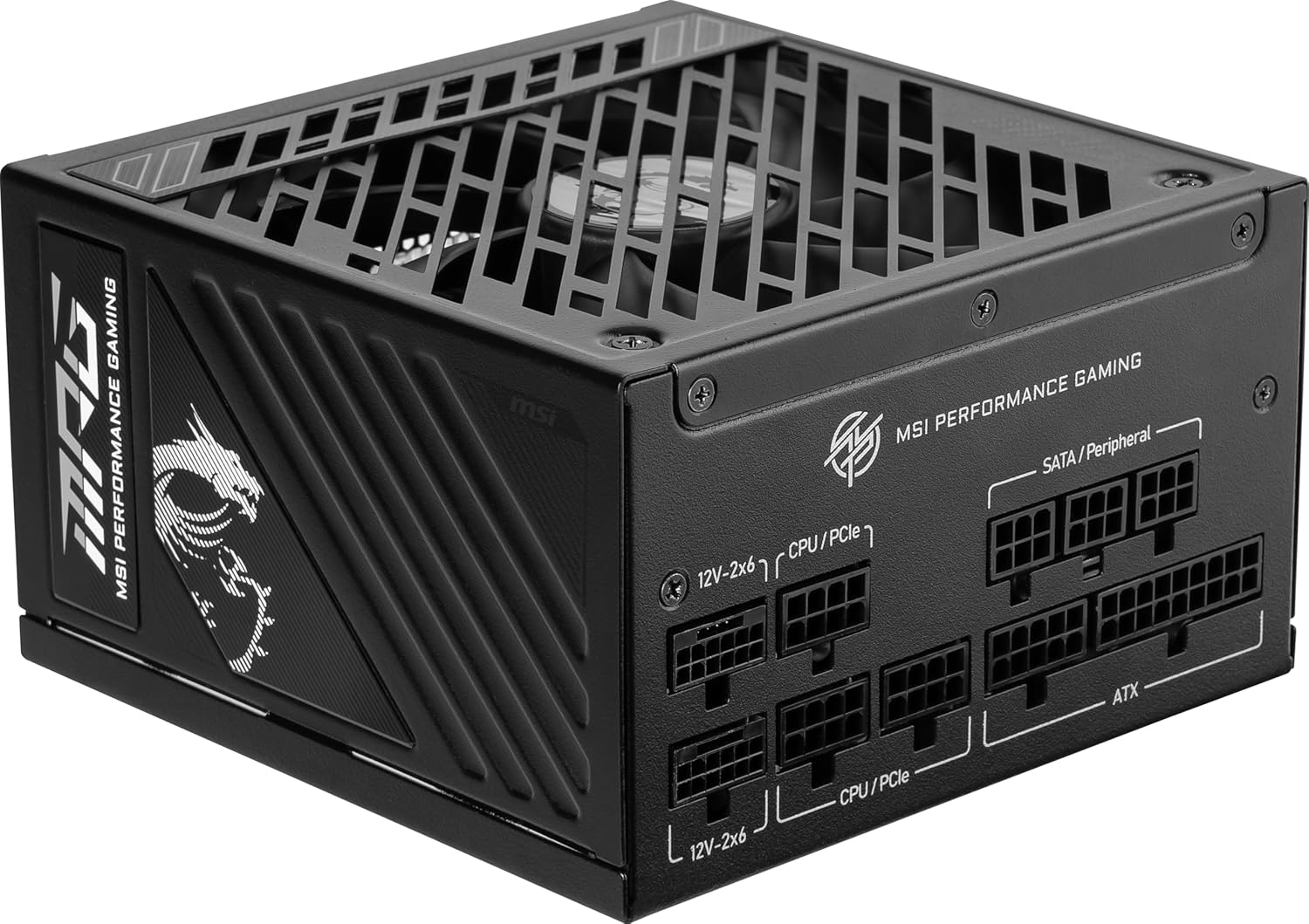
Bottom line: Per its Amazon listing, the MSI MAG A1000PLS PCIE5 ($149.99 on Amazon as of 2026-11-22 17:24 UTC): NATIVE 12V-2x6 CONNECTOR - Equipped with a native 12V-2x6 PCIe connector.
As an Amazon Associate, SpecPicks earns from qualifying purchases. Full disclosure →
*Price sourced from Amazon.com. Last updated 2026-11-22. Product prices and availability are accurate as of the date/time indicated and are subject to change. Any price and availability information displayed on Amazon.com at the time of purchase will apply to the purchase of this product.
Pros & Cons
Pros
- ✓ NATIVE 12V-2x6 CONNECTOR - Equipped with a native 12V-2x6 PCIe connector
Cons
- ✗ Confirm socket / form-factor / power-rating compatibility against your build before ordering
- ✗ Price, stock, shipping and returns are set by the retailer and may have changed since this page was last updated
Manufacturer description
Featuring ATX 3.1 and PCIe 5.1 support with native 12V-2x6 connectors, these PSUs are built to handle NVIDIA’s 50 series graphics cards and AI PCs with ease. Advanced thermal solutions ensure cool, stable, and efficient operation, even under heavy loads, giving you the reliability and durability you need for gaming, streaming, or AI-powered tasks.
SpecPicks Verdict
SpecPicks has no buyer-rating or benchmark data for MSI MAG A1000PLS PCIE5, so this read rests on the manufacturer's listed specs and the current price in the power supplies category (how we evaluate). Compare with similarly-priced alternatives in the power supplies category before committing. Judge it on the specification table and the price rather than on sentiment: check the figures that decide your use case, then put it side-by-side with two or three close alternatives in the Compare tool before clicking through.
Common buyer scenarios for power supplies of this kind: matching it to an existing build, replacing a failing part, or upgrading from a previous-generation equivalent. Check the spec table below against your current setup — particularly socket / form-factor / power-rating fields — and confirm compatibility on the retailer's listing before purchase. Prices and stock are set by the retailer and may have moved since this page was last updated.
Key Features
Quoted from the manufacturer's listing. Where it differs from the pros and cons above, those note the conditions the listing leaves out.
- GPU SAFEGUARD - This PSU provides real-time current protection. This proactive mechanism delivers an early alert if it detects the 12V-2x6 current in an abnormal status, allowing users to resolve the issue immediately.
- 80 PLUS PLATINUM CERTIFIED – With 80 PLUS Platinum certification (up to 92% efficiency), this PSU is ideal for powering hardware with high energy demands, such as high-end GPUs and CPUs.
- NATIVE 12V-2x6 CONNECTOR - Equipped with a native 12V-2x6 PCIe connector, it can deliver up to 600W of power to support PCIe 5.1 GPUs.
- DURABLE DESIGN - This power supply is equipped with a 135 mm Fluid-dynamic bearing (FDB) fan, designed to enhance durability. The UL embossed jacket modular cables with premium copper alloy connectors to ensure reliable performance.
- COMPACT SIZE - A compact 150 mm-long and 150 mm-wide ATX form factor ensures a comfortable and easy fit in most PC cases. This frees up more space for cable management and airflow to the rest of the system.
- Cables included: 1 x Motherboard, 2 x CPU, 1 x 12V-2x6, 2 x PCIe, 1 x PCIe to dual PCIe, 2 x SATA, 1 x PERIPHERAL.
Full Specifications
| Brand | msi |
|---|---|
| Wattage | 1000 watts |
| Fan Count | 1 |
| Compatibility | PC |
| Connector Type | ATX |
| Number of Fans | 1 |
| Output Wattage | 1000 watts |
| Cables included | 1 x Motherboard, 2 x CPU, 1 x 12V-2x6, 2 x PCIe, 1 x PCIe to dual PCIe, 2 x SATA, 1 x PERIPHERAL. |
| Item Dimensions | 11.89 x 8.86 x 5.08 inches |
| Number of Items | 1 |
| Number of Packs | 1 |
| Compatible Devices | Computer |
| Warranty Description | 10 Years |
| Item dimensions L x W x H | 11.89 x 8.86 x 5.08 inches |
| Connector Type Used on Cable | ATX |
| Full listing title | MSI MAG A1000PLS PCIE5, Fully Modular Gaming 1000W Power Supply, 80+ Platinum, Native 12V-2x6 Cables, GPU Safeguard, 105°C Main Capacitor, Fan Safeguard, ATX 3.1 & PCIe 5.1 Ready, 10 Year Warranty |
Ready to buy?
MSI MAG A1000PLS PCIE5, Fully Modular Gaming 1000W Power Supply, 80+ Platinum, Native 12V-2x6 Cables, GPU Safeguard, 105°C Main Capacitor, Fan Safeguard, ATX 3.1 & PCIe 5.1 Ready, 10 Year Warranty is listed on Amazon. Price, availability, shipping and returns are set by Amazon and its sellers — check the listing for current terms. SpecPicks earns a small commission on qualifying purchases — thank you for supporting independent review work.
*Price sourced from Amazon.com. Last updated 2026-11-22. Product prices and availability are accurate as of the date/time indicated and are subject to change. Any price and availability information displayed on Amazon.com at the time of purchase will apply to the purchase of this product.
Related Power Supplies




More guides & deep dives from the SpecPicks archive
Browse all articles & guides →- The Complete Voodoo5 5500 AGP Driver Guide (2026 Edition)
- Best Budget Gaming PC Build 2026 — ~$1,000 Parts List
- How to Build a Windows 98 Retro PC in 2026
- Best 1440p Gaming GPUs in 2026
- Best Retro Handhelds in 2026: Pocket, Mid-Tier and FPGA Picks
- RTX 4070 Super vs RX 7800 XT — Which to Buy in 2026
- Emulation Hardware in 2026: FPGA, Software, and Cart-Reader Ecosystems
More reviews from the SpecPicks archive
Browse all reviews →- Buying Pre-Owned SSDs and HDDs: Good Idea in 2026?
- Best Dorm Room Gaming Setup in 2026: 5 Picks That Fit One Desk
- ZOTAC RTX 3060 Twin Edge vs MSI RTX 3060 Ventus 3X: Which 12GB Card?
- Best SATA SSD for a PS4 Upgrade in 2026: BX500 vs 870 EVO vs WD Blue
- Best SSD for a Local-LLM Rig in 2026: NVMe vs SATA
- Crucial BX500 vs Samsung 870 EVO: Best Budget SATA SSD for Upgrades
- Noctua NH-U12S vs ML240L RGB: Best Cooler for a 5800X
- Silent Cooling for a Retro Sleeper PC: Fitting a Modern Quiet Fan to a Vintage Case
- Best Plug-and-Play Retro Gaming Consoles in 2026: 5 Picks
- What We Lost When LAN Parties Died: A 2026 Editorial
- Build a Silent Home NAS on a Raspberry Pi 4 8GB With a SATA SSD (2026)
- Cloning a Win98 Voodoo3 Boot Drive: SATA-IDE Adapter Workflow
- Handheld Gaming PCs With a Keyboard: 2025 Guide
- Is the Ryzen 7 5800X Still Worth It for 1440p Gaming in 2026?
- Logitech G920 vs Thrustmaster: Best Beginner Sim Racing Setup 2026
- How LAN Parties Died: A 2002-2008 Cultural Retrospective
- Best Game Controller for PC and PS5 in 2026
- Best Gaming SSD for PC Builds in 2026: 5 Picks Tested
- AMD Ryzen 7 9800X3D Bundle: DDR5 + MSI B850 Wi-Fi 7 Guide
- Best Logitech Gaming Gear in 2026: Mice, Keyboards, and Wheels
- VibeThinker-3B: A 3B Reasoning Model on RTX 3060 and Raspberry Pi 4
- Intel i7-9700K vs Ryzen 7 5700X for a Budget 2026 Gaming Build
- TCL 27R944K Review: 165Hz Mini LED Gaming Monitor
- Best CPU Coolers for High-TDP Gaming Builds in 2026
Earliest SpecPicks reviews
Browse full archive →- Best GPU for Llama 3.1 8B (2026)
- Best GPU for Qwen 3 14B (2026)
- Best GPU for Qwen 3 32B (2026)
- Best GPU for Llama 3.1 70B (2026)
- Best GPU for DeepSeek-R1 32B (2026)
- Best GPU for Llama 3.1 405B (2026)
- How to run Llama 3.1 8B on NVIDIA GeForce RTX 5090
- How to run Qwen 3 14B on NVIDIA GeForce RTX 5090
- How to run Qwen 3 32B on NVIDIA GeForce RTX 5090
- How to run Llama 3.1 70B on NVIDIA GeForce RTX 5090
- How to run DeepSeek-R1 32B on NVIDIA GeForce RTX 5090
- How to run Llama 3.1 8B on NVIDIA GeForce RTX 4090