

BestOffice
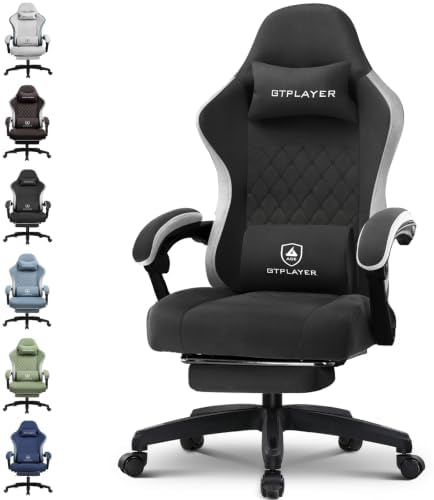
BestOffice High-Back Gaming Chair PC Office Chair Computer Racing Chair PU Desk Task Chair Ergonomic Executive Swivel Rolling Chair with Lumbar Support for Back Pain Women, Men,White
Bottom line: The BestOffice High-Back Gaming Chair PC Office Chair Computer Racing: Backrest reclines and locks anywhere from 90 to 125 degrees; main trade-off: 250 lb capacity is lower than many heavy-duty and big-and-tall chairs.
As an Amazon Associate, SpecPicks earns from qualifying purchases. Full disclosure →
Pros & Cons
Pros
- ✓ Backrest reclines and locks anywhere from 90 to 125 degrees
- ✓ Lumbar cushion you can move, plus a headrest pillow for neck support
- ✓ BIFMA-certified heavy-duty metal base rated for up to 250 lbs
- ✓ Full 360-degree swivel on smooth-rolling nylon casters
- ✓ Ships with all tools and hardware; about 10-15 minute assembly
Cons
- ✗ 250 lb capacity is lower than many heavy-duty and big-and-tall chairs
- ✗ PU leather surface gets less airflow than a mesh-back office chair
- ✗ White upholstery shows dirt and scuffs faster than a black finish
- ✗ Lumbar and headrest support are pillows, not built-in mechanisms
Manufacturer description
The BestOffice High-Back Gaming Chair is a racing-style seat that works as well at a desk as it does in front of a gaming rig. It has thick cushioning under breathable PU leather, finished here in white. The high back comes with a headrest pillow and a lumbar cushion you can move, so you can put support where your neck and lower back need it. The backrest reclines and locks at any angle from 90 to 125 degrees. Sit upright for typing, then lean back between matches or calls. Underneath, a BIFMA-certified heavy-duty metal base holds up to 250 lbs. It swivels a full 360 degrees on…
SpecPicks Verdict
SpecPicks has no buyer-rating or benchmark data for BestOffice High-Back Gaming Chair PC Office Chair Computer Racing…, so this read rests on the manufacturer's listed specs (how we evaluate). Compare with similarly-priced alternatives in the home & kitchen category before committing. On the listing's own facts, the case for it is "Backrest reclines and locks anywhere from 90 to 125 degrees"; the main trade-off is "250 lb capacity is lower than many heavy-duty and big-and-tall chairs". If those two points fit how you will use it, put it beside one or two close alternatives in the Compare tool to confirm the price.
Before ordering, check the listed dimensions, load rating and mounting or device compatibility in the spec table below against how you plan to use it, and confirm them on the retailer's listing. Prices and stock are set by the retailer and may have moved since this page was last updated.
Frequently Asked Questions
How far does the BestOffice High-Back Gaming Chair recline?
The backrest reclines from 90 to 125 degrees and locks at any position in that range, so you can sit upright for desk work or lean back to relax.
What is the weight capacity of this gaming chair?
BestOffice rates the chair for up to 250 lbs. It sits on a BIFMA-certified heavy-duty metal base.
Is the chair hard to assemble?
No. It comes with all the hardware and tools you need, plus step-by-step instructions. BestOffice estimates assembly at about 10 to 15 minutes.
Does it come with lumbar support and a headrest?
Yes. It includes a lumbar cushion you can move and a headrest pillow, so you can set the support where your lower back and neck need it.
What warranty or guarantee does BestOffice offer?
BestOffice offers a customer satisfaction guarantee through its customer service team. Specific warranty length and coverage are not stated, so check the product listing for current warranty terms.
Key Features
Quoted from the manufacturer's listing. Where it differs from the pros and cons above, those note the conditions the listing leaves out.
- COMFORT FROM EVERY ANGLE - Our high-back gaming chair is thickly cushioned for maximum comfort, whether you’re spending long hours at the office, in front of the computer, or gaming. Covered with breathable premium PU leather, the chair is equipped with freely adjustable lumbar support and a headrest pillow to protect your spine and neck, while the adjustable reclining feature allows users to lock in any reclining position, from 90-125°.
- MAXIMUM MOBILITY - Our chairs are designed with long-lasting ergonomic construction, equipped with a BIFMA-certified heavy-duty metal base, providing stability and mobility with a 360° range of motion on smooth-rolling nylon casters so you can glide easily between work stations.
- EASY ASSEMBLY – Our chair comes ready to assemble, with all the hardware and necessary tools.With step-by-step instructions, you can set up and be ready for gaming or work in approximately 10–15 minutes!
- CUSTOMER GUARANTEE – We want all of our customers to feel 100% satisfied, and ready to unwind from the comfort of our High-Back Office Chair. If you’re not satisfied, or have any questions, please contact BestOffice customer service.
- BUILT TO LAST - The high-back chair is built to endure, with a heavy-duty metal base, offering great stability and mobility for a capacity of up to 250 lbs.
Full Specifications
| Size | 27"D x 24"W x 51"H |
|---|---|
| Brand | BestOffice |
| Color | White |
| Material | Metal, Nylon |
| Compatibility | PC |
Ready to buy?
BestOffice High-Back Gaming Chair PC Office Chair Computer Racing Chair PU Desk Task Chair Ergonomic Executive Swivel Rolling Chair with Lumbar Support for Back Pain Women, Men,White is listed on Amazon. Price, availability, shipping and returns are set by Amazon and its sellers — check the listing for current terms. SpecPicks earns a small commission on qualifying purchases — thank you for supporting independent review work.
Related Home & Kitchen


More guides & deep dives from the SpecPicks archive
Browse all articles & guides →- How to Build a Windows 98 Retro PC in 2026
- Best 1440p Gaming GPUs in 2026
- Best Retro Handhelds in 2026: Pocket, Mid-Tier and FPGA Picks
- The Complete Voodoo5 5500 AGP Driver Guide (2026 Edition)
- RTX 4070 Super vs RX 7800 XT — Which to Buy in 2026
- Best Budget Gaming PC Build 2026 — ~$1,000 Parts List
- Emulation Hardware in 2026: FPGA, Software, and Cart-Reader Ecosystems
More reviews from the SpecPicks archive
Browse all reviews →- Turtle Beach Recon 50 in 2026: Is the $40 Gaming Headset Still Worth It?
- Claude Opus 4.8 Takes #1 on the Artificial Analysis Intelligence Index at 61.4
- Best Raspberry Pi for a Retro Console Build in 2026: Pi 4 8GB vs Pi Zero 2 W
- Blue Yeti vs HyperX QuadCast 2 S: Best USB Mic for New Streamers
- HiDream-O1-Image on an RTX 3060 12GB: Does It Fit?
- Best Budget SSDs for Homelab and Proxmox Boot Drives in 2026
- MTP (Multi-Token Prediction): 2x Faster Token Generation on AMD Strix Halo & Radeon 9700 AI Pro
- What Non-Gaming Tasks People Actually Run on Steam Deck
- RTX 5090 vs RTX 5080: Which Should You Buy in 2026?
- Kimi K3 Scores 57 on Intelligence Index at $0.94/Task
- Logitech G29 vs HORI Racing Wheel Overdrive for Entry Sim Racing
- Run Home Assistant on a Raspberry Pi 4 8GB in 2026 (SSD Boot)
- RTX 5090 AIO Cooler: Liquid Cooling Options in 2026
- 48GB vs 64GB DDR5 for Gaming and AI: Worth It?
- Qwen 3.8 vs Kimi K3: Which Open-Weight Model Fits a 12GB Rig?
- Sound Blaster Audigy 2 ZS in 2026: The Last Great Win98/XP Sound Card Install Guide
- ASUS ProArt PA27USD Lands: 27-Inch OLED Aims at Gaming
- Amazon RTX 5060 Deal: $324 Budget GPU for 1080p Gaming
- Best SSD for a Local AI / LLM Workstation in 2026
- Matrox G400 MAX in 2026: Period-Correct Install, EMBM Showcase, and Pentium III Benchmarks
- ComfyUI on an RTX 3060 12GB: What Image Models Actually Run Well
- Logitech G29 vs HORI Force Feedback: Best Beginner Sim-Racing Wheel in 2026
- Sound BlasterX G6 on a Windows 98/XP Retro Gaming PC: What It Actually Does
- AMD Ryzen 9 9950X3D2 on Linux vs Windows 11: Why the Penguin Wins
Earliest SpecPicks reviews
Browse full archive →- Best GPU for Llama 3.1 8B (2026)
- Best GPU for Qwen 3 14B (2026)
- Best GPU for Qwen 3 32B (2026)
- Best GPU for Llama 3.1 70B (2026)
- Best GPU for DeepSeek-R1 32B (2026)
- Best GPU for Llama 3.1 405B (2026)
- How to run Llama 3.1 8B on NVIDIA GeForce RTX 5090
- How to run Qwen 3 14B on NVIDIA GeForce RTX 5090
- How to run Qwen 3 32B on NVIDIA GeForce RTX 5090
- How to run Llama 3.1 70B on NVIDIA GeForce RTX 5090
- How to run DeepSeek-R1 32B on NVIDIA GeForce RTX 5090
- How to run Llama 3.1 8B on NVIDIA GeForce RTX 4090