Wathai
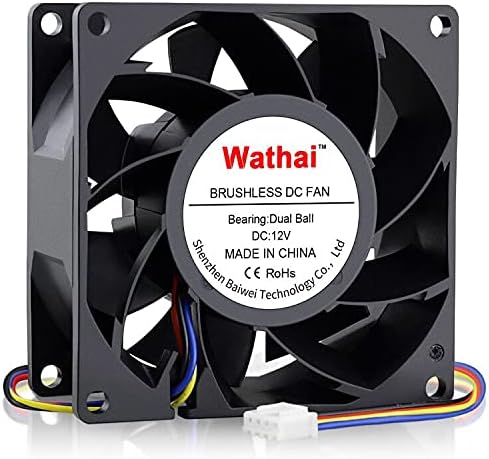
Wathai 80mm x 38mm High Static Pressure Fan 12V 4 Pin Dual Ball PWM 8038 High CFM
Bottom line: The Wathai 80mm x 38mm High Static Pressure Fan 12V 4 Pin Dual Ball PWM ($22.99 on Amazon as of 2026-11-23 13:16 UTC): Rated 72.6 CFM at 5500 RPM from a single 80mm mount; main trade-off: rated 47 dBA at full speed; too loud for quiet desktop builds.
As an Amazon Associate, SpecPicks earns from qualifying purchases. Full disclosure →
*Price sourced from Amazon.com. Last updated 2026-11-23. Product prices and availability are accurate as of the date/time indicated and are subject to change. Any price and availability information displayed on Amazon.com at the time of purchase will apply to the purchase of this product.
Pros & Cons
Pros
- ✓ Rated 72.6 CFM at 5500 RPM from a single 80mm mount
- ✓ 4-pin PWM speed range of 1600-5500 RPM, adjustable via BIOS fan curves
- ✓ High static pressure pushes air through dense radiator and heatsink fins
- ✓ Dual ball bearings aimed at longer lifespan and stable operation
- ✓ Fits PC cases, servers, CPU coolers, GPU setups and 3D printer enclosures
Cons
- ✗ Rated 47 dBA at full speed; too loud for quiet desktop builds
- ✗ 38mm thickness may not clear spots sized for standard 25mm fans
- ✗ 0.6A draw at 12V; check header current limits before sharing a header
- ✗ Needs a tuned BIOS or software fan curve to keep idle noise down
Manufacturer description
The Wathai 80mm x 38mm High Static Pressure Fan is built for builds where a standard 80mm fan can't move enough air. The extra-thick 8038 frame lets it push a rated 72.6 CFM at 5500 RPM. That makes it a strong replacement fan for servers, compact PC cases, CPU coolers, GPU shrouds and 3D printer enclosures. Its high static pressure sends a focused stream of air through the dense fins of radiators and heatsinks, which is where thin, low-pressure fans struggle. The 4-pin PWM connector lets your motherboard adjust speed anywhere from 1600 to 5500 RPM. You can set a trigger temperature and fan…
SpecPicks Verdict
SpecPicks has no buyer-rating or benchmark data for Wathai 80mm x 38mm High Static Pressure Fan 12V 4 Pin Dual Ball PWM…, so this read rests on the manufacturer's listed specs and the current price in the cooling & fans category (how we evaluate). Compare with similarly-priced alternatives in the cooling & fans category before committing. On the listing's own facts, the case for it is "Rated 72.6 CFM at 5500 RPM from a single 80mm mount"; the main trade-off is "Rated 47 dBA at full speed; too loud for quiet desktop builds". If those two points fit how you will use it, put it beside one or two close alternatives in the Compare tool to confirm the price.
Common buyer scenarios for cooling & fans of this kind: matching it to an existing build, replacing a failing part, or upgrading from a previous-generation equivalent. Check the spec table below against your current setup — particularly socket / form-factor / power-rating fields — and confirm compatibility on the retailer's listing before purchase. Prices and stock are set by the retailer and may have moved since this page was last updated.
Frequently Asked Questions
What are the exact dimensions of the Wathai 8038 fan?
It measures 80mm x 80mm x 38mm (3.15 x 3.15 x 1.5 in). That is thicker than a standard 25mm 80mm fan, so check the depth clearance in your case or enclosure before you buy.
How much airflow does this 80mm fan move?
Wathai rates it at 72.6 CFM at its top speed of 5500 RPM. It is also a high static pressure design, so it works well when pushing air through radiators or dense heatsink fins.
Can I control the fan speed from my motherboard?
Yes. It uses a 4-pin PWM connector with an adjustable range of 1600 to 5500 RPM. You can set a trigger temperature and fan percentage in your BIOS or fan-control software.
How loud is this fan at full speed?
It is rated at 47 dBA at 5500 RPM, and Wathai notes it can be too loud for some uses at full speed. Running it on a PWM fan curve keeps it much slower and quieter at low temperatures.
What power does it need, and what temperatures can it handle?
It runs on 12V and draws 0.6A, and it is rated to operate from -10 to 75C. Confirm that your fan header or controller can supply 0.6A, especially if you split one header across several fans.
Key Features
Quoted from the manufacturer's listing. Where it differs from the pros and cons above, those note the conditions the listing leaves out.
- 80mm Computer Case Fan: Experience efficient cooling for your PC: Whether as a replacement for fans, server, case, tower, or 3D printer enclosures, our solution has you covered
- 80mm Fan: This fan have high air pressure allowing for a direct and focused airflow making them ideal for the densely packed fins of a radiator. Ball Bearing, a longer lifespan and stability is possible
- 80mm High CFM Fan: This model is designed to maximize airflow and can be too loud at full speed for some applications. You can enter the BIOS to set the trigger temperature. Fan percentage operation can be set
- 4 Pin PWM Fan: Enables efficient fan speed and airflow adjustment on motherboards, ensuring optimal heat dissipation and device longevity. Adjustable speed:1600 - 5500RPM
- High Static Pressure Fan: Dimension: 80mm x 80mm x 38mm / 3.15x3.15x1.5 in. per fan ; Connecter: 4Pin ; Rated Voltage:12V 0.6A; Speed: 5500RPM; Air flow: 72.6CFM; Noise:47dBA ; Operating Temperature: -10 - 75℃
Full Specifications
| Brand | Wathai |
|---|---|
| Voltage | 12 Volts (DC) |
| Wattage | 7 watts |
| Material | Plastic |
| Dimensions | 3.15x3.15x1.5 in |
| Unit Count | 1.0 Count |
| Noise Level | 47 Decibels |
| Part Number | 80mm High Static Pressure Fan |
| Compatibility | PC |
| Material Type | Plastic |
| Cooling Method | Air, cooling fan |
| Number of Items | 1 |
| Air Flow Capacity | 72.6 Cubic Feet Per Minute |
| Compatible Devices | Desktop, Gaming Console, Inverter, Server, computer case |
| Power Connector Type | 4-Pin |
| Maximum Rotational Speed | 5500 RPM |
| Item Dimensions L x W x H | 3.14"L x 3.15"W x 1.5"H |
| Full listing title | Wathai 80mm x 38mm High Static Pressure Fan 12V 4 Pin Dual Ball PWM 8038 High CFM for PC CPU Cooler GPU Server Computerc Case Cooling |
Benchmark data for other processors
Ready to buy?
Wathai 80mm x 38mm High Static Pressure Fan 12V 4 Pin Dual Ball PWM 8038 High CFM for PC CPU Cooler GPU Server Computerc Case Cooling is listed on Amazon. Price, availability, shipping and returns are set by Amazon and its sellers — check the listing for current terms. SpecPicks earns a small commission on qualifying purchases — thank you for supporting independent review work.
*Price sourced from Amazon.com. Last updated 2026-11-23. Product prices and availability are accurate as of the date/time indicated and are subject to change. Any price and availability information displayed on Amazon.com at the time of purchase will apply to the purchase of this product.
Related Cooling & Fans


More guides & deep dives from the SpecPicks archive
Browse all articles & guides →- How to Build a Windows 98 Retro PC in 2026
- The Complete Voodoo5 5500 AGP Driver Guide (2026 Edition)
- Best Budget Gaming PC Build 2026 — ~$1,000 Parts List
- RTX 4070 Super vs RX 7800 XT — Which to Buy in 2026
- Best 1440p Gaming GPUs in 2026
- Best Retro Handhelds in 2026: Pocket, Mid-Tier and FPGA Picks
- Emulation Hardware in 2026: FPGA, Software, and Cart-Reader Ecosystems
More reviews from the SpecPicks archive
Browse all reviews →- Intel Core Ultra 5 250K Plus vs Ryzen 5 7600X3D: The Mid-Range Faceoff
- Best USB Microphone for Game Streaming on Twitch (2026)
- xAI Open-Sources Grok-Build: Can You Run It Locally?
- GPT-5.6 Sol vs Local Open-Weights: Why a 12GB Rig Still Earns Its Keep
- How Sega's $5M bet saved Nvidia in 1996 — and shaped every GPU launch since
- LM Studio on an RTX 3060 12GB: Local-LLM Setup and tok/s in 2026
- Best SATA SSD to Upgrade a PlayStation 4 Pro in 2026
- Qwen3 MTP on a Single RTX 3060 12GB: What the New Benchmark Numbers Actually Mean
- CompactFlash as a Silent IDE Boot Drive: A 1998-Era Build Log
- Prime Intellect Raises $130M to Help Enterprises Build Their Own AI Agents
- Best Raspberry Pi Alternative for Emulation (2025)
- Ryzen 7 5800X3D vs 5800X: Does 3D V-Cache Beat Raw Clocks for Gaming?
- First Homelab Setup: Hardware, Security & Networking Guide
- Steam Deck LCD 6TB Man-Cave Setup: Storage & One-Cable Dock
- Claude Now Writes 65% of Anthropic's Code: The Local Coding-Rig Angle
- RX 9070 XT vs RTX 5080 for a 9800X3D Build (2026)
- Best CPU Cooler for AMD Ryzen 7 5800X High-TDP Builds (2026)
- KDE KWin Gaming Patches 2026: Linux Latency vs Windows
- Apple Intelligence Gets a Second Shot With Google and Nvidia Help
- Voodoo3 3000 PCI No-Display Troubleshooting on Windows 98 SE (2026)
- Black Friday CPU Deals: 5 Ryzen Picks Worth Buying
- Can a Raspberry Pi 4 8GB Run Local LLMs in 2026?
- Four Frontier Models in Eight Days: What a 12GB GPU Can Actually Run
- Qwen3-Coder-Next 80B-A3B on a 12GB RTX 3060: Per-Quant VRAM, RAM and tok/s
Earliest SpecPicks reviews
Browse full archive →- Best GPU for Llama 3.1 8B (2026)
- Best GPU for Qwen 3 14B (2026)
- Best GPU for Qwen 3 32B (2026)
- Best GPU for Llama 3.1 70B (2026)
- Best GPU for DeepSeek-R1 32B (2026)
- Best GPU for Llama 3.1 405B (2026)
- How to run Llama 3.1 8B on NVIDIA GeForce RTX 5090
- How to run Qwen 3 14B on NVIDIA GeForce RTX 5090
- How to run Qwen 3 32B on NVIDIA GeForce RTX 5090
- How to run Llama 3.1 70B on NVIDIA GeForce RTX 5090
- How to run DeepSeek-R1 32B on NVIDIA GeForce RTX 5090
- How to run Llama 3.1 8B on NVIDIA GeForce RTX 4090