
Amazon Renewed
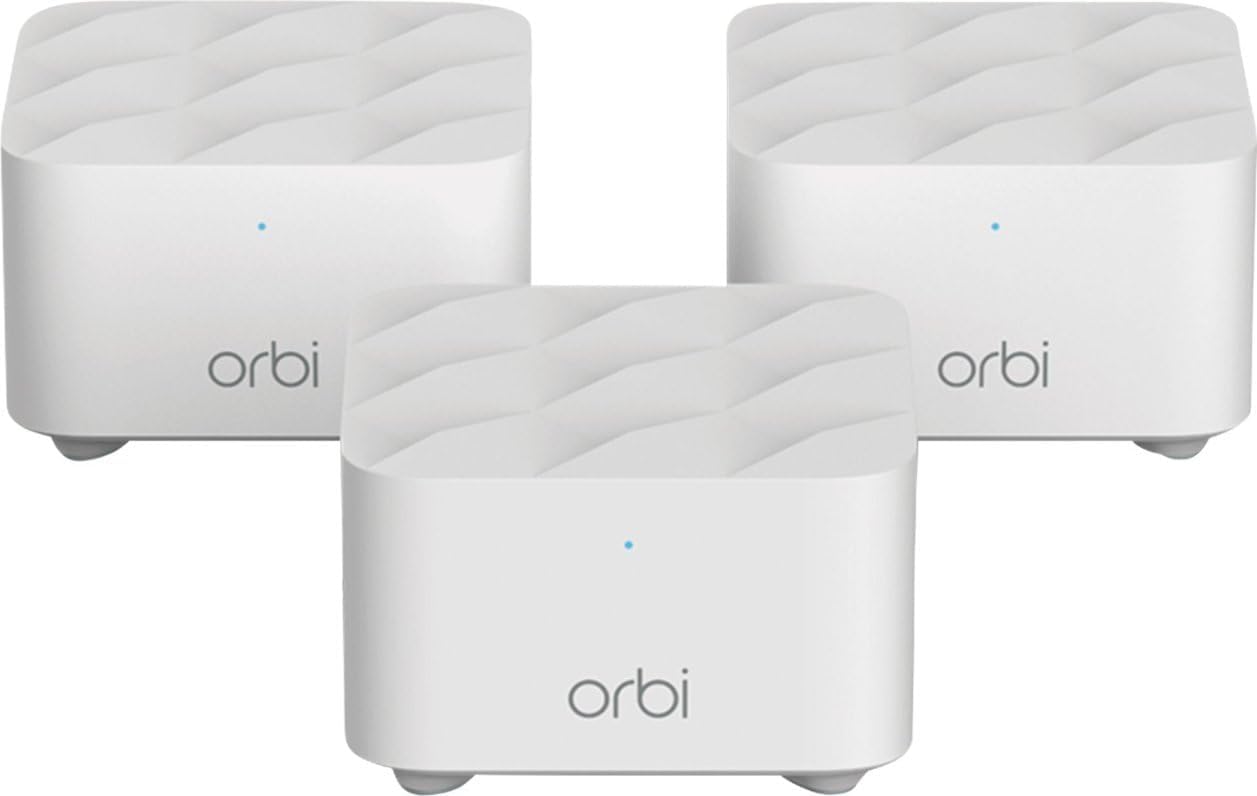
Netgear RBK13-100NAR Orbi RBK13 AC1200 Whole Home Mesh WiFi System Router (Renewed)
Bottom line: The Netgear RBK13-100NAR Orbi RBK13 AC1200 Whole Home Mesh WiFi System: Covers up to 4,500 sq ft on one Wi-Fi network name; main trade-off: renewed/refurbished unit, not sold as brand new.
As an Amazon Associate, SpecPicks earns from qualifying purchases. Full disclosure →
Pros & Cons
Pros
- ✓ Covers up to 4,500 sq ft on one Wi-Fi network name
- ✓ AC1200 delivers up to 1.2 Gbps for HD streaming
- ✓ Works with any ISP: cable, fiber, DSL, or satellite
- ✓ Orbi app sets up and manages Wi-Fi in minutes
- ✓ Includes NETGEAR Armor security 30-day free trial
Cons
- ✗ Renewed/refurbished unit, not sold as brand new
- ✗ Just one Gigabit Ethernet port for wired devices
- ✗ AC1200 is Wi-Fi 5, older than Wi-Fi 6/6E mesh kits
- ✗ Requires a separate modem or gateway, not included
SpecPicks Verdict
SpecPicks has no buyer-rating or benchmark data for Netgear RBK13-100NAR Orbi RBK13 AC1200 Whole Home Mesh WiFi System…, so this read rests on the manufacturer's listed specs (how we evaluate). Compare with similarly-priced alternatives in the networking category before committing. On the listing's own facts, the case for it is "Covers up to 4,500 sq ft on one Wi-Fi network name"; the main trade-off is "Renewed/refurbished unit, not sold as brand new". If those two points fit how you will use it, put it beside one or two close alternatives in the Compare tool to confirm the price.
Before ordering, check the listed dimensions, ports, power requirements and supported devices or systems in the spec table below against how you plan to use it, and confirm them on the retailer's listing. Prices and stock are set by the retailer and may have moved since this page was last updated.
Key Features
Quoted from the manufacturer's listing. Where it differs from the pros and cons above, those note the conditions the listing leaves out.
- NO MORE DEAD ZONES: Whole home mesh Wi-Fi coverage of up to 4,500 square feet Mesh technology helps you stay connected as you roam around home using a single network name.
- WORKS WITH ALL INTERNET PROVIDERS: Replace your existing Wi-Fi Router (separate modem or gateway required). Compatible with any Internet provider, including cable, satellite, fiber, DSL, and more.
- WIRED ETHERNET PORT: Plug in computers, game consoles, streaming players, and other nearby wired devices with a 1 Gigabit Ethernet port.
- FAST WIRELESS SPEED: AC1200 Wi-Fi powers up to 1.2 Gbps of streaming HD video, gaming, or Internet surfing and downloads.
- EASY SET UP AND MANAGE: Set up Wi-Fi in minutes with the Orbi app, manage Wi-Fi settings, test and monitor speed.
- NETGEAR Armor protects your family's WiFi with an automatic shield of security across all your connected devices with a 30-day free trial.
Full Specifications
| Brand | NETGEAR |
|---|---|
| Color | white |
| Coverage | 4,500 square feet |
| Frequency | 5 GHz |
| Model Name | RBK13 |
| Unit Count | 3 Count |
| Antenna Type | Internal |
| Connectivity | Wireless, WiFi |
| Model Number | RBK13-100NAS-cr |
| Built-In Media | Orbi Mesh Wi-Fi System |
| Control Method | App |
| Connection Type | Wired |
| Controller Type | Google Assistant |
| Mfr Part Number | RBK13-100NAS |
| Number of Items | 1 |
| Number of Packs | 3 |
| Number of Ports | 1 |
| Special Feature | Whole home mesh Wi-Fi coverage of up to 4,500 square feet Mesh technology helps you stay connected as you roam around home using a single network name. |
| Antenna Location | Home |
| Wi-Fi Generation | Wi-Fi 5 |
Ready to buy?
Netgear RBK13-100NAR Orbi RBK13 AC1200 Whole Home Mesh WiFi System Router (Renewed) is listed on Amazon. Price, availability, shipping and returns are set by Amazon and its sellers — check the listing for current terms. SpecPicks earns a small commission on qualifying purchases — thank you for supporting independent review work.
Related Networking



More guides & deep dives from the SpecPicks archive
Browse all articles & guides →- Best Budget Gaming PC Build 2026 — ~$1,000 Parts List
- Best 1440p Gaming GPUs in 2026
- Emulation Hardware in 2026: FPGA, Software, and Cart-Reader Ecosystems
- Best Retro Handhelds in 2026: Pocket, Mid-Tier and FPGA Picks
- RTX 4070 Super vs RX 7800 XT — Which to Buy in 2026
- The Complete Voodoo5 5500 AGP Driver Guide (2026 Edition)
- How to Build a Windows 98 Retro PC in 2026
More reviews from the SpecPicks archive
Browse all reviews →- Sound Blaster AWE32 vs AWE64: The 1998 MIDI Decision
- Intel Arc Pro B60 AI: 24GB VRAM for Local LLMs in 2026
- GPT and Claude Flunked Bridgewater's Finance Test — Why a Local RAG Box Fills the Gap
- Best Raspberry Pi Heatsink and Cooling Kits for Pi 5 in 2026
- Intel Kills BigDL: The Best Local-LLM Stack to Switch To in 2026
- Cursor Launches Its Own AI Model and Git Platform: What Changes
- llama.cpp vs vLLM for Single-User Local Chat on a 12GB GPU (2026)
- Voodoo3 3000 vs GeForce 256: 1999 Glide vs OpenGL Showdown
- Booting Windows 98 From CompactFlash: The Silent Solid-State Retro Drive
- Claude Fable 5 Tops the Intelligence Index: What Frontier Cloud AI Means for Local Rig Builders
- The Adder at the Heart of Intel's 8087 Math Coprocessor
- RX 580 in 2026: Still Worth It for 1080p Gaming?
- SATA/IDE to USB Adapters in 2026: FIDECO vs Unitek vs Vantec for Retro PC Data Recovery
- A LEGO Castle Case for the Raspberry Pi 5 Is Going Viral — Here's the Build
- Mystery N64 Cartridge Found in the Woods Boots Up
- Best SATA SSD to Upgrade Your PS4 Pro Storage in 2026
- Raspberry Pi Projects on GitHub: 2025 Guide
- Have Qwen Said Anything About Further Qwen 3.6 Models?
- Framework RTX 5070 12GB Module: Why It's $1,199, Not $699
- Best AM4 CPU for 1080p Gaming in 2026: 5 Value Picks
- How to run Llama 3.1 70B on Apple M3 Ultra
- Best Mechanical Keyboard for Office and Gaming Crossover (2026)
- Steam Deck OLED vs ROG Ally Z1 Extreme: 2025 Comparison
- 3dfx Voodoo5 5500 PCI Boots in a Modern ASUS Z77 Board
Earliest SpecPicks reviews
Browse full archive →- Best GPU for Llama 3.1 8B (2026)
- Best GPU for Qwen 3 14B (2026)
- Best GPU for Qwen 3 32B (2026)
- Best GPU for Llama 3.1 70B (2026)
- Best GPU for DeepSeek-R1 32B (2026)
- Best GPU for Llama 3.1 405B (2026)
- How to run Llama 3.1 8B on NVIDIA GeForce RTX 5090
- How to run Qwen 3 14B on NVIDIA GeForce RTX 5090
- How to run Qwen 3 32B on NVIDIA GeForce RTX 5090
- How to run Llama 3.1 70B on NVIDIA GeForce RTX 5090
- How to run DeepSeek-R1 32B on NVIDIA GeForce RTX 5090
- How to run Llama 3.1 8B on NVIDIA GeForce RTX 4090