
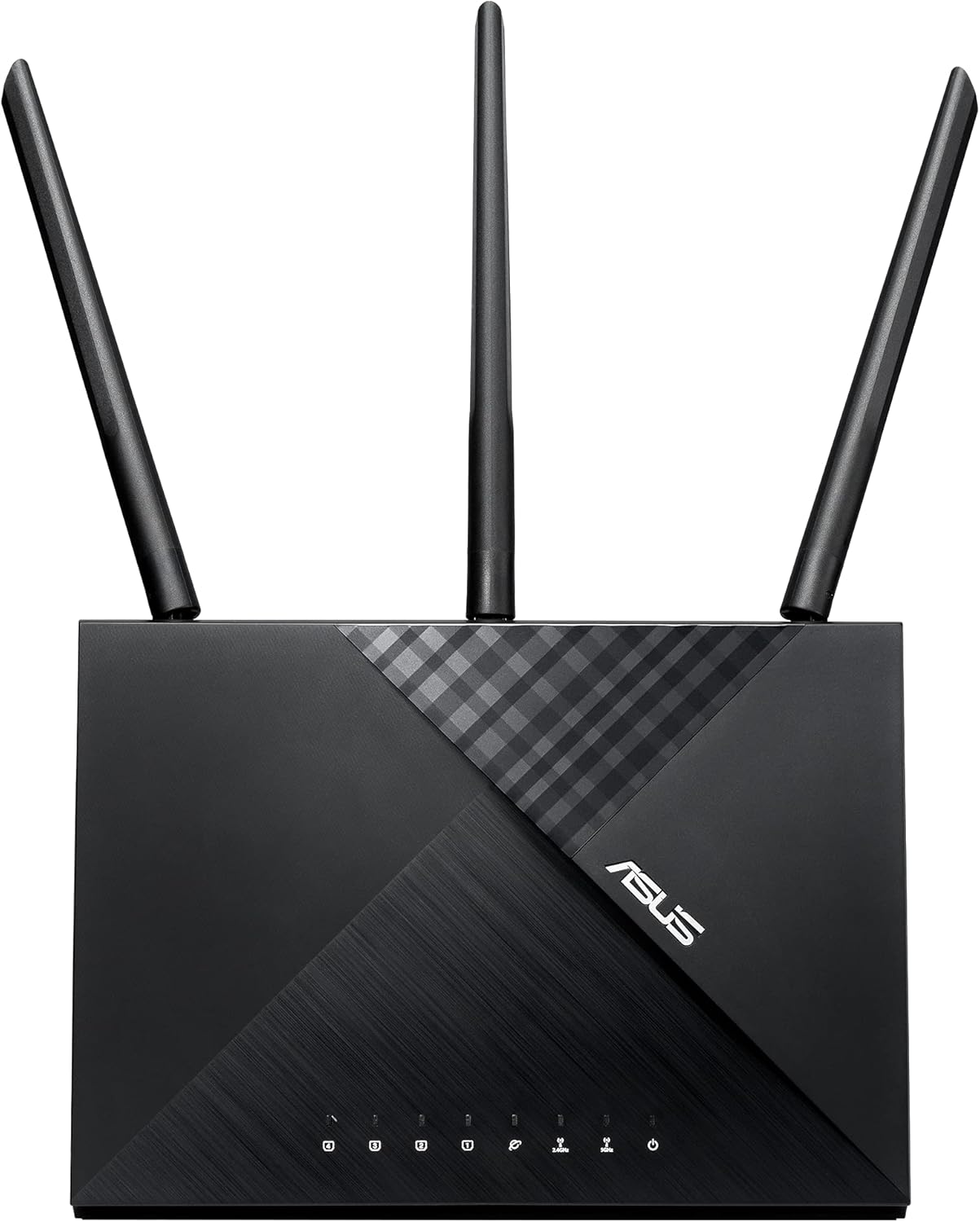
ASUS AC1750 WiFi Router (RT-AC65)
Bottom line: The ASUS AC1750 WiFi Router: AC1750 dual-band: up to 450 Mbps on 2.4GHz plus up to 1300 Mbps on 5GHz; main trade-off: wiFi 5 (802.11ac) only; no WiFi 6 or 6E support.
As an Amazon Associate, SpecPicks earns from qualifying purchases. Full disclosure →
Pros & Cons
Pros
- ✓ AC1750 dual-band: up to 450 Mbps on 2.4GHz plus up to 1300 Mbps on 5GHz
- ✓ MU-MIMO serves multiple compatible clients at full speed simultaneously
- ✓ Rated coverage up to 3,000 sq ft from three external antennas
- ✓ AiRadar beamforming focuses signal toward connected devices
- ✓ Parental controls plus setup and management via the ASUS Router app
Cons
- ✗ WiFi 5 (802.11ac) only; no WiFi 6 or 6E support
- ✗ Dual-band only; no third band for extra devices or mesh backhaul
- ✗ 1300 Mbps 5GHz figure is a theoretical maximum; real throughput is lower
- ✗ MU-MIMO gains require MU-MIMO-compatible client devices
Manufacturer description
The ASUS RT-AC65 is a dual-band AC1750 WiFi router for homes where laptops, desktops, tablets and phones all compete for the same connection. Its 802.11ac chipset reaches up to 450 Mbps on the 2.4GHz band and up to 1300 Mbps on the 5GHz band. That gives you much more bandwidth than older Wireless-N routers for streaming and everyday browsing. Three external antennas cover up to 3,000 sq ft. AiRadar beamforming aims the WiFi signal at your connected devices to keep links stable, so you don't get the same broadcast in every direction. MU-MIMO lets the router serve several MU-MIMO-compatible…
SpecPicks Verdict
SpecPicks has no buyer-rating or benchmark data for ASUS AC1750 WiFi Router, so this read rests on the manufacturer's listed specs (how we evaluate). Compare with similarly-priced alternatives in the networking category before committing. On the listing's own facts, the case for it is "AC1750 dual-band: up to 450 Mbps on 2.4GHz plus up to 1300 Mbps on 5GHz"; the main trade-off is "WiFi 5 (802.11ac) only; no WiFi 6 or 6E support". If those two points fit how you will use it, put it beside one or two close alternatives in the Compare tool to confirm the price.
Before ordering, check the listed dimensions, ports, power requirements and supported devices or systems in the spec table below against how you plan to use it, and confirm them on the retailer's listing. Prices and stock are set by the retailer and may have moved since this page was last updated.
Frequently Asked Questions
How fast is the ASUS RT-AC65 WiFi?
It is an AC1750 dual-band router. It reaches up to 450 Mbps on the 2.4GHz band and up to 1300 Mbps on the 5GHz band. These are theoretical maximums, and real-world speeds depend on your devices, distance and internet plan.
How big a home can the RT-AC65 cover?
ASUS rates its maximum range at up to 3,000 sq ft, using three external antennas and AiRadar beamforming. Walls, floors and interference can reduce coverage.
Does the ASUS RT-AC65 support WiFi 6?
No. The RT-AC65 uses an 802.11ac (WiFi 5) chipset. It is backward compatible with older Wireless-N devices, but it does not support WiFi 6 or 6E.
What does MU-MIMO do on this router?
MU-MIMO lets the router connect multiple MU-MIMO-compatible devices at each device's maximum speed at the same time, instead of serving them one after another. Devices without MU-MIMO still connect normally but don't get this benefit.
How do I set up the RT-AC65 and use parental controls?
You can set up and manage the router with the ASUS Router app, which also gives you access to the built-in parental controls. Check the product listing for current warranty terms and the full port configuration.
Key Features
Quoted from the manufacturer's listing. Where it differs from the pros and cons above, those note the conditions the listing leaves out.
- Maximum Range : 3000 Sq Ft.Antenna: External antenna x 3. Memory : 128 MB Flash, 128 MB RAM.
- Fast Wi-Fi Speed – Concurrent dual-band AC1750-level Wi-Fi delivers smooth streaming for home network.
- MU-MIMO for Full Speed on Multiple Devices – The revolutionary technology connects multiple MU-MIMO-compatible clients at each device’s maximum speed simultaneously.
- Optimized Coverage with AiRadar Beamforming – The WiFi signal is focused towards connected devices to ensure stable connection.
- Parental Control – Protect children from internet addiction.
- Easy Network Setup and Control with ASUS Router App.
Full Specifications
| Brand | ASUS |
|---|---|
| Color | Black |
| Voltage | 240 Volts |
| Coverage | Up to 3000 sq ft |
| Frequency | 5 GHz |
| Model Name | Asus AC1750 |
| Unit Count | 1.0 Count |
| Is Electric | Yes |
| Antenna Type | Retractable |
| Connectivity | Wireless, USB, WiFi |
| Model Number | RT-AC65 |
| Maximum Range | 3000 Sq Ft.Antenna: External antenna x 3. Memory : 128 MB Flash, 128 MB RAM. |
| Built-In Media | Power Adapter, Quick Start Guide, RT-AC65 WiFi Router, Warranty Card |
| Control Method | App |
| Item Type Name | Routers |
| Connection Type | Wireless |
| Mfr Part Number | RT-AC65 |
| Number of Ports | 5 |
| Special Feature | WPS |
| Antenna Location | Home |
| Full listing title | ASUS AC1750 WiFi Router (RT-AC65) - Dual Band Wireless Internet Router, Easy Setup, Parental Control, USB 3.0, AiRadar Beamforming Technology extends Speed, Stability & Coverage, MU-MIMO |
Ready to buy?
ASUS AC1750 WiFi Router (RT-AC65) - Dual Band Wireless Internet Router, Easy Setup, Parental Control, USB 3.0, AiRadar Beamforming Technology extends Speed, Stability & Coverage, MU-MIMO is listed on Amazon. Price, availability, shipping and returns are set by Amazon and its sellers — check the listing for current terms. SpecPicks earns a small commission on qualifying purchases — thank you for supporting independent review work.
Related Networking


More guides & deep dives from the SpecPicks archive
Browse all articles & guides →- The Complete Voodoo5 5500 AGP Driver Guide (2026 Edition)
- RTX 4070 Super vs RX 7800 XT — Which to Buy in 2026
- Best Budget Gaming PC Build 2026 — ~$1,000 Parts List
- How to Build a Windows 98 Retro PC in 2026
- Best 1440p Gaming GPUs in 2026
- Best Retro Handhelds in 2026: Pocket, Mid-Tier and FPGA Picks
- Emulation Hardware in 2026: FPGA, Software, and Cart-Reader Ecosystems
More reviews from the SpecPicks archive
Browse all reviews →- Building a 2001 LAN-Party Rig: Pentium III, GeForce 3, Win98 SE Period-Correct Build Log
- Asus ROG Xreal R1: 240Hz AR gaming glasses land
- Best Budget Gaming Setup Essentials for 2026: Mouse, Keyboard, Headset, Mic & Mousepad
- Best GPU for Stable Diffusion and Local Image Generation in 2026
- Steam Deck LCD Battery Swollen: Diagnosis & Safe Fix Guide
- RTX 5090 AI Build Guide: CPU, RAM, PSU & Cooling for Local Inference
- Cloudflare Swaps Its Blanket AI Bot Block for Granular Crawler Controls
- OpenAI Says 'Chat Is Dead': Building a Local Agent Rig in 2026
- Sound Blaster AWE64 vs Aureal Vortex 2: The Win98 Audio API War, Revisited
- One Desk, Two Sims: Swapping a G29 Wheel and an Extreme 3D Pro Stick
- Open-Source NVIDIA NVK Vulkan Driver Now Supports DLSS
- RTX 3060 12GB vs Ryzen 9 3900X for Qwen2.5 14B: GPU or CPU in 2026?
- Laguna XS.2 Lands in llama.cpp: What the Tiny Hybrid Model Means for Local Inference
- Best Budget SSD for Gaming and Local-LLM Storage in 2026
- Run Qwen Locally: Apple Silicon vs a 12GB RTX 3060 Rig in 2026
- Ryzen 5 5600G APU for Local LLM Inference in 2026: What You Can Actually Run
- How to run DeepSeek-R1 32B on NVIDIA GeForce RTX 5070
- Advanced Shader Delivery on the RX 9070 XT: Benchmark Results
- LongCat-2.0: A Frontier Model Trained Without Nvidia GPUs
- Gemma 4 31B Heretic Finetune: Can It Run on a 12GB RTX 3060?
- Best Budget Gaming PC Parts in 2026: A Ryzen + RTX 3060 Build
- Best Budget Streaming & Content-Creation Gear in 2026: 5 Picks That Punch Above Their Price
- Best GPU for Running Llama 8B Under $300 in 2026
- Best Arcade Fight Stick & Controller for PlayStation Fighting Games (2026)
Earliest SpecPicks reviews
Browse full archive →- Best GPU for Llama 3.1 8B (2026)
- Best GPU for Qwen 3 14B (2026)
- Best GPU for Qwen 3 32B (2026)
- Best GPU for Llama 3.1 70B (2026)
- Best GPU for DeepSeek-R1 32B (2026)
- Best GPU for Llama 3.1 405B (2026)
- How to run Llama 3.1 8B on NVIDIA GeForce RTX 5090
- How to run Qwen 3 14B on NVIDIA GeForce RTX 5090
- How to run Qwen 3 32B on NVIDIA GeForce RTX 5090
- How to run Llama 3.1 70B on NVIDIA GeForce RTX 5090
- How to run DeepSeek-R1 32B on NVIDIA GeForce RTX 5090
- How to run Llama 3.1 8B on NVIDIA GeForce RTX 4090