
Rosewill
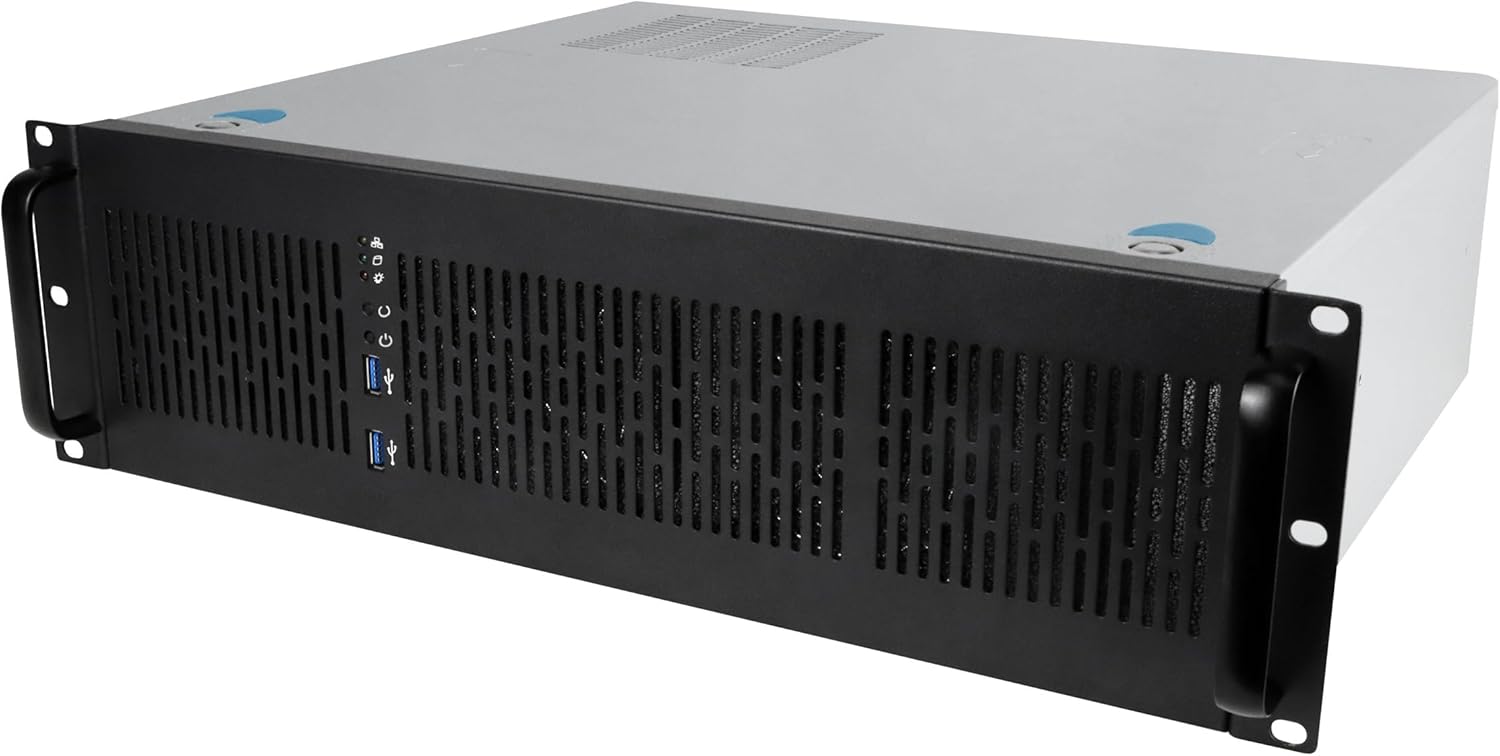
Rosewill 3U Server Chassis Rackmount Case
Bottom line: The Rosewill 3U Server Chassis Rackmount Case: 3U rackmount, ATX compatible with 4 PCI expansion slots; main trade-off: only 3U tall, limits tall CPU coolers and full-height GPUs.
As an Amazon Associate, SpecPicks earns from qualifying purchases. Full disclosure →
Pros & Cons
Pros
- ✓ 3U rackmount, ATX compatible with 4 PCI expansion slots
- ✓ 4 internal 3.5" HDD bays for storage builds
- ✓ 2 pre-installed 80mm PWM front fans for airflow
- ✓ Front USB 3.0 x2 for fast wired transfers
- ✓ Power, HDD, and LAN status LED indicators on front panel
Cons
- ✗ Only 3U tall, limits tall CPU coolers and full-height GPUs
- ✗ 4 HDD bays may fall short for large NAS builds
- ✗ Rack-only form factor, not desk-friendly
- ✗ 80mm fans move less air than 120mm at same noise
SpecPicks Verdict
SpecPicks has no buyer-rating or benchmark data for Rosewill 3U Server Chassis Rackmount Case, so this read rests on the manufacturer's listed specs (how we evaluate). Compare with similarly-priced alternatives in the pc cases category before committing. On the listing's own facts, the case for it is "3U rackmount, ATX compatible with 4 PCI expansion slots"; the main trade-off is "Only 3U tall, limits tall CPU coolers and full-height GPUs". If those two points fit how you will use it, put it beside one or two close alternatives in the Compare tool to confirm the price.
Common buyer scenarios for pc cases of this kind: matching it to an existing build, replacing a failing part, or upgrading from a previous-generation equivalent. Check the spec table below against your current setup — particularly socket / form-factor / power-rating fields — and confirm compatibility on the retailer's listing before purchase. Prices and stock are set by the retailer and may have moved since this page was last updated.
Key Features
Quoted from the manufacturer's listing. Where it differs from the pros and cons above, those note the conditions the listing leaves out.
- Roomy Chassis: This 3U server case has 4 internal 3.5" HDD bays.
- Expandable & ATX Compatible: 4 PCI expansion slots and ATX compatibility gives you options for expansion.
- Quiet Cooling: 2 pre-installed 80mm PWM front cooling fans provide excellent airflow and heat protection at reduced noise.
- Desired Features: Front panel LED indicators for power, HDD, and LAN status monitoring allow quick, easy visual assessment. Additional utility with 2 USB 3.0 port.
Full Specifications
| Brand | Rosewill |
|---|---|
| Color | Silver |
| Material | Alloy Steel |
| Case Type | Tower |
| Model Name | RSV-Z3100U |
| Connectivity | USB |
| Model Number | RSV-Z3100U |
| Quiet Cooling | 2 pre-installed 80mm PWM front cooling fans provide excellent airflow and heat protection at reduced noise. |
| Roomy Chassis | This 3U server case has 4 internal 3.5" HDD bays. |
| Cooling Method | Air |
| Number of Fans | 2 |
| Mfr Part Number | RSV-Z3100U |
| Total Usb Ports | 2 |
| Antenna Location | Business |
| Desired Features | Front panel LED indicators for power, HDD, and LAN status monitoring allow quick, easy visual assessment. Additional utility with 2 USB 3.0 port. |
| Compatible Devices | CPU, Desktop, Server |
| Enclosure Material | Alloy Steel |
| Total USB 2.0 Ports | 1 |
| Total USB 3.0 Ports | 1 |
| Warranty Description | 1 Year Manufacturer |
| Full listing title | Rosewill 3U Server Chassis Rackmount Case | 6 x 3.5 Bays | ATX Compatible | 2 x 80mm Fans | 2 x USB 3.0 | RSV-Z3100U |
Ready to buy?
Rosewill 3U Server Chassis Rackmount Case | 6 x 3.5 Bays | ATX Compatible | 2 x 80mm Fans | 2 x USB 3.0 | RSV-Z3100U is listed on Amazon. Price, availability, shipping and returns are set by Amazon and its sellers — check the listing for current terms. SpecPicks earns a small commission on qualifying purchases — thank you for supporting independent review work.
Related PC Cases


More guides & deep dives from the SpecPicks archive
Browse all articles & guides →- How to Build a Windows 98 Retro PC in 2026
- Best Budget Gaming PC Build 2026 — ~$1,000 Parts List
- Best Retro Handhelds in 2026: Pocket, Mid-Tier and FPGA Picks
- Emulation Hardware in 2026: FPGA, Software, and Cart-Reader Ecosystems
- RTX 4070 Super vs RX 7800 XT — Which to Buy in 2026
- Best 1440p Gaming GPUs in 2026
- The Complete Voodoo5 5500 AGP Driver Guide (2026 Edition)
More reviews from the SpecPicks archive
Browse all reviews →- LattePanda Sigma vs Raspberry Pi 4 8GB: x86 Windows SBC vs ARM Linux for Edge AI Workloads in 2026
- AA-Briefcase's 800x Cost Spread: What It Means for Local Agentic Rigs
- Intel i7-9700K vs Ryzen 7 5700X for a Budget 2026 Gaming Build
- GLM-5.2 Is Now the Most Intelligent Open-Weights Model — and the Most Verbose
- Self-Hosting Jellyfin on a Raspberry Pi 4 8GB: Real Performance
- Intel Arc Stable Diffusion Guide: Setup & Benchmarks 2025
- Noctua NH-U12S vs ML240L RGB: Best Cooler for a 5800X
- Modern CRT Monitor for Retro Gaming: The 2025 Reality Check
- gpt-oss 20B on Surface Laptop Ultra (RTX Spark) vs DGX Spark: tok/s by Config
- ZOTAC RTX 3060 Twin Edge vs MSI Ventus 2X: Which 12GB Card for a Quiet Build?
- Imaging Big-Box CD-ROMs to CompactFlash for a Windows 98 Retro PC
- AMD Ryzen AI Max+ PRO 495 192GB: What the PassMark Leak Tells Us
- Ryzen AI Max 395 Laptop: Specs and AI Performance
- 768GB Optane vs RTX 3060 12GB: The Trillion-Param LLM Reality
- Ryzen 5 5600X vs Ryzen 7 5800X: CPU-Only Qwen2.5 14B (2026)
- AA-AgentPerf: What the New Agentic Benchmark Means for Local Coding Rigs
- xAI Open-Sources Grok-Build: Can You Run It Locally?
- Jetson Orin Nano Super vs Hailo-8 AI HAT+: Which Edge-AI Path Is Right for You?
- Logitech G920 vs HORI Racing Wheel: Best First Sim Wheel?
- Best SATA SSDs for Older PCs and Retro Builds in 2026
- Raspberry Pi AI HAT+ 26 TOPS: Specs, Setup, and Verdict
- M5 vs DGX Spark vs Strix Halo vs RTX 6000: AI Workload Guide
- Apple Sues OpenAI Over Alleged Trade-Secret Theft: What It Means
- Gemma 4 and Larger Qwen 3.6: What Hardware You'll Actually Need
Earliest SpecPicks reviews
Browse full archive →- Best GPU for Llama 3.1 8B (2026)
- Best GPU for Qwen 3 14B (2026)
- Best GPU for Qwen 3 32B (2026)
- Best GPU for Llama 3.1 70B (2026)
- Best GPU for DeepSeek-R1 32B (2026)
- Best GPU for Llama 3.1 405B (2026)
- How to run Llama 3.1 8B on NVIDIA GeForce RTX 5090
- How to run Qwen 3 14B on NVIDIA GeForce RTX 5090
- How to run Qwen 3 32B on NVIDIA GeForce RTX 5090
- How to run Llama 3.1 70B on NVIDIA GeForce RTX 5090
- How to run DeepSeek-R1 32B on NVIDIA GeForce RTX 5090
- How to run Llama 3.1 8B on NVIDIA GeForce RTX 4090