

Atelus
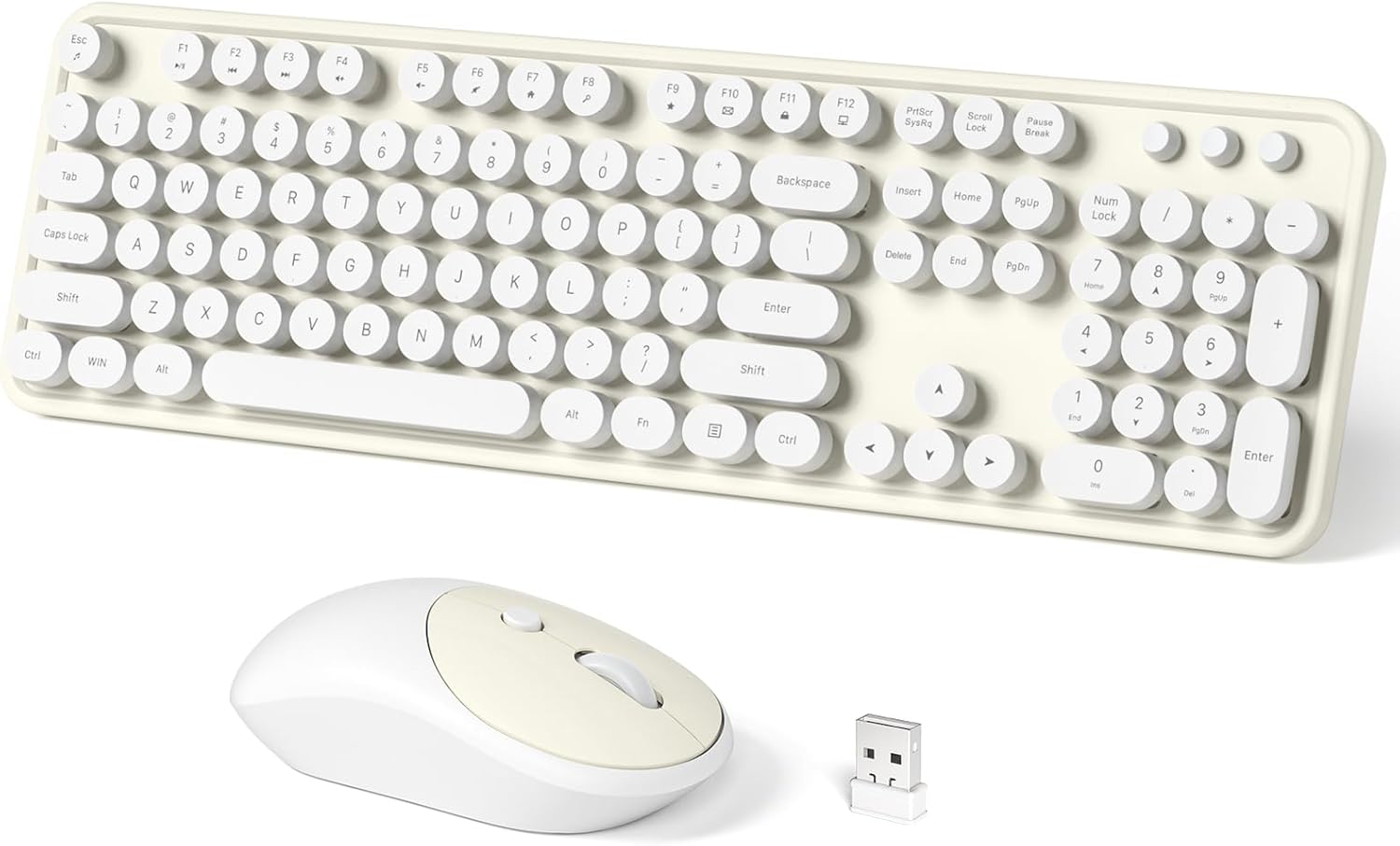
Atelus Wireless Keyboard and Mouse
Bottom line: The Atelus Wireless Keyboard and Mouse ($30.39 on Amazon as of 2026-11-22 05:27 UTC): One USB receiver pairs both keyboard and mouse, no software needed; main trade-off: listed compatibility stops at Windows 10; Mac and Windows 11 not stated.
As an Amazon Associate, SpecPicks earns from qualifying purchases. Full disclosure →
*Price sourced from Amazon.com. Last updated 2026-11-22. Product prices and availability are accurate as of the date/time indicated and are subject to change. Any price and availability information displayed on Amazon.com at the time of purchase will apply to the purchase of this product.
Pros & Cons
Pros
- ✓ One USB receiver pairs both keyboard and mouse, no software needed
- ✓ 2.4G wireless range rated up to 10 m (33 ft)
- ✓ Round typewriter-style keys with glossy edges in a blue finish
- ✓ Foldable rear stand raises the typing angle
- ✓ Auto sleep plus on/off switches help conserve batteries
Cons
- ✗ Listed compatibility stops at Windows 10; Mac and Windows 11 not stated
- ✗ No Bluetooth listed; the receiver takes up a USB port
- ✗ ABS keycaps rather than more wear-resistant PBT
- ✗ Battery type and count not specified in the listing
Manufacturer description
The Atelus Wireless Keyboard and Mouse combo pairs a full-size, typewriter-style keyboard with a cat-shaped mouse, finished in blue. The round keycaps have glossy, smooth edges, so your desk looks retro without giving up a standard full-size layout. Setup takes one step. A single 2.4G USB receiver connects both the keyboard and the mouse, with no software or drivers to install. Atelus rates the wireless range at up to 10 meters (33 ft), which covers a desk setup or a laptop connected to a TV across the room. The keycaps are ABS plastic, and a foldable stand on the back of the keyboard lets…
SpecPicks Verdict
SpecPicks has no buyer-rating or benchmark data for Atelus Wireless Keyboard and Mouse, so this read rests on the manufacturer's listed specs and the current price in the gaming peripherals category (how we evaluate). Compare with similarly-priced alternatives in the gaming peripherals category before committing. On the listing's own facts, the case for it is "One USB receiver pairs both keyboard and mouse, no software needed"; the main trade-off is "Listed compatibility stops at Windows 10; Mac and Windows 11 not stated". If those two points fit how you will use it, put it beside one or two close alternatives in the Compare tool to confirm the price.
Before ordering, check the listed dimensions, ports, power requirements and supported devices or systems in the spec table below against how you plan to use it, and confirm them on the retailer's listing. Prices and stock are set by the retailer and may have moved since this page was last updated.
Frequently Asked Questions
Do the keyboard and mouse need separate USB receivers?
No. Both connect through one 2.4G USB receiver, and no software installation is required.
How far away can I use this wireless keyboard and mouse?
Atelus rates the 2.4G wireless connection at up to 10 meters (33 ft) from the receiver.
Will it work with my Windows laptop?
The listing states compatibility with Windows XP, Vista, 7, 8 and 10 on PCs, desktops, laptops and notebooks. Mac and Windows 11 support are not stated, so check the product listing before buying for those systems.
Can I adjust the keyboard's typing angle?
Yes. A foldable stand on the back of the keyboard lets you tilt it up to reduce hand fatigue.
How does the combo save battery power?
Both devices enter auto-sleep mode when idle and wake when you press any key. They also have on/off switches. Check the product listing for the battery type required.
Key Features
Quoted from the manufacturer's listing. Where it differs from the pros and cons above, those note the conditions the listing leaves out.
- 【Unique Keyboard and Mouse Set】Cute rounded keys design with glossy and smooth edge technology and fresh color brighten up your device and your desk. Let you add a touch of fun to your dull and boring work, relieve work pressure.
- 【2.4G Wireless Plug and Play】 Simply connect both your portable keyboard and mouse with one USB receiver without any software, and then enjoy a strong and reliable wireless connection up to 10 meters(33 ft) away virtually no delays or dropouts.
- 【Upgrading Technology】The keycaps are made of ABS environment-friendly plastic characterized by ergonomic design and a comfortable feel. And there is a foldable stand on the back of the keyboard to reduce hand fatigue, hence enhancing your typing experience.
- 【Automatic Power Saving】 The wireless keyboard mouse combo features auto sleeping mode, please press any key to wake up immediately, or plus on/off switches to help conserve battery use, you can go for months without the hassle of changing the batteries.
- 【Wide Compatibility】 The wireless keyboard and mouse combo include a retro keyboard and a cute cat shape mouse. Works with your PC, desktop computer, laptop, or notebook. Compatible with Windows XP / Vista / 7 / 8 /10 operating systems.
Full Specifications
| Brand | Atelus |
|---|---|
| Color | Blue |
| Weight | 2.4g |
| Connectivity | Wireless, USB, 2.4GHz |
| Power Source | Battery Powered |
| Compatibility | PC |
| Number of Keys | 104 |
| Connection Type | Wireless |
| Keyboard Layout | QWERTY |
| Special Feature | Ergonomic, Round Key |
| Compatible Devices | Laptop, Personal Computer, Tablet |
| Movement Detection | Optical |
| Number of Batteries | 1 AA batteries required. |
| Keyboard Description | Multimedia |
| Warranty Description | 12 Months |
| Are Batteries Required | Yes |
| Connectivity Technology | Usb |
| Other Special Features of the Product | Ergonomic, Round Key |
| Full listing title | Atelus Wireless Keyboard and Mouse, Full Size Typewriter Keyboard and Cute Cat Shape Design Mouse Combo for Windows 7/8/10, Laptop, Desktop, PC, Computer (Blue) |
Ready to buy?
Atelus Wireless Keyboard and Mouse, Full Size Typewriter Keyboard and Cute Cat Shape Design Mouse Combo for Windows 7/8/10, Laptop, Desktop, PC, Computer (Blue) is listed on Amazon. Price, availability, shipping and returns are set by Amazon and its sellers — check the listing for current terms. SpecPicks earns a small commission on qualifying purchases — thank you for supporting independent review work.
*Price sourced from Amazon.com. Last updated 2026-11-22. Product prices and availability are accurate as of the date/time indicated and are subject to change. Any price and availability information displayed on Amazon.com at the time of purchase will apply to the purchase of this product.
Related Gaming Peripherals




More guides & deep dives from the SpecPicks archive
Browse all articles & guides →- RTX 4070 Super vs RX 7800 XT — Which to Buy in 2026
- Best Budget Gaming PC Build 2026 — ~$1,000 Parts List
- How to Build a Windows 98 Retro PC in 2026
- Emulation Hardware in 2026: FPGA, Software, and Cart-Reader Ecosystems
- Best Retro Handhelds in 2026: Pocket, Mid-Tier and FPGA Picks
- The Complete Voodoo5 5500 AGP Driver Guide (2026 Edition)
- Best 1440p Gaming GPUs in 2026
More reviews from the SpecPicks archive
Browse all reviews →- Best Bluetooth Controller for Switch and Retro Emulation on Steam Deck (2026)
- Local LLMs on the Ryzen 5 5600G: llama.cpp CPU Inference Numbers
- gpt-oss 20B on Surface Laptop Ultra (RTX Spark) vs DGX Spark: tok/s by Config
- Best SATA SSDs for Gaming and Retro PC Builds in 2026
- Best CompactFlash and IDE-to-USB Adapters for Retro PC Builds (2026)
- Build a Raspberry Pi 4 8GB Starter Home Lab in 2026: BOM + First Services
- AA-AgentPerf: What the New Agentic Inference Benchmark Means for Local Coding Rigs
- Local AI Server Build 2026: RAM, VRAM and NVMe for 13B+ Models
- IBM Granite 4.1 8B vs Qwen 3.6 27B: Which Small Local Model Wins on a 16GB GPU?
- Logitech G920 vs HORI Racing Wheel: Best First Sim Wheel?
- Do Wireless Keyboards Work in BIOS? Building a Homelab Crash Cart in 2026
- Best Gaming CPUs Under $400 for 2026: Ryzen, X3D, and Intel Picks
- Best Sim Racing Wheel + Shifter Combo Under $400 in 2026: 5 Setups for iRacing, ACC, and GT3
- Best Streaming Gear for New Content Creators in 2026
- Voodoo3 3000 PCI Install Guide for Win98 SE in 2026
- ASUS Beta BIOS Restores Ryzen 9000 Memory Encryption Ahead of AMD's July Timeline
- ComfyUI for NVIDIA Cosmos 3 on an RTX 3060 12GB: Setup + Limits
- Best Raspberry Pi Accessories for Home-Lab Builds in 2026
- Best Beginner Racing Wheel in 2026: Logitech G920 vs HORI Racing Wheel Overdrive
- Best Gaming Mouse for Logitech G502 Hero Loyalists in 2026
- How to run DeepSeek-R1 32B on Arc B580
- How to run Qwen 3 32B on NVIDIA GeForce RTX 5080
- Local AI News You Missed in April 2026
- Cheap 80s Keyboard Gets a Modern Brain Upgrade
Earliest SpecPicks reviews
Browse full archive →- Best GPU for Llama 3.1 8B (2026)
- Best GPU for Qwen 3 14B (2026)
- Best GPU for Qwen 3 32B (2026)
- Best GPU for Llama 3.1 70B (2026)
- Best GPU for DeepSeek-R1 32B (2026)
- Best GPU for Llama 3.1 405B (2026)
- How to run Llama 3.1 8B on NVIDIA GeForce RTX 5090
- How to run Qwen 3 14B on NVIDIA GeForce RTX 5090
- How to run Qwen 3 32B on NVIDIA GeForce RTX 5090
- How to run Llama 3.1 70B on NVIDIA GeForce RTX 5090
- How to run DeepSeek-R1 32B on NVIDIA GeForce RTX 5090
- How to run Llama 3.1 8B on NVIDIA GeForce RTX 4090