

Dilter
Dilter Wireless Keyboard and Mouse Combo
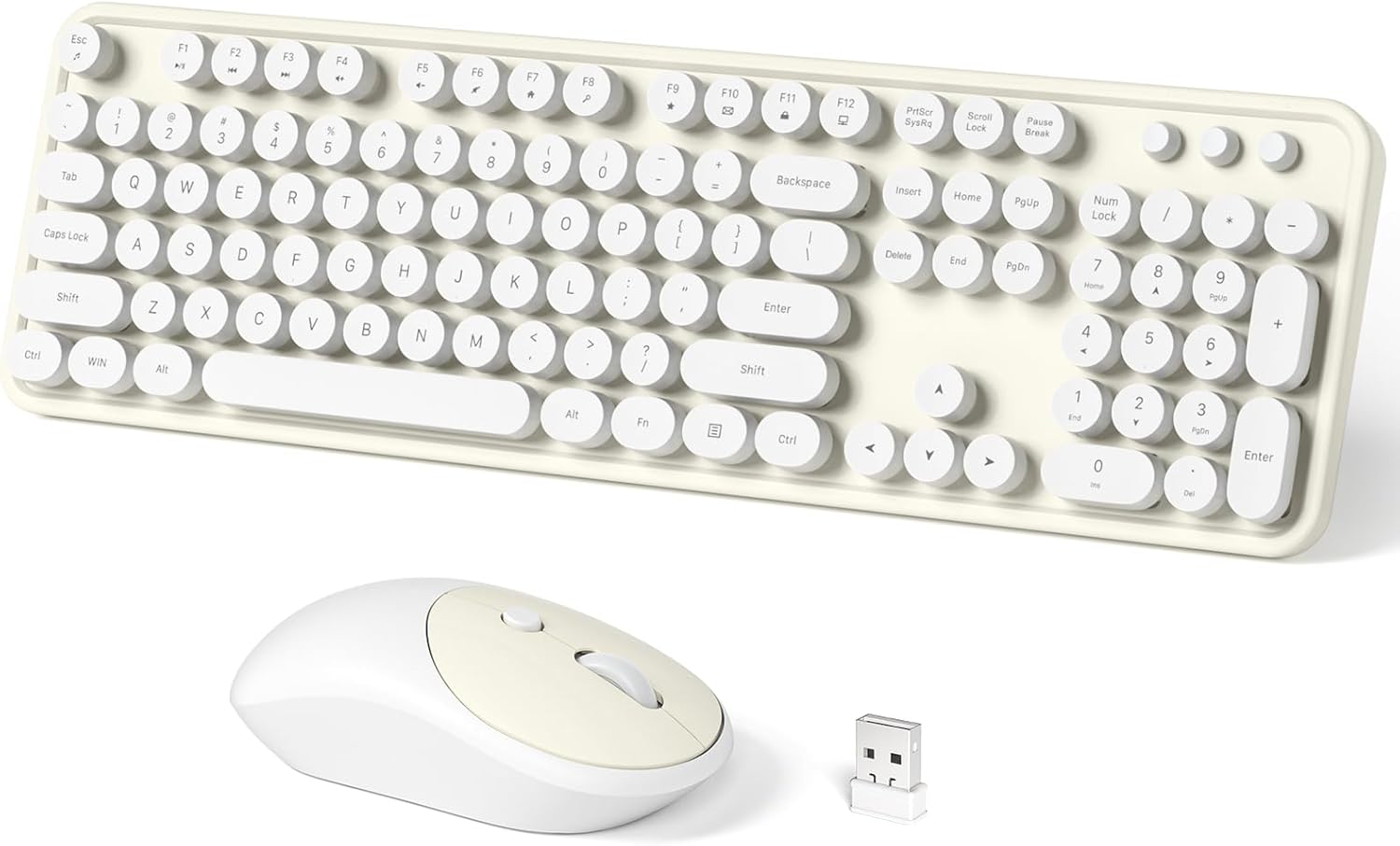
Bottom line: The Dilter Wireless Keyboard and Mouse Combo ($31.44 on Amazon as of 2026-11-22 17:18 UTC): Full 104-key layout keeps the number pad and function row; main trade-off: not fully compatible with Apple systems per the manufacturer.
As an Amazon Associate, SpecPicks earns from qualifying purchases. Full disclosure →
*Price sourced from Amazon.com. Last updated 2026-11-22. Product prices and availability are accurate as of the date/time indicated and are subject to change. Any price and availability information displayed on Amazon.com at the time of purchase will apply to the purchase of this product.
Pros & Cons
Pros
- ✓ Full 104-key layout keeps the number pad and function row
- ✓ Round typewriter-style keycaps give a distinctive retro look
- ✓ One 2.4GHz nano receiver runs both keyboard and mouse
- ✓ Driverless plug and play on Windows 11, 10, 8 and 7
- ✓ Auto sleep after 5 minutes idle saves battery; any key wakes it
Cons
- ✗ Not fully compatible with Apple systems per the manufacturer
- ✗ Round keycaps take some getting used to for touch typists
- ✗ ABS keycaps rather than more durable PBT plastic
- ✗ No companion software for remapping keys or macros
Manufacturer description
The Dilter Wireless Keyboard and Mouse Combo gives your desk a retro look with modern wireless convenience. The 104-key full-size keyboard has round, typewriter-inspired keycaps in purple, so you keep the full number pad, function row and navigation cluster without giving up character. Setup takes seconds. One 2.4GHz USB nano receiver handles both the keyboard and the mouse, so you use a single USB port and install no software. Plug it into a Windows PC, laptop or desktop and the drivers install automatically. Dilter lists support for Windows 11, 10, 8, 7, Vista and XP, and says the set also…
SpecPicks Verdict
SpecPicks has no buyer-rating or benchmark data for Dilter Wireless Keyboard and Mouse Combo, so this read rests on the manufacturer's listed specs and the current price in the gaming peripherals category (how we evaluate). Compare with similarly-priced alternatives in the gaming peripherals category before committing. On the listing's own facts, the case for it is "Full 104-key layout keeps the number pad and function row"; the main trade-off is "Not fully compatible with Apple systems per the manufacturer". If those two points fit how you will use it, put it beside one or two close alternatives in the Compare tool to confirm the price.
Before ordering, check the listed dimensions, ports, power requirements and supported devices or systems in the spec table below against how you plan to use it, and confirm them on the retailer's listing. Prices and stock are set by the retailer and may have moved since this page was last updated.
Frequently Asked Questions
Does the Dilter wireless keyboard and mouse work with a Mac?
Not fully. Dilter says the combo is not fully compatible with Apple systems. It is designed for Windows 11, 10, 8, 7, Vista and XP.
Do I need to install drivers or software?
No. Plug the single 2.4GHz USB nano receiver into your computer and the keyboard and mouse install automatically within seconds. No extra software is needed.
How many USB ports does this combo use?
Just one. The keyboard and mouse share one 2.4GHz nano receiver, which leaves your other USB ports free on a laptop or desktop.
Will the keyboard and mouse drain batteries quickly?
Both devices go into sleep mode after 5 minutes of inactivity to save battery, and pressing any key wakes them right away. Check the product listing for battery type and count.
Can I adjust the typing angle?
Yes. A foldable stand on the back of the keyboard tilts it to a more comfortable angle, which can help reduce hand fatigue during long typing sessions.
Key Features
Quoted from the manufacturer's listing. Where it differs from the pros and cons above, those note the conditions the listing leaves out.
- 【Cute Wireless Keyboard】The inspiration for these cute rounded keys comes from vintage typewriters offering you visual enjoyment and a retro feeling to type. With colorful key caps, make you be distinctive in the office and work full of fun
- 【Plug and Play】One USB 2.4GHz nano receiver for keyboard and mouse, does not need any extra software, super easy to use. All you have to do is plug the USB receiver and then give them seconds to install automatically
- 【Upgrading Technology】The keycaps are made of ABS environment-friendly plastic characterized by ergonomic design and a comfortable feel. And there is a foldable stand on the back of the keyboard to reduce hand fatigue, hence enhancing your typing experience
- 【Wide Compatibility】The keyboard and mouse combo include a full-size keyboard and a high-sensitivity mouse. Suit for Windows 7,8,10, XP/Vista. Work perfectly with PC, Laptop, Smart TV, and more. Not fully compatible with the Apple system
- 【Auto power saving】The keyboard and mouse will go into sleep mode for saving batteries after being idle for 5 minutes. Press any key to wake up immediately. If there are any problems, we are ready to help you at any time
Full Specifications
| Brand | Dilter |
|---|---|
| Color | Purple Gradient |
| Unit Count | 1 Count |
| Connectivity | Wireless, USB, 2.4GHz |
| Power Source | Battery Powered |
| Compatibility | PC |
| Number of Keys | 104 |
| Connection Type | Wireless |
| Keyboard Layout | QWERTY |
| Number of Packs | 1 |
| Special Feature | Round Key |
| Antenna Location | Office |
| Compatible Devices | Laptop, Personal Computer, Tablet, Television |
| Movement Detection | Optical |
| Number of Batteries | 2 AA batteries required. |
| Keyboard Description | Membrane |
| Warranty Description | 12 Months |
| Connectivity Technology | Usb |
| Other Special Features of the Product | Round Key |
| Full listing title | Dilter Wireless Keyboard and Mouse Combo, 104 Keys Full-Size Typewriter Keyboards, 2.4 GHz USB Receiver Plug and Play for Windows 7 8 10 11, PC, Laptop, Desktop (Purple) |
Ready to buy?
Dilter Wireless Keyboard and Mouse Combo, 104 Keys Full-Size Typewriter Keyboards, 2.4 GHz USB Receiver Plug and Play for Windows 7 8 10 11, PC, Laptop, Desktop (Purple) is listed on Amazon. Price, availability, shipping and returns are set by Amazon and its sellers — check the listing for current terms. SpecPicks earns a small commission on qualifying purchases — thank you for supporting independent review work.
*Price sourced from Amazon.com. Last updated 2026-11-22. Product prices and availability are accurate as of the date/time indicated and are subject to change. Any price and availability information displayed on Amazon.com at the time of purchase will apply to the purchase of this product.
Related Gaming Peripherals




More guides & deep dives from the SpecPicks archive
Browse all articles & guides →- How to Build a Windows 98 Retro PC in 2026
- Emulation Hardware in 2026: FPGA, Software, and Cart-Reader Ecosystems
- Best 1440p Gaming GPUs in 2026
- RTX 4070 Super vs RX 7800 XT — Which to Buy in 2026
- Best Budget Gaming PC Build 2026 — ~$1,000 Parts List
- The Complete Voodoo5 5500 AGP Driver Guide (2026 Edition)
- Best Retro Handhelds in 2026: Pocket, Mid-Tier and FPGA Picks
More reviews from the SpecPicks archive
Browse all reviews →- Crucial BX500 vs Samsung 970 EVO Plus: SATA vs NVMe Boot Drive
- Best CPU for a Budget AI + Gaming Rig: Ryzen 7 5700X vs 5800X vs 5600G
- Best Upgrades to Revive an Old Gaming PC in 2026: 5 Picks
- Black Friday KVM Switch Deals: 5 Picks for Two-PC Desks
- Home Assistant Air Quality Monitor: 2025 Setup Guide
- Best Controller for PC Gaming in 2026: Wired vs Wireless Compared
- NVIDIA GeForce GTX 10 Pascal GPUs: 10th Anniversary
- Raspberry Pi 4 8GB vs a Used Mini PC for a 2026 Beginner Homelab
- Anthropic: AI Builds Working Exploits in Hours, Not Weeks
- Best GPU for Llama 70B Local Inference in 2026: RTX 3060 12GB Dual vs RTX 3090 vs Gorgon Halo
- GLM-5.2 vs DeepSeek V4 on a 12GB RTX 3060: Which Open-Weights Model Wins?
- Building a Silent Pentium III Windows 98 Gaming Rig in 2026
- Forza Horizon 6 Runs Surprisingly Well on Steam Deck — Here's What Players Are Reporting
- How to Find and Join Active Retro Multiplayer Servers in 2026 (Quake 3, UT99, CS 1.6, Diablo II)
- Best Streaming Starter Kit for New Twitch Streamers in 2026
- Arc Pro B60 Dual 48GB vs Dual RTX 3060 12GB for 70B Local LLMs (2026)
- Can the RTX 3060 12GB Still Game at 1440p in 2026?
- LM Studio vs Jan.ai vs Ollama on an RTX 3060 12GB: Which Local Runner Wins?
- Building a 1998 Voodoo2 SLI Gaming PC With CF Storage in 2026
- Period-Correct 2002 LAN Party Build Around an Athlon XP and GeForce 4 Ti
- Sound Blaster G6 on a Modern Retro Build: When a USB DAC Beats an AWE32
- Ethernet WiFi Router on a Pi Pico 2W: What's Possible
- Prime Day 2026: Logitech Gaming Mice Drop Up to 47% Off
- EU GPU Price Tracking: Why RTX 5090 Won't Get Cheaper
Earliest SpecPicks reviews
Browse full archive →- Best GPU for Llama 3.1 8B (2026)
- Best GPU for Qwen 3 14B (2026)
- Best GPU for Qwen 3 32B (2026)
- Best GPU for Llama 3.1 70B (2026)
- Best GPU for DeepSeek-R1 32B (2026)
- Best GPU for Llama 3.1 405B (2026)
- How to run Llama 3.1 8B on NVIDIA GeForce RTX 5090
- How to run Qwen 3 14B on NVIDIA GeForce RTX 5090
- How to run Qwen 3 32B on NVIDIA GeForce RTX 5090
- How to run Llama 3.1 70B on NVIDIA GeForce RTX 5090
- How to run DeepSeek-R1 32B on NVIDIA GeForce RTX 5090
- How to run Llama 3.1 8B on NVIDIA GeForce RTX 4090