
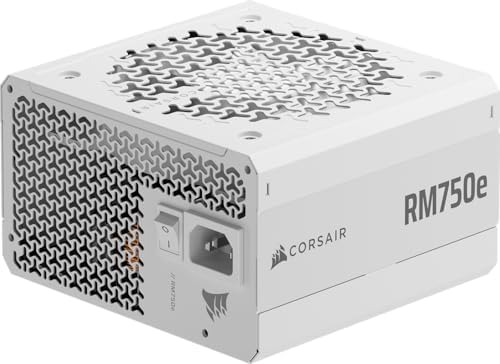
CORSAIR RM750e ATX 3.1 PCIe 5.1 Ready 750W Power Supply – White
Bottom line: The CORSAIR RM750e ATX 3.1 PCIe 5.1 Ready 750W Power Supply: Native 12V-2x6 connector and cable for PCIe 5.1 GPUs, no adapter needed; main trade-off: 750W leaves little headroom for top-tier GPUs paired with high-draw CPUs.
As an Amazon Associate, SpecPicks earns from qualifying purchases. Full disclosure →
Pros & Cons
Pros
- ✓ Native 12V-2x6 connector and cable for PCIe 5.1 GPUs, no adapter needed
- ✓ Intel ATX 3.1 certified to withstand 2x GPU transient power excursions
- ✓ Fully modular cabling, so you only run the cables your build uses
- ✓ 120mm rifle bearing fan with a low-noise curve, even at full load
- ✓ Seven-year warranty plus 105°C-rated capacitors
Cons
- ✗ 750W leaves little headroom for top-tier GPUs paired with high-draw CPUs
- ✗ Cybenetics Gold efficiency, a step below Platinum or Titanium units
- ✗ Rifle bearing fan rather than a fluid dynamic or maglev bearing
- ✗ ATX size won't fit small form factor cases that only accept SFX
Manufacturer description
The CORSAIR RM750e is a 750W fully modular ATX power supply in white. It is built for current-generation builds that need ATX 3.1 and PCIe 5.1 compliance. A native 12V-2x6 connector and cable powers a modern graphics card directly, so you don't need an adapter. Several PCIe 8-pin connectors cover cards that still use the older standard. Intel ATX 3.1 certification means the unit is designed to withstand 2x transient power excursions from the GPU. With fully modular cabling you connect only the cables your build needs, which keeps the case tidier and leaves more room for airflow. A 120mm…
SpecPicks Verdict
SpecPicks has no buyer-rating or benchmark data for CORSAIR RM750e ATX 3.1 PCIe 5.1 Ready 750W Power Supply, so this read rests on the manufacturer's listed specs (how we evaluate). Compare with similarly-priced alternatives in the power supplies category before committing. On the listing's own facts, the case for it is "Native 12V-2x6 connector and cable for PCIe 5.1 GPUs, no adapter needed"; the main trade-off is "750W leaves little headroom for top-tier GPUs paired with high-draw CPUs". If those two points fit how you will use it, put it beside one or two close alternatives in the Compare tool to confirm the price.
Common buyer scenarios for power supplies of this kind: matching it to an existing build, replacing a failing part, or upgrading from a previous-generation equivalent. Check the spec table below against your current setup — particularly socket / form-factor / power-rating fields — and confirm compatibility on the retailer's listing before purchase. Prices and stock are set by the retailer and may have moved since this page was last updated.
Frequently Asked Questions
Can the Corsair RM750e power a graphics card that uses a 12V-2x6 connector?
Yes. The RM750e meets ATX 3.1 and PCIe 5.1 and includes a native 12V-2x6 connector and cable, so you can connect a 12V-2x6 graphics card directly without an adapter. It also has several PCIe 8-pin connectors for older cards.
Is the RM750e fully modular?
Yes. Every cable is modular, so you connect only the cables your build needs. Leaving out unused cables cuts clutter and helps airflow inside the case.
How loud is the RM750e under load?
It uses a 120mm rifle bearing fan with a specially calculated fan curve designed to keep noise low, even at full load. Corsair does not list a decibel figure, so check the manufacturer's spec sheet if you need one.
What warranty comes with the Corsair RM750e?
Corsair backs the RMe series with a seven-year warranty. For claim details and coverage terms, check Corsair's current warranty policy.
Will the RM750e fit in my case?
The RM750e is an ATX power supply with a 140mm-long casing, so it fits most cases that accept a standard ATX PSU. Cases that only take SFX power supplies won't fit it, so check your case's PSU clearance before you buy.
Key Features
Quoted from the manufacturer's listing. Where it differs from the pros and cons above, those note the conditions the listing leaves out.
- Fully Modular PSU: Reliable and efficient, low-noise power supply with fully modular cabling, so you only have to connect the cables your system build needs
- Intel ATX 3.1 Certified: Compliant with the ATX 3.1 power standard, supporting PCIe 5.1 platform withstands 2x transient power excursions from the GPU
- Keeps Quiet: A 120mm rifle bearing fan with a specially calculated fan curve keeps fan noise down, even when operating at full load
- 105°C-Rated Capacitors: Delivers steady, reliable power and dependable electrical performance
- Modern Standby Compatible: Extremely fast wake-from-sleep times and better low-load efficiency
Full Specifications
| Brand | Corsair |
|---|---|
| Color | White |
| Wattage | 750 watts |
| Model Name | RM750e |
| Unit Count | 1 Count |
| Form Factor | ATX |
| Keeps Quiet | A 120mm rifle bearing fan with a specially calculated fan curve keeps fan noise down, even when operating at full load |
| Model Number | CP-9020292-NA/AM |
| Connector Type | ATX |
| Cooling Method | Fan |
| Number of Fans | 1 |
| Output Wattage | 750 watts |
| Item Dimensions | 5.91 x 5.51 x 3.35 inches |
| Mfr Part Number | CP-9020292-NA/AM |
| Number of Items | 1 |
| Fully Modular PSU | Reliable and efficient, low-noise power supply with fully modular cabling, so you only have to connect the cables your system build needs |
| Compatible Devices | Monitor |
| Power Supply Design | Full Modular |
| Warranty Description | 7 Year Manufacturer |
| Maximum Input Voltage | 240 volts_of_alternating_current |
Ready to buy?
CORSAIR RM750e ATX 3.1 PCIe 5.1 Ready 750W Power Supply – White is listed on Amazon. Price, availability, shipping and returns are set by Amazon and its sellers — check the listing for current terms. SpecPicks earns a small commission on qualifying purchases — thank you for supporting independent review work.
Related Power Supplies


More guides & deep dives from the SpecPicks archive
Browse all articles & guides →- How to Build a Windows 98 Retro PC in 2026
- Best 1440p Gaming GPUs in 2026
- The Complete Voodoo5 5500 AGP Driver Guide (2026 Edition)
- Best Budget Gaming PC Build 2026 — ~$1,000 Parts List
- RTX 4070 Super vs RX 7800 XT — Which to Buy in 2026
- Best Retro Handhelds in 2026: Pocket, Mid-Tier and FPGA Picks
- Emulation Hardware in 2026: FPGA, Software, and Cart-Reader Ecosystems
More reviews from the SpecPicks archive
Browse all reviews →- Logitech G920 vs HORI Racing Wheel: Best Starter Sim Wheel in 2026
- AVX-512 Speeds Linux Software RAID Up to 41% — What It Means for Your Homelab NAS
- KDE Plasma 6.7 X11 vs. Wayland NVIDIA Gaming on CachyOS
- Best Esports Club Practice Room Gear in 2026
- Ryzen 7 5800X vs 5700X for Streaming and Gaming in 2026
- Resident Evil Code: Veronica on a CRT — Why It Still Hits Different
- Watching a Z80 Live From a Raspberry Pi RP2350
- Best SSDs and Storage Adapters for Retro PC Builds in 2026
- Cursor vs Cline vs Aider for Local-First AI Coding in 2026
- 8BitDo Sn30 Pro vs Pro 2: Best Bluetooth Controller for Raspberry Pi 4 Emulation
- Build a 2001 GeForce3 + Win98 SE Gaming Rig in 2026: Parts and Gotchas
- KOORUI 27" 4K QD-Mini LED vs Samsung Odyssey 27" 4K: Which 4K Gaming Monitor Wins?
- Best CPU Coolers for AMD Ryzen in 2026: 5 Picks Ranked
- Voodoo3 3000 PCI No-Display Troubleshooting on Windows 98 SE (2026)
- Panther Lake NPU vs RTX 3060 12GB for Local LLM Inference
- ComfyUI on an RTX 3060 12GB: A 2026 Local Stable Diffusion Setup Guide
- Q4_K_M Is Fine for Chat, a Trap for Agents: KV Cache Quant Math for Local Coding
- PFlash on a Single RTX 3090: 10× Prefill Speedup at 128K Context vs llama.cpp
- Best CPU for Streaming and Gaming on a Single PC in 2026
- Best Gaming Monitor for Console and PC Hybrid Setups Under $300 in 2026
- Training an LLM in Swift, Part 1: Matrix Mult Speed
- CompactFlash as a Silent IDE Boot Drive: A 1998-Era Build Log
- Best Bluetooth Controller for Switch and Retro Emulation on Steam Deck (2026)
- Windows XP Gaming Setup Guide: Hardware & Drivers (2025)
Earliest SpecPicks reviews
Browse full archive →- Best GPU for Llama 3.1 8B (2026)
- Best GPU for Qwen 3 14B (2026)
- Best GPU for Qwen 3 32B (2026)
- Best GPU for Llama 3.1 70B (2026)
- Best GPU for DeepSeek-R1 32B (2026)
- Best GPU for Llama 3.1 405B (2026)
- How to run Llama 3.1 8B on NVIDIA GeForce RTX 5090
- How to run Qwen 3 14B on NVIDIA GeForce RTX 5090
- How to run Qwen 3 32B on NVIDIA GeForce RTX 5090
- How to run Llama 3.1 70B on NVIDIA GeForce RTX 5090
- How to run DeepSeek-R1 32B on NVIDIA GeForce RTX 5090
- How to run Llama 3.1 8B on NVIDIA GeForce RTX 4090