
SINEFINE
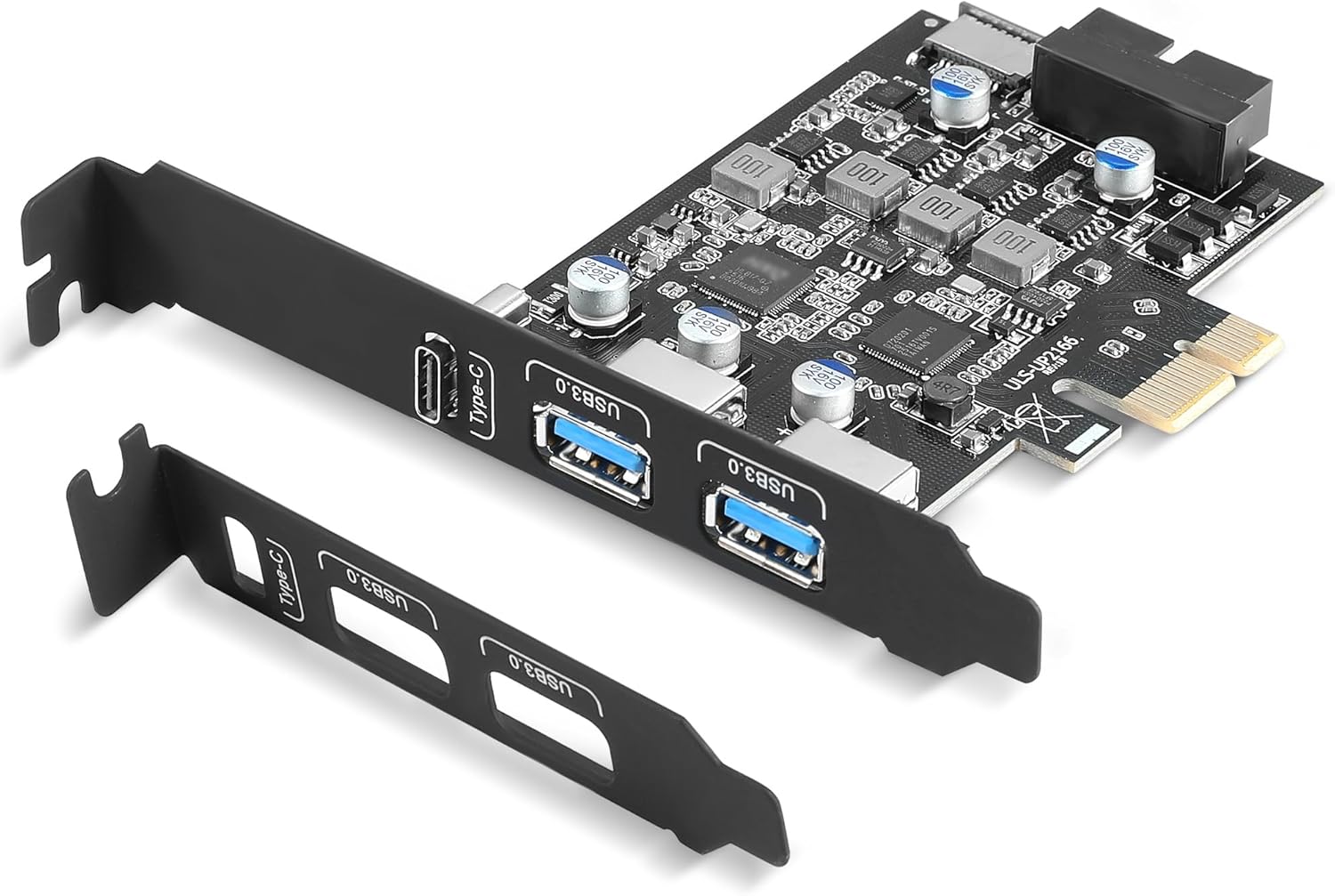
SINEFINE USB 3.0 PCIe Expansion Card
Bottom line: Per its Amazon listing, the SINEFINE USB 3.0 PCIe Expansion Card: versatile 5-Port Configuration: This card adds two USB-A (5Gbps); the 4 added USB-A ports share 5Gbps total bandwidth.
As an Amazon Associate, SpecPicks earns from qualifying purchases. Full disclosure →
Pros & Cons
Pros
- ✓ Versatile 5-Port Configuration: This card adds two USB-A (5Gbps)
- ✓ The 4 added USB-A ports share 5Gbps total bandwidth
- ✓ Backed by SINEFINE's warranty and support channels
Cons
- ✗ Needs a free PCIe slot — check which of your board's slots are wired for it
Manufacturer description
Upgrade Your PC’s USB Connectivity with High-Speed, Multi-Port ExpansionTired of limited USB ports on your desktop PC? Our USB 3.0 PCIe Expansion Card is the perfect solution to expand your connectivity options, featuring a versatile 5-port design and high-performance hardware to meet all your daily and professional needs.Powered by the reliable RENESAS UPD720201 5Gbps USB 3.0 host controller, this expansion card supports the UASP protocol, delivering faster data transfer speeds compared to traditional USB 3.0 controllers. With 2 USB-A ports, 1 USB-C port, 1 Type-E port, and a 19pin Front…
SpecPicks Verdict
SpecPicks has no buyer-rating or benchmark data for SINEFINE USB 3.0 PCIe Expansion Card, so this read rests on the manufacturer's listed specs (how we evaluate). Compare with similarly-priced alternatives in the expansion cards category before committing. Judge it on the specification table and the price rather than on sentiment: check the figures that decide your use case, then put it side-by-side with two or three close alternatives in the Compare tool before clicking through.
Before ordering, confirm the board side: this card needs a free PCIe slot of the width the card uses. Your motherboard manual lists which slots share lanes with M.2 sockets or other slots. Prices and stock are set by the retailer and may have moved since this page was last updated.
Key Features
Quoted from the manufacturer's listing. Where it differs from the pros and cons above, those note the conditions the listing leaves out.
- Versatile 5-Port Configuration: This card adds two USB-A (5Gbps), one USB-C (5Gbps), one internal Type-E port (for front-panel USB-C), and one 19-pin USB 3.0 header to your desktop PC. It’s the ultimate solution for connecting modern and legacy USB devices simultaneously
- High-Speed RENESAS Controller: Built with 1X RENESAS UPD720201 5Gbps USB 3.0 host controller, supporting UASP protocol for faster data transfer speeds. The 4 added USB-A ports share 5Gbps total bandwidth, ensuring smooth performance with compatible devices, and works seamlessly with AMD, ARM, and Intel desktop PC hardware platforms
- Wide PCIe Compatibility: Fully supports PCIe 3.0 and PCIe 2.0 motherboards, compatible with PCI Express x1, x4, x8, and x16 slots. No need to worry about slot mismatch—easily install into most desktop PC cases for instant USB port expansion
- System Compatibility Details: Plug and play on Windows 11/10/8.x (32/64bit), Windows Server 2012-2022, and most Linux kernels. Drivers required for Windows XP/Vista/7 (32/64bit) and Windows Server 2003-2008R2 (32/64bit). NOT compatible with MAC OS X
- Dual Bracket for All Chassis: Comes with a pre-installed 12cm standard PC case bracket and an 8cm short bracket for small tower chassis. Suitable for different case sizes, eliminating the need for additional purchases and ensuring easy installation
- Broad Device Compatibility: Works with all standard USB devices, including USB keyboards, mice, speakers, KVM switches, hubs, flash drives, printers, gaming pads, smartphones, tablets, and other USB-A interface devices. Ideal for home, office, and gaming setups
Full Specifications
| Brand | SINEFINE |
|---|---|
| Style | 5 Port Usb 3.0 |
| Style Name | 5 Port Usb 3.0 |
| Unit Count | 1 Count |
| Connectivity | USB-C |
| Model Number | UP2166 |
| Compatibility | PC, Mac, Linux |
| Number of Items | 1 |
| Compatible Devices | Desktop Computer, Personal Computer |
| Hardware Interface | PCIE x 1, PCIE x 16, PCIE x 4, PCIE x 8 |
| Warranty Description | 180 Days Warranty |
| Item Dimensions L x W x H | 5.5"L x 4"W x 0.8"H |
| Full listing title | USB 3.0 PCIe Expansion Card, 5-Port (2X USB-A + 1x USB-C + Type-E + 19-pin Header) PCI Express Card with UASP Support, Plug and Play for Windows 11/10/8/Linux, Includes Low-Profile Bracket |
Ready to buy?
USB 3.0 PCIe Expansion Card, 5-Port (2X USB-A + 1x USB-C + Type-E + 19-pin Header) PCI Express Card with UASP Support, Plug and Play for Windows 11/10/8/Linux, Includes Low-Profile Bracket is listed on Amazon. Price, availability, shipping and returns are set by Amazon and its sellers — check the listing for current terms. SpecPicks earns a small commission on qualifying purchases — thank you for supporting independent review work.
Related Expansion Cards




More guides & deep dives from the SpecPicks archive
Browse all articles & guides →- The Complete Voodoo5 5500 AGP Driver Guide (2026 Edition)
- Best 1440p Gaming GPUs in 2026
- How to Build a Windows 98 Retro PC in 2026
- RTX 4070 Super vs RX 7800 XT — Which to Buy in 2026
- Emulation Hardware in 2026: FPGA, Software, and Cart-Reader Ecosystems
- Best Budget Gaming PC Build 2026 — ~$1,000 Parts List
- Best Retro Handhelds in 2026: Pocket, Mid-Tier and FPGA Picks
More reviews from the SpecPicks archive
Browse all reviews →- Ryzen 5 5600G vs Ryzen 7 5700X: Best Budget Build CPU 2026
- Best Budget SSD for Gaming and Local-LLM Storage in 2026
- Best SSD for PS4 Pro Upgrade in 2026: SATA Picks That Actually Cut Load Times
- Period-Correct Pentium III + GeForce 4 Ti Build for 2001-2003 Gaming
- GPT-5.5-Cyber vs Mythos: Can You Run Cyber-Eval Models Locally?
- PCIe Gen2/Gen3 1:2 Analog MUX: Practical Maker Implementation
- Qwen3.6-27B at Q4_K_M for Agentic Coding: Is the Quant Safe on a 12GB RTX 3060?
- Steam Deck Sleep Mode: Should You Leave It Plugged In?
- Noctua NH-U12S vs DeepCool AK620: Best Air Cooler for an Overclocked Ryzen
- Dump and Archive Your Retro PC's IDE Drives in 2026: A USB Adapter Workflow
- AMD Ryzen AI Max 400 'Gorgon Halo': What 192GB of Unified Memory Unlocks for Local AI
- Claude Code + Fable 5 Ported Command & Conquer to iOS in Hours: What Local Coding Rigs Need
- Building a Local AI-Agent Eval Rig After AISI's Benchmark Warning
- Best CPU Cooler for a Ryzen 7 5800X (AM4) in 2026
- Air vs AIO for the Ryzen 7 5800X: is the Noctua NH-U12S enough?
- Raspberry Pi 5 Power Supply: What You Actually Need (2026)
- Best Budget AM4 Gaming PC Parts in 2026
- Ryzen 5 5600X vs 5700X vs 5800X: Best AM4 Gaming CPU in 2026
- Raspberry Pi OS Moves to Linux 6.18 LTS — Real Performance Gains
- Best Wheel and Controller for Truck and Farm Sims in 2026
- Best AMD Ryzen 5000 CPU for Gaming in 2026: 5 Picks
- Beijing's $295B AI Buildout Wants 80% Domestic Chips — What It Means for GPU Buyers
- Build Your Own Gaming PC in 2026: The 5 Components That Actually Matter
- Ryzen 7 5800X3D vs Core i7-14700K on DDR4 for 1440p Gaming (2026)
Earliest SpecPicks reviews
Browse full archive →- Best GPU for Llama 3.1 8B (2026)
- Best GPU for Qwen 3 14B (2026)
- Best GPU for Qwen 3 32B (2026)
- Best GPU for Llama 3.1 70B (2026)
- Best GPU for DeepSeek-R1 32B (2026)
- Best GPU for Llama 3.1 405B (2026)
- How to run Llama 3.1 8B on NVIDIA GeForce RTX 5090
- How to run Qwen 3 14B on NVIDIA GeForce RTX 5090
- How to run Qwen 3 32B on NVIDIA GeForce RTX 5090
- How to run Llama 3.1 70B on NVIDIA GeForce RTX 5090
- How to run DeepSeek-R1 32B on NVIDIA GeForce RTX 5090
- How to run Llama 3.1 8B on NVIDIA GeForce RTX 4090