

NGFF
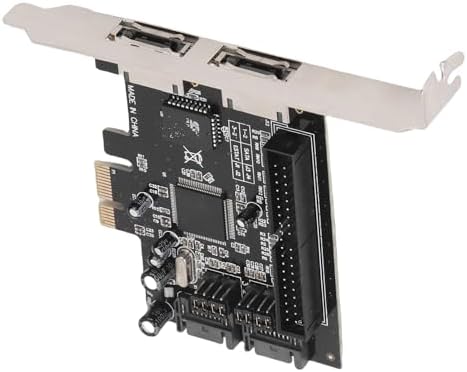
NGFF 4X Oculink SFF-8612 SFF-8611 to PCIE PCI-Express 16x Adapter
Bottom line: Per its Amazon listing, the NGFF 4X Oculink SFF-8612 SFF-8611 to PCIE PCI-Express 16x Adapter: the atx power port support 12V power.
As an Amazon Associate, SpecPicks earns from qualifying purchases. Full disclosure →
Pros & Cons
Pros
- ✓ The atx power port support 12V power
- ✓ Backed by NGFF's warranty and support channels
Cons
- ✗ Needs a free PCIe slot — check which of your board's slots are wired for it
Manufacturer description
4x Oculink SFF-8612 SFF-8611 to PCIE PCI-Express 16x Adapter with ATX 24pin Power Port for Mainboard Graphics CardOculink 4x connectors are internal and external small form factor PCI-E connectors and cables optimized for the client and market.This oculink pci-e converter enables belowing applications.One PCIE PCI-Express 16x 4x device can be connected,The converter can be installed into the system internally through the SFF-8611/8612 oculink interface.The converter support all standard PCI-E 16x 8x 4x card, like USB,LAN,1394,Audio,Graphics Card.The atx power port support 12V power. Please…
SpecPicks Verdict
SpecPicks has no buyer-rating or benchmark data for NGFF 4X Oculink SFF-8612 SFF-8611 to PCIE PCI-Express 16x Adapter, so this read rests on the manufacturer's listed specs (how we evaluate). Compare with similarly-priced alternatives in the expansion cards category before committing. Judge it on the specification table and the price rather than on sentiment: check the figures that decide your use case, then put it side-by-side with two or three close alternatives in the Compare tool before clicking through.
Before ordering, confirm the board side: this card needs a free PCIe slot of the width the card uses. Your motherboard manual lists which slots share lanes with M.2 sockets or other slots. Prices and stock are set by the retailer and may have moved since this page was last updated.
Key Features
Quoted from the manufacturer's listing. Where it differs from the pros and cons above, those note the conditions the listing leaves out.
- Oculink 4x connectors are internal and external small form factor PCI-E connectors and cables optimized for the client and market.
- This oculink pci-e converter enables belowing applications.One PCIE PCI-Express 16x 4x device can be connected,The converter can be installed into the system internally through the SFF-8611/8612 oculink interface.
- The converter support all standard PCI-E 16x 8x 4x card, like USB,LAN,1394,Audio,Graphics Card.
- The atx power port support 12V power. Please connect the extral power for your PCI-E card if the power is insufficient. (The switch is for ATX power)
- It transmits PCI Express 4.0 signals using the PCIE protocol; Support PCIE 4.0 data transmission, Data transfer rate up to 64Gbps, Support connecting GPU graphics card, SSD, expansion card, etc., backward compatible with PCIE 3.0.
Full Specifications
| Brand | NGFF |
|---|---|
| Style | 4X-Oculink to PCIE-16X With ATX-24PIN Power |
| Style Name | 4X-Oculink to PCIE-16X With ATX-24PIN Power |
| Unit Count | 1.0 Count |
| Connectivity | USB |
| Model Number | SF-059-NG |
| Compatibility | Switch |
| Mfr Part Number | SF-059-NG |
| Number of Items | 1 |
| Compatible Devices | PCI-e NVME Motherboard & U.2 SSD & Graphics Card |
| Hardware Interface | PCI Express 4.0 |
| Warranty Description | One Year Manufacturer |
| Full listing title | 4X Oculink SFF-8612 SFF-8611 to PCIE PCI-Express 16x Adapter with ATX 24pin Power Port for Mainboard Graphics Card |
Ready to buy?
4X Oculink SFF-8612 SFF-8611 to PCIE PCI-Express 16x Adapter with ATX 24pin Power Port for Mainboard Graphics Card is listed on Amazon. Price, availability, shipping and returns are set by Amazon and its sellers — check the listing for current terms. SpecPicks earns a small commission on qualifying purchases — thank you for supporting independent review work.
Related Expansion Cards




More guides & deep dives from the SpecPicks archive
Browse all articles & guides →- Best 1440p Gaming GPUs in 2026
- Best Budget Gaming PC Build 2026 — ~$1,000 Parts List
- RTX 4070 Super vs RX 7800 XT — Which to Buy in 2026
- Emulation Hardware in 2026: FPGA, Software, and Cart-Reader Ecosystems
- The Complete Voodoo5 5500 AGP Driver Guide (2026 Edition)
- How to Build a Windows 98 Retro PC in 2026
- Best Retro Handhelds in 2026: Pocket, Mid-Tier and FPGA Picks
More reviews from the SpecPicks archive
Browse all reviews →- LLM-Driven Driver Install on Windows 98: How Claude Walks Voodoo + Sound Blaster Setup
- The $500M Claude Bill: What Local LLM Inference Actually Costs
- Are We the Last Generation of PC Builders?
- Best Raspberry Pi Starter Kits for Beginners (2026)
- Build a Self-Updating 24/7 FM Radio Station on a Raspberry Pi Zero W
- How to Identify Any Vintage GPU: A Visual + GPU-Z Guide for Retro PC Builders
- GLM-5.2 vs Qwen3 on a 12GB GPU: Best Open-Weights LLM for an RTX 3060
- Best CPU Cooler for AM4 Ryzen in 2026
- GPU Benchmark Data Freshness and Source Attribution in 2026
- Claude Code + Fable 5 Ported Command & Conquer to iOS in Hours: What Local Coding Rigs Need
- Best 1TB SATA SSDs for PC Builds and Retro Upgrades
- Intel Plans Two 22-Core Nova Lake-S SKUs With Game-Boosting Cache
- Custom Steam Controller Startup: Reviving OG Big Picture Mode
- Raspberry Pi Projects for College Students: 2026 Guide
- NVIDIA GeForce GTX 10 Pascal GPUs: 10th Anniversary
- Best Budget Gaming CPU: Ryzen 5 5600G vs 5700X vs i7-9700K
- Cloudflare Swaps Its Blanket AI Bot Block for Granular Crawler Controls
- Logitech G29 vs HORI Force Feedback: Which Sim Wheel for Beginners?
- Best GPU for Qwen 3 14B (2026)
- gpt-oss 20B on Intel Arc A770 16GB vs RTX 3060 12GB: Quant Table (2026)
- AMD Ryzen AI Max+ 'Gorgon Halo' 192GB: What 192GB Unified Memory Means for Local LLMs
- Upgrading a Ryzen 7 5800X + RTX 4080 Build in 2026
- Intel Arc B60 Stable Diffusion: Setup & Benchmarks 2025
- 3D-Printed Retro PC Case Fits ITX Board, ATX PSU
Earliest SpecPicks reviews
Browse full archive →- Best GPU for Llama 3.1 8B (2026)
- Best GPU for Qwen 3 14B (2026)
- Best GPU for Qwen 3 32B (2026)
- Best GPU for Llama 3.1 70B (2026)
- Best GPU for DeepSeek-R1 32B (2026)
- Best GPU for Llama 3.1 405B (2026)
- How to run Llama 3.1 8B on NVIDIA GeForce RTX 5090
- How to run Qwen 3 14B on NVIDIA GeForce RTX 5090
- How to run Qwen 3 32B on NVIDIA GeForce RTX 5090
- How to run Llama 3.1 70B on NVIDIA GeForce RTX 5090
- How to run DeepSeek-R1 32B on NVIDIA GeForce RTX 5090
- How to run Llama 3.1 8B on NVIDIA GeForce RTX 4090