

NGFF
PCI-E 3.0 Express 4.0 x4 to Oculink Internal SFF-8612 SFF-8611 Host Adapter for PCIe SSD with Bracket
Bottom line: The PCI-E 3.0 Express 4.0 x4 to Oculink Internal SFF-8612 SFF-8611 Host is a specs-and-price decision rather than a crowd-consensus one in the expansion cards category. Check the specification table below against one or two close alternatives — on price and spec fit, not on star ratings.
As an Amazon Associate, SpecPicks earns from qualifying purchases. Full disclosure →
Before you buy
- Needs a free PCIe slot — check which of your board's slots are wired for it
Manufacturer description
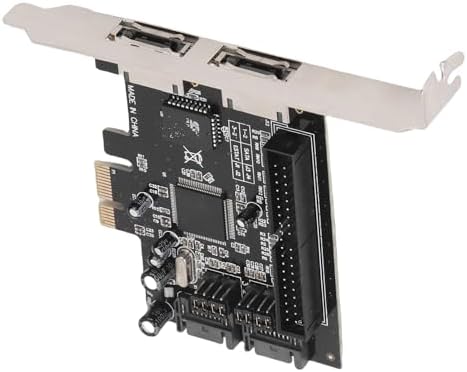
PCI-Express 4.0 PCIE 4x to Oculink SFF-8612 SFF-8611 Host Card for U.2 SSD eGPU External Graphics Card DockThis PCI Express 4x card expands the PC by one SFF-8612 interface, It can be connected e.g. one SSD/eGPU using an optional cable. The card transmits PCI Express signals using the PCIE4.0 protocol.Oculink is the next generation of high-speed internal and external I/O connectors for PCI-E, compatible with T10/ SAS-4 24 Gbps, SFF-8611, SFF-8612, PCIe Gen 3 and Gen 4.It can be connected e.g. one SSD or eGPU Graphics Card by using an optional cable. Suitable for small hosts, desktops…
SpecPicks Verdict
SpecPicks has no buyer-rating or benchmark data for PCI-E 3.0 Express 4.0 x4 to Oculink Internal SFF-8612 SFF-8611 Host…, so this read rests on the manufacturer's listed specs (how we evaluate). Compare with similarly-priced alternatives in the expansion cards category before committing. Judge it on the specification table and the price rather than on sentiment: check the figures that decide your use case, then put it side-by-side with two or three close alternatives in the Compare tool before clicking through.
Before ordering, confirm the board side: this card needs a free PCIe slot of the width the card uses. Your motherboard manual lists which slots share lanes with M.2 sockets or other slots. Prices and stock are set by the retailer and may have moved since this page was last updated.
Key Features
Quoted from the manufacturer's listing. Where it differs from the Before you buy notes above, those note the conditions the listing leaves out.
- Internal Oculink Connector, PCI-Express 4.0 PCIE 4x to Oculink SFF-8612 SFF-8611 Host Card for U.2 SSD eGPU External Graphics Card Dock
- This PCI Express 4x card expands the PC by one SFF-8612 interface, It can be connected e.g. one SSD/eGPU using an optional cable. The card transmits PCI Express signals using the PCIE4.0 protocol.
- Oculink is the next generation of high-speed internal and external I/O connectors for PCI-E, compatible with T10/ SAS-4 24 Gbps, SFF-8611, SFF-8612, PCIe Gen 3 and Gen 4.
- It transmits PCI Express 4.0 signals using the PCIE protocol; Support PCIE 4.0 data transmission, Data transfer rate up to 64Gbps, Support connecting GPU graphics card, SSD, expansion card, etc., backward compatible with PCIE 3.0.
- Transform your works with this cable adapter, facilitating integration of PCI-E into systems requiring OCuLink connection;Elevates your system's capabilities with our adapter, ensuring a stable and robusts connection investments without compromising on space or convenience.
Full Specifications
| Brand | NGFF |
|---|---|
| Style | Internal Oculink for SSD |
| Style Name | Internal Oculink for SSD |
| Model Number | SF-022-NG |
| Compatibility | PC |
| Mfr Part Number | SF-022-NG |
| Number of Items | 1 |
| Compatible Devices | PCI-e NVME Motherboard & U.2 SSD |
| Warranty Description | One Year Manufacturer |
Ready to buy?
PCI-E 3.0 Express 4.0 x4 to Oculink Internal SFF-8612 SFF-8611 Host Adapter for PCIe SSD with Bracket is listed on Amazon. Price, availability, shipping and returns are set by Amazon and its sellers — check the listing for current terms. SpecPicks earns a small commission on qualifying purchases — thank you for supporting independent review work.
Related Expansion Cards


More guides & deep dives from the SpecPicks archive
Browse all articles & guides →- How to Build a Windows 98 Retro PC in 2026
- Emulation Hardware in 2026: FPGA, Software, and Cart-Reader Ecosystems
- The Complete Voodoo5 5500 AGP Driver Guide (2026 Edition)
- RTX 4070 Super vs RX 7800 XT — Which to Buy in 2026
- Best Budget Gaming PC Build 2026 — ~$1,000 Parts List
- Best Retro Handhelds in 2026: Pocket, Mid-Tier and FPGA Picks
- Best 1440p Gaming GPUs in 2026
More reviews from the SpecPicks archive
Browse all reviews →- PCIe Gen2/Gen3 1:2 Analog MUX: Practical Maker Implementation
- Sony Trinitron FW900 Setup for Retro Gaming: Resolution Sweet Spots, Calibration, and Refresh-Rate Math
- Best Sim Racing Wheel Setup for Beginners in 2026
- BOSGAME VTA-439: AMD Ryzen AI 9 HX 470 Mini PC for Linux
- Best GPU for a NAS or Homelab Running Local LLMs (2026)
- Best CPU Cooler for a Ryzen 7 3700X: Air vs 240mm AIO in 2026
- Best Cheap Raspberry Pi Alternatives in 2025
- Best GPU for 1080p Esports in 2026: High-Refresh Without Overspending
- Best SATA SSD for a 2026 Game Library Drive
- AVX-512 Lifts Linux RAID Up to 41% on AMD Ryzen Chips
- Noctua NH-U12S vs DeepCool AK620 for Ryzen Overclocking: Air-Cooler Showdown
- Audio DSP Firmware for the Raspberry Pi Pico: A 2026 Guide
- Gemma 4 31B Abliterated on a Single RTX 3060 12GB: Quantization, VRAM, and Real Tok/s
- Acti Brings AI Agents Into Your Smartphone Keyboard
- Best Budget PC Upgrades Under $250 in 2026
- Best 16GB GPU for Local LLM 2026
- DualSense vs 8BitDo Pro 2 vs GameSir G7 SE: Best PC Controller in 2026
- Jetson Orin Nano Super vs Hailo-8 AI HAT+: Which Edge-AI Path Is Right for You?
- Best Webcam for Streaming and Remote Work in 2026
- Claude Fable 5 Burns 117k Tokens/Task: Can a Local RTX 3060 Keep Up?
- Sound Blaster G6 on a Modern Retro Build: When a USB DAC Beats an AWE32
- Claude Fable 5: Anthropic Admits 'Wrong Tradeoff' on Throttling
- Troubleshooting Ryzen 7 5800X Memory Training, Boot Loops, and Cold-Start Hangs on B550 in 2026
- Run a Local Coding Agent on an RTX 3060 12GB (After Codex Went Autonomous)
Earliest SpecPicks reviews
Browse full archive →- Best GPU for Llama 3.1 8B (2026)
- Best GPU for Qwen 3 14B (2026)
- Best GPU for Qwen 3 32B (2026)
- Best GPU for Llama 3.1 70B (2026)
- Best GPU for DeepSeek-R1 32B (2026)
- Best GPU for Llama 3.1 405B (2026)
- How to run Llama 3.1 8B on NVIDIA GeForce RTX 5090
- How to run Qwen 3 14B on NVIDIA GeForce RTX 5090
- How to run Qwen 3 32B on NVIDIA GeForce RTX 5090
- How to run Llama 3.1 70B on NVIDIA GeForce RTX 5090
- How to run DeepSeek-R1 32B on NVIDIA GeForce RTX 5090
- How to run Llama 3.1 8B on NVIDIA GeForce RTX 4090