

Wisoqu
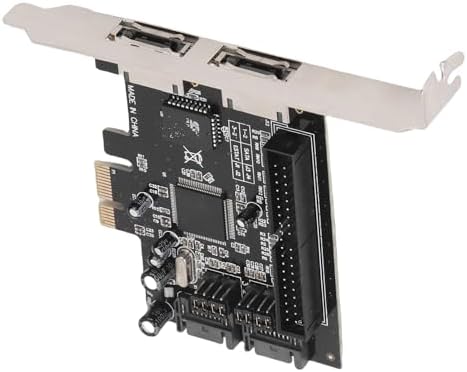
Wisoqu PCI Express Expansion Card
Bottom line: The Wisoqu PCI Express Expansion Card is a specs-and-price decision rather than a crowd-consensus one in the expansion cards category. Check the specification table below against one or two close alternatives — on price and spec fit, not on star ratings.
As an Amazon Associate, SpecPicks earns from qualifying purchases. Full disclosure →
Before you buy
- Needs a free PCIe slot — check which of your board's slots are wired for it
SpecPicks Verdict
SpecPicks has no buyer-rating or benchmark data for Wisoqu PCI Express Expansion Card, so this read rests on the manufacturer's listed specs (how we evaluate). Compare with similarly-priced alternatives in the expansion cards category before committing. Judge it on the specification table and the price rather than on sentiment: check the figures that decide your use case, then put it side-by-side with two or three close alternatives in the Compare tool before clicking through.
Before ordering, confirm the board side: this card needs a free PCIe slot of the width the card uses. Your motherboard manual lists which slots share lanes with M.2 sockets or other slots. Prices and stock are set by the retailer and may have moved since this page was last updated.
Key Features
Quoted from the manufacturer's listing. Where it differs from the Before you buy notes above, those note the conditions the listing leaves out.
- HIGH SPEED DATA TRANSFER: Supports the USB 3.2 standard, delivering theoretical bandwidth of up to 20Gbps, twice the speed of USB 3.2 Gen1. Ideal for transferring large files or connecting high speed peripherals.
- EXCELLENT COMPATIBILITY: Compatible with USB 3.2 Gen1, USB 3.0, and USB 2.0 devices, and supports PCIe 3.0 x4 and higher slot versions, ensuring broad compatibility.
- CONVENIENT FRONT EXPANSION: Features a front Type C interface for easy device connection, improving internal cable management and reducing clutter inside the case.
- PLUG AND PLAY INSTALLATION: Driver free setup allows for seamless use, with automatic system recognition without the need for additional driver installations.
- STABLE AND RELIABLE PERFORMANCE: Utilizes high grade main control chips like support for ASM3242 and effective heat dissipation design for stable operation under prolonged high loads.
Full Specifications
| Brand | Wisoqu |
|---|---|
| Connectivity | USB |
| Model Number | Wisoquih70l8u4yw |
| Number of Items | 1 |
| Warranty Description | manufacturer warranty for 90 day |
| EXCELLENT COMPATIBILITY | Compatible with USB 3.2 Gen1, USB 3.0, and USB 2.0 devices, and supports PCIe 3.0 x4 and higher slot versions, ensuring broad compatibility. |
| CONVENIENT FRONT EXPANSION | Features a front Type C interface for easy device connection, improving internal cable management and reducing clutter inside the case. |
| PLUG AND PLAY INSTALLATION | Driver free setup allows for seamless use, with automatic system recognition without the need for additional driver installations. |
| STABLE AND RELIABLE PERFORMANCE | Utilizes high grade main control chips like support for ASM3242 and effective heat dissipation design for stable operation under prolonged high loads. |
| Full listing title | PCI Express Expansion Card, USB 3.2 20Gbps Type C Front Interface with ASM3242 Chip, Compatible with PCIe X4 X8 X16 Slots for High Speed Data Transfer |
Ready to buy?
PCI Express Expansion Card, USB 3.2 20Gbps Type C Front Interface with ASM3242 Chip, Compatible with PCIe X4 X8 X16 Slots for High Speed Data Transfer is listed on Amazon. Price, availability, shipping and returns are set by Amazon and its sellers — check the listing for current terms. SpecPicks earns a small commission on qualifying purchases — thank you for supporting independent review work.
Related Expansion Cards




More guides & deep dives from the SpecPicks archive
Browse all articles & guides →- How to Build a Windows 98 Retro PC in 2026
- Emulation Hardware in 2026: FPGA, Software, and Cart-Reader Ecosystems
- Best Retro Handhelds in 2026: Pocket, Mid-Tier and FPGA Picks
- Best 1440p Gaming GPUs in 2026
- RTX 4070 Super vs RX 7800 XT — Which to Buy in 2026
- Best Budget Gaming PC Build 2026 — ~$1,000 Parts List
- The Complete Voodoo5 5500 AGP Driver Guide (2026 Edition)
More reviews from the SpecPicks archive
Browse all reviews →- Best GPU for 4K Gaming in 2026: Five Cards Ranked by FPS-per-Dollar
- Best Storage Upgrades for Gaming and Retro PCs in 2026
- Best GPU for Local LLMs in 2026: Why the RTX 3060 12GB Still Wins on Value
- Best Sim Racing Wheel and Shifter Combo for Beginners: Logitech G920 + Thrustmaster TH8A
- Amstrad CPC Emulator Now Runs on the Raspberry Pi Pico 2
- Gaming PC Build 2026: The Reddit-Consensus Parts List
- Adding USB Storage to a Windows 98 PC With a SATA/IDE Adapter
- How to run DeepSeek-R1 32B on NVIDIA GeForce RTX 4090
- Sound Blaster vs Aureal Vortex 2: The Positional-Audio War Creative Won
- Best Raspberry Pi Projects for College Students in 2026: 8 Builds on a Pi 4 8GB
- Building a Budget Local-AI Box: Ryzen 7 5800X + RTX 3060 12GB
- Best GPU for Training CNNs at Home in 2026: The RTX 3060 12GB Case
- Sound BlasterX G6 for DOS and Win98 Retro Gaming: SBEMU and Real-Mode Audio
- Intel Arc B60 Stable Diffusion: Setup & Benchmarks 2025
- GeForce 4 Ti 4600 Won't Boot in Windows XP — Field Troubleshooting Guide
- Custom Steam Controller Startup: Reviving OG Big Picture Mode
- RTX 3060 12GB Showdown: ZOTAC Twin Edge vs MSI Ventus 2X (2026)
- Asus ROG Harpe II Extreme: A 24K-Gold, 65K-Sensor Gaming Mouse
- Raspberry Pi 4/5 Wall Mount Case: 3D Printing Guide
- Best Microphones for Streaming and Podcasting (2026)
- How to run Llama 3.1 8B on NVIDIA GeForce RTX 3090
- Best Budget SSD for Gaming and Boot Drives in 2026
- OpenAI Codex Price War vs Running a Local Coding Model on an RTX 3060
- AI Bug-Hunting Exploded: Run a Local Vuln-Scanner LLM on 12GB VRAM
Earliest SpecPicks reviews
Browse full archive →- Best GPU for Llama 3.1 8B (2026)
- Best GPU for Qwen 3 14B (2026)
- Best GPU for Qwen 3 32B (2026)
- Best GPU for Llama 3.1 70B (2026)
- Best GPU for DeepSeek-R1 32B (2026)
- Best GPU for Llama 3.1 405B (2026)
- How to run Llama 3.1 8B on NVIDIA GeForce RTX 5090
- How to run Qwen 3 14B on NVIDIA GeForce RTX 5090
- How to run Qwen 3 32B on NVIDIA GeForce RTX 5090
- How to run Llama 3.1 70B on NVIDIA GeForce RTX 5090
- How to run DeepSeek-R1 32B on NVIDIA GeForce RTX 5090
- How to run Llama 3.1 8B on NVIDIA GeForce RTX 4090