
NETGEAR
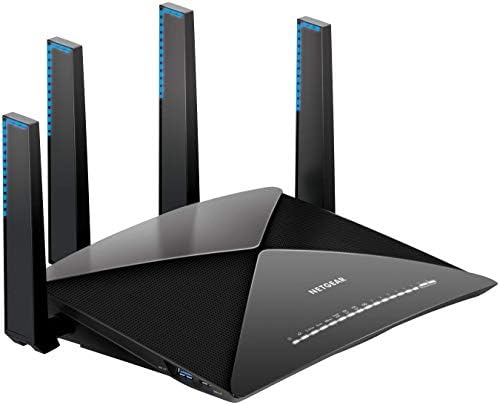
NETGEAR Nighthawk X10 Smart WiFi Router (R9000)
Bottom line: The NETGEAR Nighthawk X10 Smart WiFi Router: 10G SFP+ port is rare at this price - direct NAS or fiber uplink; main trade-off: the 4600 Mbps 60GHz band needs 802.11ad clients, which stayed rare.
As an Amazon Associate, SpecPicks earns from qualifying purchases. Full disclosure →
Pros & Cons
Pros
- ✓ 10G SFP+ port is rare at this price - direct NAS or fiber uplink
- ✓ Six gigabit Ethernet ports handle consoles, PCs, and a switch at once
- ✓ 1.7GHz quad-core CPU keeps QoS and VPN from throttling throughput
- ✓ Built-in Plex media server streams from USB 3.0 storage, no PC needed
Cons
- ✗ The 4600 Mbps 60GHz band needs 802.11ad clients, which stayed rare
- ✗ 802.11ac era design - no Wi-Fi 6 or 6E, so no OFDMA or WPA3-only mesh
- ✗ 2500 sq ft coverage is mid-pack for a router this large and this priced
- ✗ Four external antennas make it bulky and awkward to shelf or wall-mount
Manufacturer description
The NETGEAR Nighthawk X10 (R9000) is a tri-band router built around a 1.7GHz quad-core processor and a quad-stream 802.11ac/ad architecture, combining an 800 Mbps 2.4GHz band, a 1733 Mbps 5GHz band, and a 4600 Mbps 60GHz band for AD7200 class speed. That 60GHz band is the headline: if you own 802.11ad devices, it is where the 4600 Mbps figure lives, and it is what NETGEAR built this router around for 4K streaming, VR gaming, and fast local transfers. Wired connectivity is unusually deep for a consumer router, with six gigabit Ethernet ports plus a 10G SFP+ port for a NAS or a fiber uplink…
SpecPicks Verdict
SpecPicks has no buyer-rating or benchmark data for NETGEAR Nighthawk X10 Smart WiFi Router, so this read rests on the manufacturer's listed specs (how we evaluate). Compare with similarly-priced alternatives in the networking category before committing. On the listing's own facts, the case for it is "10G SFP+ port is rare at this price - direct NAS or fiber uplink"; the main trade-off is "The 4600 Mbps 60GHz band needs 802.11ad clients, which stayed rare". If those two points fit how you will use it, put it beside one or two close alternatives in the Compare tool to confirm the price.
Before ordering, check the listed dimensions, ports, power requirements and supported devices or systems in the spec table below against how you plan to use it, and confirm them on the retailer's listing. Prices and stock are set by the retailer and may have moved since this page was last updated.
Frequently Asked Questions
Is the Nighthawk X10 a Wi-Fi 6 router?
No. The R9000 is an 802.11ac/ad tri-band router. Its speed rating comes from combining 800 Mbps on 2.4GHz, 1733 Mbps on 5GHz, and 4600 Mbps on the 60GHz 802.11ad band, not from Wi-Fi 6.
Do I need special devices to hit the 7200 Mbps speed?
Yes. The 4600 Mbps portion runs on the 60GHz band and only works with 802.11ad devices. Without one, you are using the 800 + 1733 Mbps 2.4GHz and 5GHz bands.
What is the 10G SFP+ port used for?
It accepts a 10-gigabit fiber or DAC connection, typically to a NAS or a 10G switch, so local transfers are not capped by the six 1G Ethernet ports.
How many devices and how much area does it cover?
NETGEAR rates the R9000 for up to 2500 square feet of wireless coverage and recommends it for up to 45 connected devices, using four amplified antennas with Beamforming+ and MU-MIMO.
Can I attach a hard drive or printer to it?
Yes. Two USB 3.0 ports let you share a storage drive or printer with connected devices and set up personal cloud access, and the router includes a Plex media server for that storage.
Key Features
Quoted from the manufacturer's listing. Where it differs from the pros and cons above, those note the conditions the listing leaves out.
- Fast Wi-Fi performance: Get up to 2500 square feet wireless coverage with AD7200 speed (Tri-band up to 800 + 1733 + 4600 Mbps - for 60Ghz band devices)
- Recommended Up To 45 Devised: Reliably stream videos, play games, surf the internet, and connect smart home devices
- Wired Ethernet ports: Plug in computers, game consoles, streaming players, and other nearby wired devices with 6 x 1 gigabit Ethernet ports, and 1 x 10g SFP+ port.
- Loaded with advanced technology: Designed with a 1.7GHz quad-core processor, 4 amplified antennas, Beamforming+, MU-MIMO, Dynamic QoS, Amazon Alexa Voice Controls, and more. System requirements: Microsoft Windows 7, 8, 10, Vista, XP, 2000, Mac OS, UNIX, or Linux and Microsoft Internet Explorer 5.0, Firefox 2.0, Safari 1.4, Google Chrome 11.0 browsers or higher
- USB connections; Share a storage drive and printer with any connected device, and create a personal cloud storage to access from anywhere, using the 2 x 3.0 USB ports
Full Specifications
| Brand | NETGEAR |
|---|---|
| Color | black |
| Weight | 10g |
| Voltage | 100 volts |
| Coverage | 2500 sq ft |
| Frequency | 60 GHz |
| Model Name | R9000-100NAS |
| Antenna Type | Fixed |
| Connectivity | Wireless, USB, WiFi |
| Model Number | R9000-100NAS |
| Compatibility | Mac, Linux |
| Built-In Media | Ethernet cable, Nighthawk® X10 AD7200 Smart WiFi Router (R9000), Power adapter, Quick start guide |
| Control Method | Voice |
| Item Type Name | NETGEAR Nighthawk X10 – AD7200 802.11AC/Ad Quad-Stream MU-MIMO Wi-Fi Router |
| Connection Type | Wired |
| Controller Type | amazon_alexa, vera |
| Mfr Part Number | R9000-100NAS |
| Number of Ports | 4 |
| Special Feature | QoS, WPS |
| Antenna Location | Gaming, Home |
| Full listing title | NETGEAR Nighthawk X10 Smart WiFi Router (R9000) - AD7200 Wireless Speed (up to 7200 Mbps) for 60Ghz WiFi Devices | Up to 2500 sq ft Coverage | 6 x 1G Ethernet, 1 x 10G SFP+, and 2 USB Ports |
Ready to buy?
NETGEAR Nighthawk X10 Smart WiFi Router (R9000) - AD7200 Wireless Speed (up to 7200 Mbps) for 60Ghz WiFi Devices | Up to 2500 sq ft Coverage | 6 x 1G Ethernet, 1 x 10G SFP+, and 2 USB Ports is listed on Amazon. Price, availability, shipping and returns are set by Amazon and its sellers — check the listing for current terms. SpecPicks earns a small commission on qualifying purchases — thank you for supporting independent review work.
Related Networking


More guides & deep dives from the SpecPicks archive
Browse all articles & guides →- Best Retro Handhelds in 2026: Pocket, Mid-Tier and FPGA Picks
- Best Budget Gaming PC Build 2026 — ~$1,000 Parts List
- Best 1440p Gaming GPUs in 2026
- How to Build a Windows 98 Retro PC in 2026
- Emulation Hardware in 2026: FPGA, Software, and Cart-Reader Ecosystems
- The Complete Voodoo5 5500 AGP Driver Guide (2026 Edition)
- RTX 4070 Super vs RX 7800 XT — Which to Buy in 2026
More reviews from the SpecPicks archive
Browse all reviews →- Best PC Upgrades to Buy Before the 2026 Memory Price Spike
- Best Budget Gaming Keyboard Under $50 in 2026
- 768GB Intel Optane DIMMs Running a 1-Trillion-Parameter LLM: How the Build Actually Works
- Best Way to Stream a PS4 Pro to PC: Elgato Cam Link 4K Capture Setup
- RTX 5080 vs RTX 5070: Which Blackwell GPU Should You Buy in 2026?
- Best Budget SATA SSD for Gaming PC Builds in 2026: 5 Picks Tested for Steam Library Speed
- Build a Pi Zero W Retro Handheld in 2026: Full Parts List and Setup
- Jan.ai vs LM Studio vs Ollama: Easiest Local-LLM App for a 12GB Card in 2026
- Sound Blaster in 2026: Using the Creative Sound BlasterX G6 on a Retro and Modern PC
- Best CPU Cooler for AM4 Ryzen Overclocking in 2026
- Best SSD for 2000s LAN Party PC Builds (2026)
- Asus ProArt PA27USD OLED Lands — and What 4K Gamers Can Buy for Less
- Raspberry Pi Projects for Students (2025 Guide)
- Ryzen AI Max LLM Test: What the Public Data Shows
- 10 Raspberry Pi Projects for Kids to Build in 2026
- RX 9070 XT vs RTX 3060 12GB for Local LLMs
- Sound Blaster vs Aureal Vortex 2: The Positional-Audio War Creative Won
- How to Image a 90s Big-Box CD-ROM to CompactFlash for IDE-Adapter Retro PCs
- Best Internal SATA SSDs for PC Upgrades (2026)
- Solar-Powered Bird Identifier: Raspberry Pi Zero 2W + AI Camera
- Period-Correct 1999 LAN Rig: Pentium III, Voodoo3 3000, Sound Blaster
- Anthropic's 2GW AMD Deal: Should You Still Run Local?
- CompactFlash as a Boot Disk: A Silent, Reliable Drive for Your Win98 Retro Rig
- Best Budget Gaming Peripherals Under $50 in 2026
Earliest SpecPicks reviews
Browse full archive →- Best GPU for Llama 3.1 8B (2026)
- Best GPU for Qwen 3 14B (2026)
- Best GPU for Qwen 3 32B (2026)
- Best GPU for Llama 3.1 70B (2026)
- Best GPU for DeepSeek-R1 32B (2026)
- Best GPU for Llama 3.1 405B (2026)
- How to run Llama 3.1 8B on NVIDIA GeForce RTX 5090
- How to run Qwen 3 14B on NVIDIA GeForce RTX 5090
- How to run Qwen 3 32B on NVIDIA GeForce RTX 5090
- How to run Llama 3.1 70B on NVIDIA GeForce RTX 5090
- How to run DeepSeek-R1 32B on NVIDIA GeForce RTX 5090
- How to run Llama 3.1 8B on NVIDIA GeForce RTX 4090