

SHD
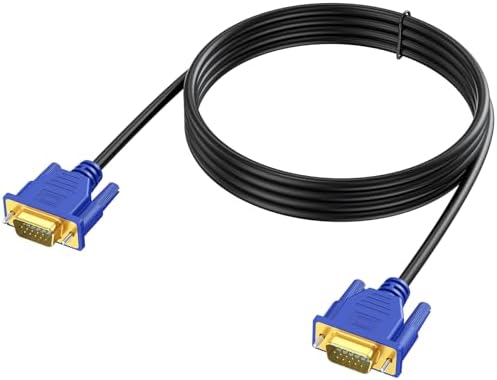
SHD VGA Cable 3Feet, VGA to VGA Monitor Cable HD15 SVGA for PC Laptop TV Projector Black and Red Color
Bottom line: The SHD VGA Cable 3Feet: 3-foot length keeps desks and retro PC setups free of extra slack; main trade-off: 3 feet is too short for most ceiling projector or wall-mounted TV runs.
As an Amazon Associate, SpecPicks earns from qualifying purchases. Full disclosure →
Pros & Cons
Pros
- ✓ 3-foot length keeps desks and retro PC setups free of extra slack
- ✓ Listed support from 800x600 up to 1920x1080 and 2560x1600
- ✓ Two ferrite cores plus aluminum foil shielding to cut EMI/RFI noise
- ✓ Gold-plated HD15 connectors and oxygen-free copper conductors
- ✓ Black-and-red jacket is easy to spot in a crowded cable bundle
Cons
- ✗ 3 feet is too short for most ceiling projector or wall-mounted TV runs
- ✗ Analog video only; audio needs a separate cable
- ✗ Male-to-male only; HDMI or DisplayPort devices need an adapter
- ✗ Ferrite cores add bulk near the plugs in tight spaces behind a PC
Manufacturer description
The SHD VGA cable is a 3-foot, male-to-male HD15 cable for any two devices with a standard 15-pin VGA port. You can use it to connect a desktop PC or laptop to an LED or LCD monitor, run a projector in a meeting room, or hook up a TV box or an older TV that still takes analog video. Short runs suit analog signals, and at 3 feet this cable stays tidy on a desk or behind a retro PC build without extra slack. SHD lists support for common resolutions from 800x600 and 1024x768 up through 1920x1080 Full HD and 2560x1600. That covers everything from classic 4:3 modes to modern widescreen panels…
SpecPicks Verdict
SpecPicks has no buyer-rating or benchmark data for SHD VGA Cable 3Feet, so this read rests on the manufacturer's listed specs (how we evaluate). Compare with similarly-priced alternatives in the cables & connectors category before committing. On the listing's own facts, the case for it is "3-foot length keeps desks and retro PC setups free of extra slack"; the main trade-off is "3 feet is too short for most ceiling projector or wall-mounted TV runs". If those two points fit how you will use it, put it beside one or two close alternatives in the Compare tool to confirm the price.
Before ordering, check the listed dimensions, ports, power requirements and supported devices or systems in the spec table below against how you plan to use it, and confirm them on the retailer's listing. Prices and stock are set by the retailer and may have moved since this page was last updated.
Frequently Asked Questions
What resolutions does the SHD VGA cable support?
SHD lists support for 800x600, 1024x768, 1280x720, 1280x960, 1366x768, 1440x900, 1600x900, 1920x1080 (1080p Full HD) and 2560x1600. The resolution you actually get depends on your graphics output and display.
Will this cable work with a laptop that only has HDMI?
Not on its own. Both ends are male 15-pin VGA (HD15) connectors, so the cable only connects two devices that have VGA ports. An HDMI-only laptop needs a separate HDMI-to-VGA adapter.
Does this VGA cable carry audio?
No. VGA is an analog video-only standard, so you need a separate audio cable, such as a 3.5mm cable, or the speakers built into your device.
Will it help reduce ghosting or interference on my monitor?
The cable has two ferrite cores and aluminum foil shielding to reduce crosstalk, noise and EMI/RFI interference. Those are the usual causes of ghosting and shimmer on analog VGA video. The short 3-foot length also limits signal loss.
Can I use it with a projector or an older TV?
Yes, as long as the device has a standard 15-pin VGA input. SHD lists LED/LCD monitors, projectors, PCs, laptops, TVs and TV boxes as compatible devices. At 3 feet, it works best when the source sits close to the display.
Key Features
Quoted from the manufacturer's listing. Where it differs from the pros and cons above, those note the conditions the listing leaves out.
- 3 Feet 15 Pin SVGA Cable VGA Male to VGA Male Cable,Easy to Installation and Easy to Use
- High Definition SVGA Cable Support resolution:800*600 1024*768 1280*720 1280* 960 1366*768 1440*900 1600*900 1920*1080(1080P Full HD) 2560*1600 etc.
- SHD VGA Monitor Cable Applications for Any Devices with a VGA Interface:LED/LCD Monitor,Projector,PC,Laptop,TV,PSP,TV Box
- High Quality VGA Cables, Gold Plated Connectors for Optimal Conductivity,Oxygen-Free Copper Conductor for Antioxidation,PVC Jacket for Durability
- VGA Cord with Two Ferrite Core and Aluminum Foil Shielding for Minimize Crosstalk,Suppress Noise and Protect Against EMI/RFI
Full Specifications
| Brand | SHD |
|---|---|
| Color | Red |
| Model | VRSHD-3FT |
| Cable Type | vga cable |
| Item Shape | Round |
| Model Name | VRSHD-3FT |
| Part Number | VRSHD-3FT |
| Compatibility | PC |
| Connector Type | VGA |
| Number of Pins | 15 |
| Number of Items | 1 |
| Special Feature | no |
| Connector Gender | Male-to-Male |
| Compatible Devices | Laptop |
| Indoor Outdoor Usage | Indoor, Outdoor |
| Customer Package Type | FFP |
| Recommended Uses For Product | Connecting VGA-compatible devices, high-definition video output |
| Other Special Features of the Product | no |
Ready to buy?
SHD VGA Cable 3Feet, VGA to VGA Monitor Cable HD15 SVGA for PC Laptop TV Projector Black and Red Color is listed on Amazon. Price, availability, shipping and returns are set by Amazon and its sellers — check the listing for current terms. SpecPicks earns a small commission on qualifying purchases — thank you for supporting independent review work.
Related Cables & Connectors



More guides & deep dives from the SpecPicks archive
Browse all articles & guides →- Emulation Hardware in 2026: FPGA, Software, and Cart-Reader Ecosystems
- How to Build a Windows 98 Retro PC in 2026
- The Complete Voodoo5 5500 AGP Driver Guide (2026 Edition)
- RTX 4070 Super vs RX 7800 XT — Which to Buy in 2026
- Best 1440p Gaming GPUs in 2026
- Best Retro Handhelds in 2026: Pocket, Mid-Tier and FPGA Picks
- Best Budget Gaming PC Build 2026 — ~$1,000 Parts List
More reviews from the SpecPicks archive
Browse all reviews →- Expanding the SNES Classic and Genesis Mini Library in 2026
- Tesla P40 vs RTX 3090: Used 24GB GPUs for Local LLMs in 2026
- Hyperscalers May Soon Outrun Their Cash Flow on AI Buildout
- Ryzen AI Max 400 192GB vs RTX 3060 for Local LLMs
- Stable Diffusion WebUI Forge on an RTX 3060 12GB: Setup and Real Throughput
- Best Upgrades for a DDR4 Gaming PC in 2026
- Retro Games With 1:1 Remakes: The Faithful Rebuild List
- Best Budget 4K Gaming Monitor 2026: SANSUI 27" vs KOORUI QD-Mini LED vs ASUS TUF
- 16GB vs 32GB RAM for Windows 11 Gaming in 2026
- Gemma 4 26B-A4B (NVFP4) vs Qwen 3.6 27B: Local Speed vs Quality (Nov 2026)
- CPU Fan Angled Left on a New Prebuilt: Normal or Not?
- IBM Granite 4.1 8B vs Qwen 3.6 27B: Which Small Local Model Wins on a 16GB GPU?
- Qwen3 Local: RTX 3060 12GB Build vs Mac Mini for Inference
- Intel Arc Stable Diffusion Benchmark: A770, B580 & B60 (2025)
- Best SATA SSD to Revive an Old Laptop: Crucial BX500 vs Samsung 870 EVO
- Qwen3 MTP on a Single RTX 3060 12GB: What the New Benchmark Numbers Actually Mean
- Rescue Your Retro PC's Data Before the IDE or SATA Drive Dies
- Best 16GB GPU for Local LLM 2026
- Best SSD for a Big Steam Library: Crucial BX500 1TB vs WD Blue
- Best GPU for Llama 70B Local Inference in 2026: RTX 3060 12GB Dual vs RTX 3090 vs Gorgon Halo
- 9800X3D vs Core Ultra 9 285K — gaming vs productivity
- Best GPU for Stable Diffusion and Local Image Generation in 2026
- Running a Local Bug-Hunting LLM on an RTX 3060 12GB
- Best Raspberry Pi Alternative in 2025: Full Buying Guide
Earliest SpecPicks reviews
Browse full archive →- Best GPU for Llama 3.1 8B (2026)
- Best GPU for Qwen 3 14B (2026)
- Best GPU for Qwen 3 32B (2026)
- Best GPU for Llama 3.1 70B (2026)
- Best GPU for DeepSeek-R1 32B (2026)
- Best GPU for Llama 3.1 405B (2026)
- How to run Llama 3.1 8B on NVIDIA GeForce RTX 5090
- How to run Qwen 3 14B on NVIDIA GeForce RTX 5090
- How to run Qwen 3 32B on NVIDIA GeForce RTX 5090
- How to run Llama 3.1 70B on NVIDIA GeForce RTX 5090
- How to run DeepSeek-R1 32B on NVIDIA GeForce RTX 5090
- How to run Llama 3.1 8B on NVIDIA GeForce RTX 4090