

FOIFKIN
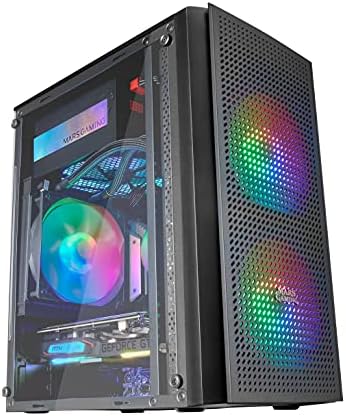
FOIFKIN M1 PC Case
Bottom line: The FOIFKIN M1 PC Case ($79.99 on Amazon as of 2026-11-23 05:30 UTC): Real walnut wood front panel over metal for a warm, non-generic desk look; main trade-off: 310mm GPU clearance rules out the longest flagship cards.
As an Amazon Associate, SpecPicks earns from qualifying purchases. Full disclosure →
*Price sourced from Amazon.com. Last updated 2026-11-23. Product prices and availability are accurate as of the date/time indicated and are subject to change. Any price and availability information displayed on Amazon.com at the time of purchase will apply to the purchase of this product.
Pros & Cons
Pros
- ✓ Real walnut wood front panel over metal for a warm, non-generic desk look
- ✓ Ships with 4 ARGB PWM fans pre-installed — no extra fans to buy at launch
- ✓ Tool-less snap-on tempered glass side panel for quick component access
- ✓ Front-panel USB-C 3.0 plus USB 3.0 and USB 2.0 ports
- ✓ Mounts up to eight 120mm fans and a 240/280mm top radiator
Cons
- ✗ 310mm GPU clearance rules out the longest flagship cards
- ✗ 174mm CPU cooler height limit is tight for the tallest air coolers
- ✗ ATX power supply length capped at 170mm
- ✗ Top radiator maxes at 280mm — no 360mm AIO support
SpecPicks Verdict
SpecPicks has no buyer-rating or benchmark data for FOIFKIN M1 PC Case, so this read rests on the manufacturer's listed specs and the current price in the pc cases category (how we evaluate). Compare with similarly-priced alternatives in the pc cases category before committing. On the listing's own facts, the case for it is "Real walnut wood front panel over metal for a warm, non-generic desk look"; the main trade-off is "310mm GPU clearance rules out the longest flagship cards". If those two points fit how you will use it, put it beside one or two close alternatives in the Compare tool to confirm the price.
Common buyer scenarios for pc cases of this kind: matching it to an existing build, replacing a failing part, or upgrading from a previous-generation equivalent. Check the spec table below against your current setup — particularly socket / form-factor / power-rating fields — and confirm compatibility on the retailer's listing before purchase. Prices and stock are set by the retailer and may have moved since this page was last updated.
Key Features
Quoted from the manufacturer's listing. Where it differs from the pros and cons above, those note the conditions the listing leaves out.
- 【Green Design of Wood Elements】Using the original wood elements combined with metal, natural and elegant, the wood elements are perfectly integrated into the modern workspace, enhance the appearance of the game station, and bid farewell to mediocrity. (CASE SIZE: 370*220*450 MM/14.6*8.7*17.7 IN)
- 【High Performance Cooling】M1 comes pre-installed with 4 ARGB PWM fans, and the glass side panel adopts a snap-on design, which can be quickly removed without tools, bringing convenient installation and heat dissipation experience. The front, rear, top, and bottom fan mounting points of your PC case can accommodate up to eight 120mm fans, ensuring optimal cooling performance for your PC case
- 【Extra Large Capacity】The space in the case is configured for each component and will be fully compatible with your new computer components. (1) Support ATX/M-ATX/ITX motherboard (2) Support top 240MM/280MM cooler (3) CPU cooler height 174MM (4) GPU length limit 310MM (5) Power supply type ATX up to 170MM (6) Equipped with 2* HDD and 2*SDD mount/1* HDD and 3* SSD mount (7) 7 expansion slots
- 【Input/Output Ports】1x Type-C 3.0, 1 x USB 3.0, 1 x USB 2.0, Microphone/Audio, Power Button, Reboot Button
- 【Risk-free purchase】The product quality is guaranteed, if you have any problems with your box, please feel free to click "S0ld-by-FOIFKIN" to contact us, we will try our best to help you! FOIFKIN strives to provide the best support to its customers!
Full Specifications
| Brand | FOIFKIN |
|---|---|
| Color | White walnut |
| Material | Metal, Plastic, Tempered Glass, Wood |
| Case Type | Mid Tower |
| Model Name | M1 |
| Unit Count | 1.0 Count |
| Connectivity | USB |
| Compatibility | PC |
| Cooling Method | Air, Water |
| Antenna Location | Business, Gaming |
| Compatible Devices | ATX, M-ATX, ITX, GPUs up to 320MM, PSU up to 170MM, Radiator: 280/240/120MM |
| Enclosure Material | Metal, Plastic, Tempered Glass, Wood |
| Total USB 3.0 Ports | 1 |
| Warranty Description | 1 |
| Hard Disk Form Factor | 3.5 Inches |
| Supported Motherboard | ATX, M-ATX, ITX |
| Internal Bays Quantity | 4 |
| Item Dimensions D x W x H | 16.2"D x 7.87"W x 17.7"H |
| Motherboard Compatability | ATX, M-ATX, ITX |
| Power Supply Mounting Type | Bottom Mount |
| Full listing title | FOIFKIN M1 PC Case - Walnut Front pane Pre-Installed 4 PWM ARGB Fan, ATX Mid-Tower Computer case, Gaming PC Case, 240MM RAD Support, Type-C, FOIFKIN (White Walnut) |
Ready to buy?
FOIFKIN M1 PC Case - Walnut Front pane Pre-Installed 4 PWM ARGB Fan, ATX Mid-Tower Computer case, Gaming PC Case, 240MM RAD Support, Type-C, FOIFKIN (White Walnut) is listed on Amazon. Price, availability, shipping and returns are set by Amazon and its sellers — check the listing for current terms. SpecPicks earns a small commission on qualifying purchases — thank you for supporting independent review work.
*Price sourced from Amazon.com. Last updated 2026-11-23. Product prices and availability are accurate as of the date/time indicated and are subject to change. Any price and availability information displayed on Amazon.com at the time of purchase will apply to the purchase of this product.
Related PC Cases



More guides & deep dives from the SpecPicks archive
Browse all articles & guides →- Best 1440p Gaming GPUs in 2026
- Best Budget Gaming PC Build 2026 — ~$1,000 Parts List
- The Complete Voodoo5 5500 AGP Driver Guide (2026 Edition)
- RTX 4070 Super vs RX 7800 XT — Which to Buy in 2026
- How to Build a Windows 98 Retro PC in 2026
- Best Retro Handhelds in 2026: Pocket, Mid-Tier and FPGA Picks
- Emulation Hardware in 2026: FPGA, Software, and Cart-Reader Ecosystems
More reviews from the SpecPicks archive
Browse all reviews →- Best GPU for Local LLMs Under $300: Why the RTX 3060 12GB Still Wins
- KOORUI 27" 4K vs Samsung Odyssey 4K for Console + PC Gaming
- RTX 3060 12GB vs RTX 4070 12GB for Qwen2.5 14B (2026)
- Microsoft's SkillOpt Boosts Models With Just a Markdown File — What It Means for Your Local RTX 3060 Rig
- Can a 12GB RTX 3060 Run a 70B LLM? The Offload Reality Check
- Voodoo3 3000 PCI vs AGP — Driver Install Troubleshooting in 2026
- RX 9070 XT vs RTX 3060 12GB for Local LLMs
- The $500M Claude Bill: What Local LLM Inference Actually Costs
- Aider vs Cline vs Continue.dev for Local-LLM Coding on a 12GB GPU
- Microsoft + Nvidia Agent PCs vs a DIY RTX 3060 12GB Local-Agent Box
- Cloudflare CEO: The Web's Future Is 'Pay to Crawl' as Bots Overtake Humans
- Local AI on a Raspberry Pi in 2026: What Actually Runs (and What Doesn't)
- Best SSD for PS4 Pro in 2026: SATA Upgrades That Cut Load Times
- RTX PRO 6000 vs RTX 5090 for Local 70B LLMs: 96GB vs 32GB
- Best Wireless Controller for PC Gaming in 2026
- Build a Silent Pi 4 NVMe Homelab: Cooling, VESA, SSD Boot
- Memory Prices Climb as Samsung and SK Hynix Pour $590B Into Chips
- Ryzen 7 5800X vs 5700X for Streaming and Gaming in 2026
- GeForce FX 5900 Ultra vs Radeon 9800 Pro: The 2003 DirectX 9 Showdown Revisited
- ROCm in 2026: Is AMD Finally a Real Local-LLM Option?
- Logitech G29 vs HORI Racing Wheel Overdrive: Which Entry Sim Wheel Wins?
- Best Budget GPU for Local Stable Diffusion and ComfyUI in 2026
- Qwen3.6 27B on a Single RTX 3060 12GB: Why MTP Drops Context From 137K to 14K
- Old Massive Chieftec Full Tower: Homelab Gem or Junk?
Earliest SpecPicks reviews
Browse full archive →- Best GPU for Llama 3.1 8B (2026)
- Best GPU for Qwen 3 14B (2026)
- Best GPU for Qwen 3 32B (2026)
- Best GPU for Llama 3.1 70B (2026)
- Best GPU for DeepSeek-R1 32B (2026)
- Best GPU for Llama 3.1 405B (2026)
- How to run Llama 3.1 8B on NVIDIA GeForce RTX 5090
- How to run Qwen 3 14B on NVIDIA GeForce RTX 5090
- How to run Qwen 3 32B on NVIDIA GeForce RTX 5090
- How to run Llama 3.1 70B on NVIDIA GeForce RTX 5090
- How to run DeepSeek-R1 32B on NVIDIA GeForce RTX 5090
- How to run Llama 3.1 8B on NVIDIA GeForce RTX 4090