
Mars Gaming
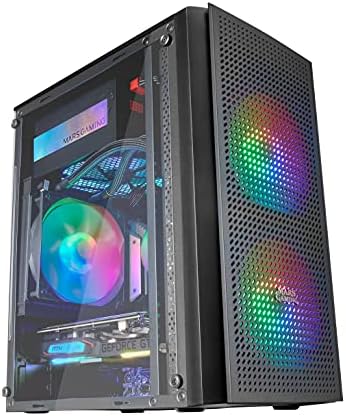
MARSGAMING MC300 Black, Micro ATX PC Case, Tempered Glass, Front MESH, 3xFRGB Fans
Bottom line: The MARSGAMING MC300 Black: Three FRGB front fans included, no separate fan purchase needed.
As an Amazon Associate, SpecPicks earns from qualifying purchases. Full disclosure →
Pros & Cons
Pros
- ✓ Three FRGB front fans included, no separate fan purchase needed
- ✓ TOTAL-MESH front grille feeds air straight to the intake fans
- ✓ Tempered glass side panel shows the full build
- ✓ Holds 4x 2.5in SSDs plus 2x 3.5in HDDs in a Micro ATX footprint
Cons
- ✗ Price, stock, shipping and returns are set by the retailer and may have changed since this page was last updated
Manufacturer description
The Mars Gaming MC300 is a Micro ATX chassis built around airflow and visibility rather than bulk. A TOTAL-MESH front grille feeds three pre-installed FRGB fans, and the triple front/rear ventilation layout pushes air across your GPU and VRM zone without you buying a single extra fan. The fixed-RGB lighting runs a constant color flow through those front vents, and the tempered glass side window puts the whole build on display. Inside, the MC300 takes MicroATX or Mini-ITX boards, mounts up to four 2.5-inch SSDs and two 3.5-inch hard drives, and supports a 120mm liquid cooler if you want to…
SpecPicks Verdict
SpecPicks has no buyer-rating or benchmark data for MARSGAMING MC300 Black, so this read rests on the manufacturer's listed specs (how we evaluate). Compare with similarly-priced alternatives in the pc cases category before committing. Its clearest listed strength is "Three FRGB front fans included, no separate fan purchase needed"; check that against the figure your use case actually depends on, then compare close alternatives in the Compare tool.
Common buyer scenarios for pc cases of this kind: matching it to an existing build, replacing a failing part, or upgrading from a previous-generation equivalent. Check the spec table below against your current setup — particularly socket / form-factor / power-rating fields — and confirm compatibility on the retailer's listing before purchase. Prices and stock are set by the retailer and may have moved since this page was last updated.
Frequently Asked Questions
What motherboard sizes fit the Mars Gaming MC300?
The MC300 supports MicroATX and Mini-ITX motherboards. Full ATX boards are not listed as compatible.
Key Features
Quoted from the manufacturer's listing. Where it differs from the pros and cons above, those note the conditions the listing leaves out.
- GAMING DESIGN: Tempered glass side window, 3x FRGB front fans, TOTAL-MESH front grille, top-mounted controls and connections
- MAXIMUM COOLING CAPACITY: Triple front/rear ventilation system, TOTAL-MESH front grill and support for 120mm liquid coolers
- MAXIMUM INTERNAL CAPACITY: Support for MicroATX and Mini-ITX motherboards, up to 4 x 2.5" SSDs and 2 x 3.5" HDDs
- ADVANCED GAMING RGB LIGHTING: The MC300's triple vents feature a Fixed RGB lighting system that provides your setup with a constant flow of colour
Full Specifications
| Brand | Mars Gaming |
|---|---|
| Color | Black |
| Fan Size | 12 centimeters |
| Material | Glass |
| Case Type | Mid Tower |
| Model Name | MC300 |
| Unit Count | 1 Count |
| Light Color | RGB |
| Model Number | MC300 |
| Compatibility | PC |
| GAMING DESIGN | Tempered glass side window, 3x FRGB front fans, TOTAL-MESH front grille, top-mounted controls and connections |
| Cooling Method | Air |
| Item Type Name | MC300 |
| Number of Fans | 3 |
| Mfr Part Number | MC300 |
| Antenna Location | Gaming |
| Compatible Devices | Motherboards (MicroATX, Mini-ITX), ATX Power Supply, Up to 4 SSDs, 2 HDDs, Liquid Cooling Systems (up to 120 mm) |
| Enclosure Material | Glass |
| Total USB 3.0 Ports | 1 |
| Hard Disk Form Factor | 3.5 inches |
Ready to buy?
MARSGAMING MC300 Black, Micro ATX PC Case, Tempered Glass, Front MESH, 3xFRGB Fans is listed on Amazon. Price, availability, shipping and returns are set by Amazon and its sellers — check the listing for current terms. SpecPicks earns a small commission on qualifying purchases — thank you for supporting independent review work.
Related PC Cases


More guides & deep dives from the SpecPicks archive
Browse all articles & guides →- Best Retro Handhelds in 2026: Pocket, Mid-Tier and FPGA Picks
- RTX 4070 Super vs RX 7800 XT — Which to Buy in 2026
- The Complete Voodoo5 5500 AGP Driver Guide (2026 Edition)
- Best Budget Gaming PC Build 2026 — ~$1,000 Parts List
- Emulation Hardware in 2026: FPGA, Software, and Cart-Reader Ecosystems
- How to Build a Windows 98 Retro PC in 2026
- Best 1440p Gaming GPUs in 2026
More reviews from the SpecPicks archive
Browse all reviews →- GameSir G7 SE vs DualSense: Which Controller Is Better on PC in 2026?
- Best Budget GPU for RPCS3 PS3 Emulation in 2026
- Best Streaming Starter Kits in 2026: Mic, Light, Capture, and the One-Box Builds
- Logitech G502 Hero vs SteelSeries QcK: The Cheap FPS Setup That Still Wins in 2026
- Can a Ryzen AI Max+ 395 Mini-PC With 128GB Run Big LLMs? The r/LocalLLaMA Question
- Transcend CF133 CompactFlash as a Retro PC Boot Drive: Setup + Gotchas
- Started a Homelab a Month Ago: Am I Doing It Right?
- Best Streaming Setup Bundle in 2026: 5 Picks From Mic to Stream Deck
- SteamOS Boots on Intel Hardware: Enthusiast Hack Lands
- Hy3-Preview vs DeepSeek V4 Flash: Where the New Open-Weights Model Actually Lands
- Ryzen 7 5800X vs 5700X for a Dual-Duty Gaming and Local-LLM Build
- Best CPU Cooler for Ryzen 7 5800X Overclocking (2026)
- vLLM on a Single RTX 3060 12GB: Batched Serving Numbers and When It's Worth It (2026)
- Sound Blaster G6 on a Modern Retro Build: When a USB DAC Beats an AWE32
- Logitech Extreme 3D Pro vs DualSense for Flight and Space Sims in 2026
- Can a Local RTX 3060 12GB LLM Debug Linux Boot Like Gemini?
- RTX 3060 12GB Showdown: ZOTAC Twin Edge vs MSI Ventus 2X (2026)
- GLM-5.2's 37k-Token Reasoning Outputs and What They Mean for Local Rigs
- Best GPU for ComfyUI & Stable Diffusion Under $300 in 2026
- Best CompactFlash and IDE/SATA-to-USB Storage Gear for Retro PC Builds in 2026
- Can a Ryzen 5 5600G Run Local LLMs With No GPU? CPU + iGPU Inference Tested
- Local AI News You Missed in April 2026
- Best 27-inch 4K Monitor for PC and Console: Odyssey vs KOORUI
- Unified RAM for LLMs: 2025-2026 Hardware Guide
Earliest SpecPicks reviews
Browse full archive →- Best GPU for Llama 3.1 8B (2026)
- Best GPU for Qwen 3 14B (2026)
- Best GPU for Qwen 3 32B (2026)
- Best GPU for Llama 3.1 70B (2026)
- Best GPU for DeepSeek-R1 32B (2026)
- Best GPU for Llama 3.1 405B (2026)
- How to run Llama 3.1 8B on NVIDIA GeForce RTX 5090
- How to run Qwen 3 14B on NVIDIA GeForce RTX 5090
- How to run Qwen 3 32B on NVIDIA GeForce RTX 5090
- How to run Llama 3.1 70B on NVIDIA GeForce RTX 5090
- How to run DeepSeek-R1 32B on NVIDIA GeForce RTX 5090
- How to run Llama 3.1 8B on NVIDIA GeForce RTX 4090