
NETGEAR
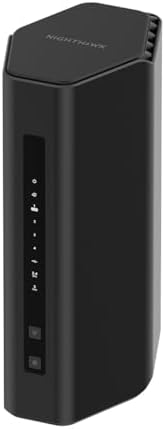
NETGEAR Nighthawk Dual-Band WiFi 7 Router (RS180)
Bottom line: The NETGEAR Nighthawk Dual-Band WiFi 7 Router ($179.00 on Amazon as of 2026-11-23 05:45 UTC): WiFi 7 hits up to 5.5 Gbps, 1.2x faster than WiFi 6; main trade-off: router only, no built-in modem, separate modem required.
As an Amazon Associate, SpecPicks earns from qualifying purchases. Full disclosure →
*Price sourced from Amazon.com. Last updated 2026-11-23. Product prices and availability are accurate as of the date/time indicated and are subject to change. Any price and availability information displayed on Amazon.com at the time of purchase will apply to the purchase of this product.
Pros & Cons
Pros
- ✓ WiFi 7 hits up to 5.5 Gbps, 1.2x faster than WiFi 6
- ✓ 2.5 Gig internet port unlocks multi-gig cable/fiber plans
- ✓ Covers up to 2,500 sq. ft. on high-performance antennas
- ✓ Handles up to 80 connected devices at once
Cons
- ✗ Router only, no built-in modem, separate modem required
- ✗ Dual-band only, no dedicated 6 GHz band listed
- ✗ 80-device cap tight for dense smart-home setups
- ✗ NETGEAR Armor security is subscription after trial
Manufacturer description
Leverage the power of WiFi 7 for speeds up to 5.5 Gbps at 1.2X faster than WiFi 6. The Nighthawk RS180 WiFi 7 Dual-band Router provides up to 2,500 sq. ft. WiFi coverage and capacity for up to 80 devices. Experience stunning 4K streaming, video conferencing and reliably connect smart home devices. NETGEAR Armor protects your family’s WiFi by creating an automatic shield for all connected devices. Product dimensions: 9.8 x 5.9 x 4 in.
SpecPicks Verdict
SpecPicks has no buyer-rating or benchmark data for NETGEAR Nighthawk Dual-Band WiFi 7 Router, so this read rests on the manufacturer's listed specs and the current price in the networking category (how we evaluate). Compare with similarly-priced alternatives in the networking category before committing. On the listing's own facts, the case for it is "WiFi 7 hits up to 5.5 Gbps, 1.2x faster than WiFi 6"; the main trade-off is "Router only, no built-in modem, separate modem required". If those two points fit how you will use it, put it beside one or two close alternatives in the Compare tool to confirm the price.
Before ordering, check the listed dimensions, ports, power requirements and supported devices or systems in the spec table below against how you plan to use it, and confirm them on the retailer's listing. Prices and stock are set by the retailer and may have moved since this page was last updated.
Key Features
Quoted from the manufacturer's listing. Where it differs from the pros and cons above, those note the conditions the listing leaves out.
- Blazing-fast WiFi 7 speeds up to 5.5 Gbps for gaming, smooth streaming, video conferencing and entertainment
- WiFi 7 delivers 1.2x faster speeds than WiFi 6 to maximize performance across all devices. This is a Router not a Modem.
- This router does not include a built-in cable modem. A separate cable modem (with coax inputs) is required for internet service.
- Sleek new body with smaller footprint and high-performance antennas for up to 2,500 sq. ft. of WiFi coverage
- 2.5 Gig internet port enables multi-gig speeds with the latest cable or fiber internet service plans, a separate modem may be needed for you cable or fiber internet service
Full Specifications
| Brand | NETGEAR |
|---|---|
| Color | Black |
| Voltage | 12 volts_of_direct_current |
| Coverage | 2500 square feet |
| Frequency | 5 GHz |
| Model Name | RS180-100NAS |
| Antenna Type | Fixed |
| Connectivity | Wireless, WiFi |
| Model Number | RS180-100NAS |
| Built-In Media | One (1) 12V/2.5A power adapter, One (1) 2m Ethernet cable, One (1) WiFi 7 Dual-Band Router (RS180), Quick start guide |
| Control Method | App |
| Connection Type | Wireless |
| Mfr Part Number | RS180-100NAS |
| Number of Ports | 4 |
| Special Feature | Internet Security |
| Antenna Location | Business, Gaming, Home |
| Wi-Fi Generation | WiFi 7 |
| Security Protocol | WPA3, WPA2 |
| Compatible Devices | Gaming Console, Personal Computer, Security Camera, Smart Television, Smartphone |
| Connectivity Range | 2500 square_feet |
| Full listing title | NETGEAR Nighthawk Dual-Band WiFi 7 Router (RS180) - Router Only, BE5500 Wireless Speed (up to 5.5 Gbps) - Covers up to 2,500 sq. ft., 80 Devices - 2.5 Gig Internet Port – Free Expert Help |
Ready to buy?
NETGEAR Nighthawk Dual-Band WiFi 7 Router (RS180) - Router Only, BE5500 Wireless Speed (up to 5.5 Gbps) - Covers up to 2,500 sq. ft., 80 Devices - 2.5 Gig Internet Port – Free Expert Help is listed on Amazon. Price, availability, shipping and returns are set by Amazon and its sellers — check the listing for current terms. SpecPicks earns a small commission on qualifying purchases — thank you for supporting independent review work.
*Price sourced from Amazon.com. Last updated 2026-11-23. Product prices and availability are accurate as of the date/time indicated and are subject to change. Any price and availability information displayed on Amazon.com at the time of purchase will apply to the purchase of this product.
Related Networking


More guides & deep dives from the SpecPicks archive
Browse all articles & guides →- The Complete Voodoo5 5500 AGP Driver Guide (2026 Edition)
- Best Budget Gaming PC Build 2026 — ~$1,000 Parts List
- Best 1440p Gaming GPUs in 2026
- RTX 4070 Super vs RX 7800 XT — Which to Buy in 2026
- How to Build a Windows 98 Retro PC in 2026
- Best Retro Handhelds in 2026: Pocket, Mid-Tier and FPGA Picks
- Emulation Hardware in 2026: FPGA, Software, and Cart-Reader Ecosystems
More reviews from the SpecPicks archive
Browse all reviews →- Muse Spark 1.1 Beats GLM-5.2 at Coding — Does It Change the Local-Rig Question?
- Lenovo G02 Retro Handheld Reportedly Ships With Pirated Game Library
- Meta Muse Spark 1.1 Hits 51 on the Intelligence Index: The Local Angle
- Best Dock and Storage Combo for Handheld PC Gaming: JSAUX Dock + a Fast SSD
- 180Hz 1440p Gaming Monitors Hit Entry-Level Pricing
- Raspberry Pi 4 as an SMB1 File Server for Windows 98 Retro Rigs
- Aider vs Cline vs Cursor for AI-Assisted Coding in 2026
- Best Cooler for a Ryzen 7 5800X: ML240L RGB V2 vs Kraken M22
- Silent, SD-Free Retro Storage: CompactFlash + IDE on Win98/XP
- Best Budget 4K Monitor for an RTX 3060 Build in 2026: SANSUI vs KOORUI vs ASUS TUF
- Best Budget SSDs for Homelab and Proxmox Boot Drives in 2026
- Why Direct3D Killed Glide: How the 3dfx Voodoo Empire Lost the API Wars
- Best Cooler for a Ryzen 7 5800X: Noctua NH-U12S vs CoolerMaster ML240L
- Build Your Own Gaming PC in 2026: The 5 Components That Actually Matter
- Load Retro Games onto a Win98 IDE PC with a CompactFlash Adapter (2026)
- Best PC Game Streaming Gear in 2026: 5 Picks for Mic, Light & Capture
- Asus ROG Harpe II Extreme: A 24K-Gold, 65K-Sensor Gaming Mouse
- Best Streaming Setup for PC Gamers in 2026: 5 Picks Under $500
- Mistral Seeks €3B: What a Bigger European Lab Means for Local Rigs
- SNES Classic vs Sega Genesis Mini in 2026: Which Is Worth It?
- Save $550 on iBuyPower RTX 5070 + 7800X3D 4K Gaming PC
- Apple Intelligence Ships in China on Alibaba's Qwen: What It Means
- Best CPU Coolers for Ryzen and Intel Builds in 2026
- Best GPU for Running Llama 3 8B Locally Under $350 (2026)
Earliest SpecPicks reviews
Browse full archive →- Best GPU for Llama 3.1 8B (2026)
- Best GPU for Qwen 3 14B (2026)
- Best GPU for Qwen 3 32B (2026)
- Best GPU for Llama 3.1 70B (2026)
- Best GPU for DeepSeek-R1 32B (2026)
- Best GPU for Llama 3.1 405B (2026)
- How to run Llama 3.1 8B on NVIDIA GeForce RTX 5090
- How to run Qwen 3 14B on NVIDIA GeForce RTX 5090
- How to run Qwen 3 32B on NVIDIA GeForce RTX 5090
- How to run Llama 3.1 70B on NVIDIA GeForce RTX 5090
- How to run DeepSeek-R1 32B on NVIDIA GeForce RTX 5090
- How to run Llama 3.1 8B on NVIDIA GeForce RTX 4090