
Elgato
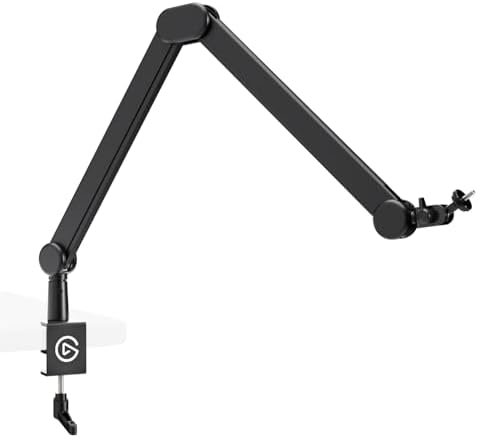
Elgato Wave Mic Arm MK.2
Bottom line: The Elgato Wave Mic Arm MK.2 ($89.99 on Amazon as of 2026-11-23 05:45 UTC): Rises above tall monitors or drops below shoulder level for a low-profile setup; main trade-off: listing gives no maximum microphone weight, so check support for heavy mics.
As an Amazon Associate, SpecPicks earns from qualifying purchases. Full disclosure →
*Price sourced from Amazon.com. Last updated 2026-11-23. Product prices and availability are accurate as of the date/time indicated and are subject to change. Any price and availability information displayed on Amazon.com at the time of purchase will apply to the purchase of this product.
Pros & Cons
Pros
- ✓ Rises above tall monitors or drops below shoulder level for a low-profile setup
- ✓ Angles and rotates the mic in almost any direction for precise positioning
- ✓ Moves smoothly and silently with a touch, so adjustments stay off a live mic
- ✓ Slim all-metal arms with no logos keep the arm unobtrusive on camera
- ✓ Padded clamp fits nearly any desk edge, including tight spaces
Cons
- ✗ Listing gives no maximum microphone weight, so check support for heavy mics
- ✗ Reach and arm length figures are not stated in the product details
- ✗ Only a desk clamp is mentioned; no grommet or wall mount is listed
- ✗ No built-in cable management is described for routing mic cables
Manufacturer description
Rising up over monitors or reaching across a table, Wave Mic Arm brings your microphone in close while giving you complete freedom of movement.
SpecPicks Verdict
SpecPicks has no buyer-rating or benchmark data for Elgato Wave Mic Arm MK.2, so this read rests on the manufacturer's listed specs and the current price in the streaming gear category (how we evaluate). Compare with similarly-priced alternatives in the streaming gear category before committing. On the listing's own facts, the case for it is "Rises above tall monitors or drops below shoulder level for a low-profile setup"; the main trade-off is "Listing gives no maximum microphone weight, so check support for heavy mics". If those two points fit how you will use it, put it beside one or two close alternatives in the Compare tool to confirm the price.
Before ordering, check the listed dimensions, load rating and mounting or device compatibility in the spec table below against how you plan to use it, and confirm them on the retailer's listing. Prices and stock are set by the retailer and may have moved since this page was last updated.
Key Features
Quoted from the manufacturer's listing. Where it differs from the pros and cons above, those note the conditions the listing leaves out.
- Ultra flexible: Rise above tall monitors or stay below shoulder level
- Precise control: Angle and rotate your mic in virtually any direction
- Smooth & silent: Maneuver with just a touch in complete quiet
- Sleek design: Slim, all-metal arms with no distracting logos
- Padded clamp: Fits almost any desk edge, even tight spaces
Full Specifications
| Brand | Elgato |
|---|---|
| Color | Black |
| Material | Metal |
| Set Name | Boom Arm |
| Base Type | Clamp |
| Model Name | Mic Arm HR |
| Finish Type | Matte |
| Model Number | 20AAY9901 |
| Padded clamp | Fits almost any desk edge, even tight spaces |
| Sleek design | Slim, all-metal arms with no distracting logos |
| Material Type | Metal |
| Product Style | Boom Arm |
| Maximum Height | 21.31 centimeters |
| Ultra flexible | Rise above tall monitors or stay below shoulder level |
| Item Dimensions | 30.55 x 2.36 x 8.39 inches |
| Number of Items | 1 |
| Precise control | Angle and rotate your mic in virtually any direction |
| Smooth & silent | Maneuver with just a touch in complete quiet |
| Body Material Type | Metal |
| Included Components | 3/8" and 5/8" adapters, Allen key, Desk clamp, Riser extension, Quick Start Guide, Wave Mic Arm |
| Full listing title | Elgato Wave Mic Arm MK.2, Studio Boom Arm for Microphones | Rises above monitors or stays low profile, Silent operation, Slim all-metal design, Padded clamp fits tight spaces |
Ready to buy?
Elgato Wave Mic Arm MK.2, Studio Boom Arm for Microphones | Rises above monitors or stays low profile, Silent operation, Slim all-metal design, Padded clamp fits tight spaces is listed on Amazon. Price, availability, shipping and returns are set by Amazon and its sellers — check the listing for current terms. SpecPicks earns a small commission on qualifying purchases — thank you for supporting independent review work.
*Price sourced from Amazon.com. Last updated 2026-11-23. Product prices and availability are accurate as of the date/time indicated and are subject to change. Any price and availability information displayed on Amazon.com at the time of purchase will apply to the purchase of this product.
Related Streaming Gear




More guides & deep dives from the SpecPicks archive
Browse all articles & guides →- Best 1440p Gaming GPUs in 2026
- Emulation Hardware in 2026: FPGA, Software, and Cart-Reader Ecosystems
- Best Budget Gaming PC Build 2026 — ~$1,000 Parts List
- Best Retro Handhelds in 2026: Pocket, Mid-Tier and FPGA Picks
- RTX 4070 Super vs RX 7800 XT — Which to Buy in 2026
- The Complete Voodoo5 5500 AGP Driver Guide (2026 Edition)
- How to Build a Windows 98 Retro PC in 2026
More reviews from the SpecPicks archive
Browse all reviews →- Replace a Dying IDE Drive With CompactFlash in a Win98 Retro PC
- Best Budget Gaming PC Parts in 2026: A 5-Pick Build List
- Logitech G502 Hero in 2026: Is the FPS Mouse King Still Worth It?
- Open-Source NVK Adds DLSS: What RTX 3060 Owners Get
- Intel Arc Pro B60 vs RTX 3060 12GB for Local LLMs
- Self-Hosting Jellyfin on a Raspberry Pi 4 8GB: What It Can Really Do
- Genesis Mini vs SNES Classic vs a Pi RetroPie in 2026
- Raspberry Pi LLM GPU Guide: What Actually Works in 2026
- Shared ChatGPT & Claude Chat Malware: Why Local LLMs Cut the Risk
- How to run Llama 3.1 70B on NVIDIA GeForce RTX 5080
- Open-Weight Models Caught Up on Cyber Benchmarks in Four Months — What That Means for Your Rig
- Best SSDs & Cloning Tools for Gaming PC Upgrades 2026
- Best Retro PC Upgrade Kit 2026: Sound & Storage
- AMD Ryzen 7 5800X3D Re-Review: DDR4's Last Gaming Champion in 2026
- KOORUI 4K QD-Mini LED vs Samsung Odyssey 4K: Which 27-Inch Wins?
- Anthropic Raises $65B Series H Near a Trillion-Dollar Valuation: What It Means for Local-AI Builders
- Raspberry Pi 5 8GB Review: Specs, Price & Use Cases (2025)
- GeForce FX 5900 Ultra Period-Correct WinXP Build Guide: Driver Hunt, Half-Life 2 Mixed-Mode, and Doom 3…
- Athlon 64 + Radeon 9800 Pro Windows XP Build (2026 Revival): CompactFlash-to-IDE Boot Guide
- Meta Is 'Token Managing' Now: Cut Local-LLM Cost on a Single RTX 3060
- DwarfStar Distributed Inference: Splitting a Single LLM Across a Home LAN of Mismatched GPUs
- RTX 5080 vs RTX 5070: Which Blackwell GPU Should You Buy in 2026?
- KOORUI 27" QD-Mini LED vs Samsung Odyssey 27" 4K: Which 4K Panel for Console + PC?
- Best Wired Controller for Fighting Games on PC (2026)
Earliest SpecPicks reviews
Browse full archive →- Best GPU for Llama 3.1 8B (2026)
- Best GPU for Qwen 3 14B (2026)
- Best GPU for Qwen 3 32B (2026)
- Best GPU for Llama 3.1 70B (2026)
- Best GPU for DeepSeek-R1 32B (2026)
- Best GPU for Llama 3.1 405B (2026)
- How to run Llama 3.1 8B on NVIDIA GeForce RTX 5090
- How to run Qwen 3 14B on NVIDIA GeForce RTX 5090
- How to run Qwen 3 32B on NVIDIA GeForce RTX 5090
- How to run Llama 3.1 70B on NVIDIA GeForce RTX 5090
- How to run DeepSeek-R1 32B on NVIDIA GeForce RTX 5090
- How to run Llama 3.1 8B on NVIDIA GeForce RTX 4090