

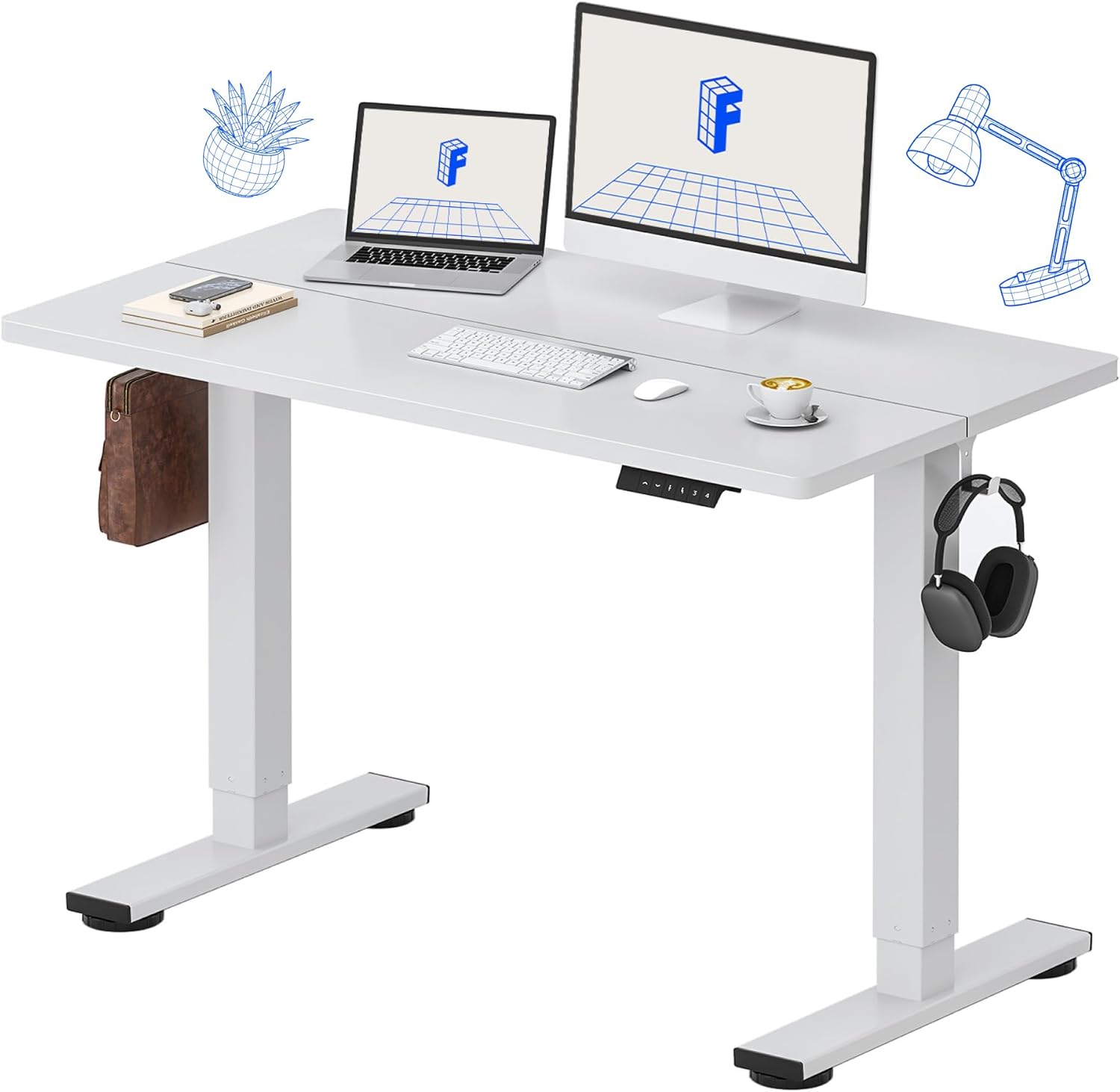
FLEXISPOT 71x32 Inch Electric Large Standing Desk for Home & Office
Bottom line: The FLEXISPOT 71x32 Inch Electric Large Standing Desk for Home & Office: 71x32 inch top fits dual monitors plus a laptop side by side; main trade-off: splice board top joins two panels rather than one solid slab.
As an Amazon Associate, SpecPicks earns from qualifying purchases. Full disclosure →
Pros & Cons
Pros
- ✓ 71x32 inch top fits dual monitors plus a laptop side by side
- ✓ 4 programmable memory presets for one-touch sit-to-stand switching
- ✓ 28.9 to 46.5 inch height range covers seated and standing use
- ✓ Steel frame and wide feet limit wobble while typing or gaming
- ✓ 5-year frame/mechanical warranty plus 2-year electronics coverage
Cons
- ✗ Splice board top joins two panels rather than one solid slab
- ✗ 28.9 inch minimum height may sit high for shorter users
- ✗ 46.5 inch maximum may fall short for very tall users standing
- ✗ Assembly may need a power drill, which is not included
Manufacturer description
The FLEXISPOT 71x32 Inch Electric Standing Desk gives you a large work surface for dual monitors, a laptop and your peripherals, with room left over. Whether you game, design or work through spreadsheets, the 71" x 32" splice board top lets you spread out. Height adjusts electrically from 28.9" to 46.5", and the motor moves quietly enough for a shared home office. Four programmable memory presets let you switch between sitting and standing with one touch. Each person who shares the desk can save their own heights, so nobody has to find their settings again every morning. A steel frame and…
SpecPicks Verdict
SpecPicks has no buyer-rating or benchmark data for FLEXISPOT 71x32 Inch Electric Large Standing Desk for Home & Office, so this read rests on the manufacturer's listed specs (how we evaluate). Compare with similarly-priced alternatives in the gaming desks category before committing. On the listing's own facts, the case for it is "71x32 inch top fits dual monitors plus a laptop side by side"; the main trade-off is "Splice board top joins two panels rather than one solid slab". If those two points fit how you will use it, put it beside one or two close alternatives in the Compare tool to confirm the price.
Common buyer scenarios for gaming desks: matching surface dimensions to the room footprint and monitor count, checking height-adjustment range for sit-stand setups, verifying cable-management channels for a clean multi-monitor build, and confirming weight capacity for a full tower + dual-monitor load. Review the spec sheet for assembly difficulty before ordering.
Frequently Asked Questions
What is the height range of the FLEXISPOT 71x32 standing desk?
The desk adjusts electrically from 28.9 inches at its lowest to 46.5 inches at its highest. The motor is designed for smooth, quiet movement between sitting and standing heights.
Is the desktop big enough for two monitors?
Yes. The 71 x 32 inch surface is sized for dual monitors plus a laptop and other gear, so it suits multi-screen work, design and gaming setups.
Can multiple people save their own desk heights?
Yes. The controller has 4 programmable memory presets, so different users or different routines can each store a height and recall it with one touch.
What warranty does the FLEXISPOT standing desk come with?
FlexiSpot covers the frame and mechanical parts for 5 years and the electronics for 2 years. Check the product listing for the full warranty terms.
Do I need any tools to assemble this desk?
It comes with simple step-by-step instructions, but a power drill may be needed and is not included. Have one ready before you start to make assembly faster.
Key Features
Quoted from the manufacturer's listing. Where it differs from the pros and cons above, those note the conditions the listing leaves out.
- OVERSIZED WORK SURFACE: Spacious 71"x32" desktop holds dual monitors, laptop, and more – ideal for multitasking, designing, or gaming without feeling cramped.
- EASY HEIGHT MEMORY CONTRO: Switch from sitting to standing in one touch with 4 programmable memory presets – perfect for multiple users or daily routines.
- SMOOTH & QUIET ADJUSTMENT: Height range from 28.9" to 46.5" with smooth, whisper-quiet motor movement. Maintain focus in both home and office settings.
- STABLE AND SHAKE-FREE: Strong steel frame and wide feet deliver reliable stability at all heights – no wobble during typing, drawing, or heavy use.
- FAST SETUP, LASTING SUPPORT: Simple instructions make assembly quick (power drill may be needed, not included). 5-year frame/mechanical warranty, 2-year electronics coverage.
Full Specifications
| Base | Alloy Steel |
|---|---|
| Size | 71"x32" |
| Brand | FLEXISPOT |
| Color | White |
| Shape | Rectangular |
| Style | Modern |
| Base Type | Steel |
| Room Type | Classroom, Dormitory, Living Room, Office, Study Room |
| Top Color | White |
| Item Depth | 32 inches |
| Style Name | Modern |
| Unit Count | 1.0 Count |
| Drawer Type | No Drawer |
| Finish Type | Powder Coated |
| Finish Types | Powder Coated |
| Base Material | Alloy Steel |
| Compatibility | Switch |
| Is Extendable | No |
| Mounting Type | Freestanding |
| Product Grade | new |
| Full listing title | FLEXISPOT 71x32 Inch Electric Large Standing Desk for Home & Office, Spacious Splice Board Desk with Cable Management & Organizer, Cup Holder & Hook, White |
Ready to buy?
FLEXISPOT 71x32 Inch Electric Large Standing Desk for Home & Office, Spacious Splice Board Desk with Cable Management & Organizer, Cup Holder & Hook, White is listed on Amazon. Price, availability, shipping and returns are set by Amazon and its sellers — check the listing for current terms. SpecPicks earns a small commission on qualifying purchases — thank you for supporting independent review work.
Related Gaming Desks


More guides & deep dives from the SpecPicks archive
Browse all articles & guides →- Best Retro Handhelds in 2026: Pocket, Mid-Tier and FPGA Picks
- Emulation Hardware in 2026: FPGA, Software, and Cart-Reader Ecosystems
- How to Build a Windows 98 Retro PC in 2026
- Best Budget Gaming PC Build 2026 — ~$1,000 Parts List
- The Complete Voodoo5 5500 AGP Driver Guide (2026 Edition)
- RTX 4070 Super vs RX 7800 XT — Which to Buy in 2026
- Best 1440p Gaming GPUs in 2026
More reviews from the SpecPicks archive
Browse all reviews →- Best CompactFlash and IDE-to-USB Adapters for Retro PC Builds (2026)
- ComfyUI on an RTX 3060 12GB: Stable Diffusion & Flux Throughput in 2026
- Build a Magic Mirror 2 Smart Home Hub (2026)
- Noctua NH-U12S vs Corsair H150i vs Kraken M22 on a 24/7 Ryzen 7 5800X Host
- Inside the Creative Katana V2X Soundbar Teardown — and What It Says About Sound Blaster
- Adding a Manual Shifter to Your Sim Rig: Is the Thrustmaster TH8A Worth It for the G29?
- 8BitDo Sn30 Pro vs Pro 2: Best Bluetooth Controller for Raspberry Pi 4 Emulation
- Sony to End Physical PlayStation Disc Production by 2028: What It Means for Retro Collectors
- Best Low-Power CPU for a Jellyfin Home Server: 5600G vs i7-9700K
- Using an LLM to Fix Win98 Voodoo & TNT Driver Installs
- A DIY Wireless Fingerprint Authorization Device Turns Heads on Hackaday
- Samsung's 256GB microSD Falls to $47.99 — Plus the SSD Sidegrade
- Matrox G400 MAX in 2026: Period-Correct Install, EMBM Showcase, and Pentium III Benchmarks
- Period-Correct 2002 LAN Party Build Around an Athlon XP and GeForce 4 Ti
- Inkling 975B Open Weights: What a Frontier Speech Model Means for Local Rigs
- Claude Code Telemetry Flap: Why a Local RTX 3060 Rig Is the Privacy Play
- Sega Genesis Mini vs SNES Classic: The Definitive 2026 Plug-and-Play Retro Showdown
- 1440p Gaming PC Build 2026: Cost, Parts, FPS
- How to run Qwen 3 32B on NVIDIA GeForce RTX 4090
- EU GPU Price Tracking: Why RTX 5090 Won't Get Cheaper
- Best CPU Cooler for a Ryzen 5800X Under PBO + Manual Overclock in 2026
- RTX 3060 12GB vs Ryzen 5 5600G iGPU for Entry Local LLM Inference
- Best 4K Gaming Monitor Under $500 in 2026
- The Pac-Man Benchmark: Testing Local Agentic Coding AI
Earliest SpecPicks reviews
Browse full archive →- Best GPU for Llama 3.1 8B (2026)
- Best GPU for Qwen 3 14B (2026)
- Best GPU for Qwen 3 32B (2026)
- Best GPU for Llama 3.1 70B (2026)
- Best GPU for DeepSeek-R1 32B (2026)
- Best GPU for Llama 3.1 405B (2026)
- How to run Llama 3.1 8B on NVIDIA GeForce RTX 5090
- How to run Qwen 3 14B on NVIDIA GeForce RTX 5090
- How to run Qwen 3 32B on NVIDIA GeForce RTX 5090
- How to run Llama 3.1 70B on NVIDIA GeForce RTX 5090
- How to run DeepSeek-R1 32B on NVIDIA GeForce RTX 5090
- How to run Llama 3.1 8B on NVIDIA GeForce RTX 4090