
TP-Link
TP-Link Omada ER707-M2
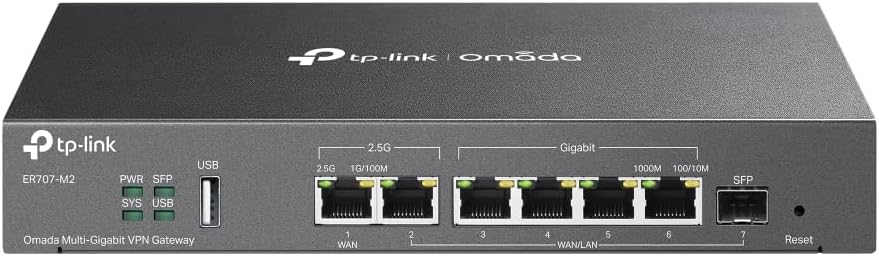
Bottom line: The TP-Link Omada ER707-M2 ($84.99 on Amazon as of 2026-11-22 17:19 UTC): Two 2.5Gbps ports: one WAN, one WAN/LAN, for dual multi-gig ISP links; main trade-off: only two ports are 2.5G; the four RJ45 LAN/WAN ports top out at 1Gbps.
As an Amazon Associate, SpecPicks earns from qualifying purchases. Full disclosure →
*Price sourced from Amazon.com. Last updated 2026-11-22. Product prices and availability are accurate as of the date/time indicated and are subject to change. Any price and availability information displayed on Amazon.com at the time of purchase will apply to the purchase of this product.
Pros & Cons
Pros
- ✓ Two 2.5Gbps ports: one WAN, one WAN/LAN, for dual multi-gig ISP links
- ✓ Gigabit SFP WAN/LAN port for a fiber uplink
- ✓ Handles up to 500,000 concurrent sessions and 1,000+ clients
- ✓ Up to 100 IPsec site-to-site tunnels plus 66 OpenVPN connections
- ✓ 5-year warranty with free weekday technical support
Cons
- ✗ Only two ports are 2.5G; the four RJ45 LAN/WAN ports top out at 1Gbps
- ✗ SFP port is limited to Gigabit, not 10G
- ✗ USB port is USB 2.0 only
- ✗ LTE failover needs a separately purchased USB LTE dongle
Manufacturer description
The TP-Link Omada ER707-M2 is a wired multi-gigabit VPN router for small offices, home labs and multi-site networks that have outgrown a consumer gateway. It has two 2.5Gbps ports: one dedicated WAN and one that works as WAN or LAN. Next to them are four Gigabit WAN/LAN ports and a Gigabit SFP WAN/LAN port, so you can run two fast ISP links with load balancing, add a fiber uplink, or connect more local switches. The router handles up to 500,000 concurrent sessions and more than 1,000 clients, which leaves room for busy offices and device-heavy homes. For remote sites and remote workers it…
SpecPicks Verdict
SpecPicks has no buyer-rating or benchmark data for TP-Link Omada ER707-M2, so this read rests on the manufacturer's listed specs and the current price in the networking category (how we evaluate). Compare with similarly-priced alternatives in the networking category before committing. On the listing's own facts, the case for it is "Two 2.5Gbps ports: one WAN, one WAN/LAN, for dual multi-gig ISP links"; the main trade-off is "Only two ports are 2.5G; the four RJ45 LAN/WAN ports top out at 1Gbps". If those two points fit how you will use it, put it beside one or two close alternatives in the Compare tool to confirm the price.
Before ordering, check the listed dimensions, ports, power requirements and supported devices or systems in the spec table below against how you plan to use it, and confirm them on the retailer's listing. Prices and stock are set by the retailer and may have moved since this page was last updated.
Frequently Asked Questions
How many WAN connections can the TP-Link ER707-M2 handle?
It has one dedicated 2.5Gbps WAN port and one 2.5Gbps WAN/LAN port. The four Gigabit RJ45 ports and the Gigabit SFP port can also be set as WAN, and the router load-balances traffic across multiple ISP links.
Can I use the ER707-M2 with a fiber connection?
Yes. It includes one Gigabit SFP WAN/LAN port. You can use it for a fiber WAN link or a fiber LAN uplink with a compatible SFP module. Check the product listing for supported modules.
How many VPN tunnels does the ER707-M2 support?
Up to 100 LAN-to-LAN IPsec connections, 66 OpenVPN connections, 60 L2TP connections and 60 PPTP connections.
Does the ER707-M2 support cellular backup if my internet goes down?
Yes, through its USB 2.0 port. Plug in a compatible LTE dongle, sold separately, for LTE backup. The same port also supports USB storage.
What warranty comes with the TP-Link Omada ER707-M2?
TP-Link includes a 5-year warranty and free technical support from 6am to 6pm PST, Monday through Friday.
Key Features
Quoted from the manufacturer's listing. Where it differs from the pros and cons above, those note the conditions the listing leaves out.
- 【Flexible Port Configuration】1 2.5Gigabit WAN Port + 1 2.5Gigabit WAN/LAN Ports + 4 Gigabit WAN/LAN Port + 1 Gigabit SFP WAN/LAN Port + 1 USB 2.0 Port (Supports USB storage and LTE backup with LTE dongle) provide high-bandwidth aggregation connectivity.
- 【High-Performace Network Capacity】Maximum number of concurrent sessions – 500,000. Maximum number of clients – 1000+.
- 【Cloud Access】Remote Cloud access and Omada app brings centralized cloud management of the whole network from different sites—all controlled from a single interface anywhere, anytime.
- 【Highly Secure VPN】Supports up to 100× LAN-to-LAN IPsec, 66× OpenVPN, 60× L2TP, and 60× PPTP VPN connections.
- 【5 Years Warranty】5-years warranty and free technical support from 6am to 6pm PST Monday to Fridays, you can work with confidence.
Full Specifications
| Brand | TP-Link |
|---|---|
| Color | Black |
| Voltage | 9 volts |
| Frequency | 2.5 GHz |
| Model Name | ER707-M2 |
| Unit Count | 1 Count |
| Antenna Type | Internal |
| Connectivity | USB |
| Model Number | ER707-M2 |
| Built-In Media | ER707-M2, Power Adapter, Quick Installation Guide |
| Control Method | App |
| Controller Type | App Control |
| Mfr Part Number | ER707-M2 |
| Number of Ports | 6 |
| Special Feature | Access Point Mode |
| Antenna Location | Business |
| Security Protocol | SSL, IPSec, GRE, SSH, IKEv1/v2, PPTP, L2TP, OpenVPN |
| Compatible Devices | Windows |
| Data Transfer Rate | 2500 megabits_per_second |
| LAN Port Bandwidth | 10/100/1000/2500 Mbps |
| Full listing title | Omada ER707-M2, Multi-Gigabit VPN Route | Dual 2.5Gig WAN Ports, High Network Capacity, SPI Firewall, Omada SDN Integrated, Load Balance, Lightning Protection |
Ready to buy?
Omada ER707-M2, Multi-Gigabit VPN Route | Dual 2.5Gig WAN Ports, High Network Capacity, SPI Firewall, Omada SDN Integrated, Load Balance, Lightning Protection is listed on Amazon. Price, availability, shipping and returns are set by Amazon and its sellers — check the listing for current terms. SpecPicks earns a small commission on qualifying purchases — thank you for supporting independent review work.
*Price sourced from Amazon.com. Last updated 2026-11-22. Product prices and availability are accurate as of the date/time indicated and are subject to change. Any price and availability information displayed on Amazon.com at the time of purchase will apply to the purchase of this product.
Related Networking


More guides & deep dives from the SpecPicks archive
Browse all articles & guides →- Emulation Hardware in 2026: FPGA, Software, and Cart-Reader Ecosystems
- Best Budget Gaming PC Build 2026 — ~$1,000 Parts List
- Best Retro Handhelds in 2026: Pocket, Mid-Tier and FPGA Picks
- The Complete Voodoo5 5500 AGP Driver Guide (2026 Edition)
- How to Build a Windows 98 Retro PC in 2026
- Best 1440p Gaming GPUs in 2026
- RTX 4070 Super vs RX 7800 XT — Which to Buy in 2026
More reviews from the SpecPicks archive
Browse all reviews →- AI Rigging 3D Models: The 2026 Hardware Guide
- Best Budget SSD for Gaming and Local-LLM Storage in 2026
- 42 LLMs Tested for Apocalypse Compliance: What Data Shows
- CompactFlash as a Hard Drive: The Win98 Retro Storage Guide
- Best SSD to Upgrade a PS4 Pro: Crucial BX500 vs Samsung 870 EVO Real-World Gains
- Best Gear for Online D&D and Virtual Tabletop Nights in 2026
- Mount a 90s Big-Box CD-ROM ISO on Win98 Without a CD Drive
- Raspberry Pi 4 8GB vs Pi 5 for a 2026 Homelab: Is the Pi 4 Still Worth It?
- Run Soofi S 30B Locally: What a 12GB RTX 3060 Can Actually Do
- Voodoo5 5500 PCI Boots on Modern ASUS P8Z77-V Pro — A Look at Retro GPUs in 2026 Boards
- i7-9700K vs Ryzen 7 5800X as a CPU-Offload Host for a 12GB GPU
- Best Budget GPU for 1080p Gaming in 2026: Is the RTX 3060 12GB Still the Pick?
- Logitech G29 vs HORI Force Feedback Wheel for Sim-Racing Beginners
- Best Budget SATA SSD for Everyday Upgrades (2026)
- Run Home Assistant on a Raspberry Pi 4 8GB in 2026 (SSD Boot)
- AI Technologies We'll Realistically See in Our Lifetimes
- Can a Ryzen AI Max+ 395 Mini-PC With 128GB Run Big LLMs? The r/LocalLLaMA Question
- Aureal Vortex 2 vs Sound Blaster Live!: A3D 2.0 vs EAX in Vintage PC Gaming
- Microsoft's SkillOpt Boosts GPT-5.5 With Just a Trained Markdown File
- RTX 5070 Ti vs RTX 5090 for Local LLMs: 16GB vs 32GB
- Gunnir Arc B580 vs RTX 5090D on DeepSeek: The Budget AI-Rig Upset Explained
- Intel Plans Two 22-Core Nova Lake-S SKUs With Game-Boosting Cache
- Vision LLMs Driving Period-Correct WinXP and Win98 Installers: Field Report from a 4-PC Retro Fleet
- Best Raspberry Pi 5 Home Lab Cluster Setup for Self-Hosting (2026)
Earliest SpecPicks reviews
Browse full archive →- Best GPU for Llama 3.1 8B (2026)
- Best GPU for Qwen 3 14B (2026)
- Best GPU for Qwen 3 32B (2026)
- Best GPU for Llama 3.1 70B (2026)
- Best GPU for DeepSeek-R1 32B (2026)
- Best GPU for Llama 3.1 405B (2026)
- How to run Llama 3.1 8B on NVIDIA GeForce RTX 5090
- How to run Qwen 3 14B on NVIDIA GeForce RTX 5090
- How to run Qwen 3 32B on NVIDIA GeForce RTX 5090
- How to run Llama 3.1 70B on NVIDIA GeForce RTX 5090
- How to run DeepSeek-R1 32B on NVIDIA GeForce RTX 5090
- How to run Llama 3.1 8B on NVIDIA GeForce RTX 4090