
Ocypus
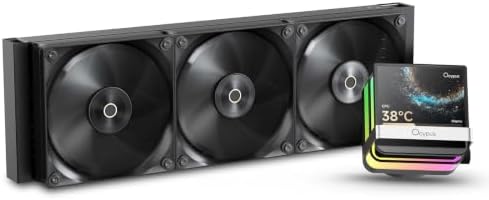
Ocypus Sigma PRO L36 BK 360MM AIO Liquid CPU Cooler with 3.5" LCD Display
Bottom line: The Ocypus Sigma PRO L36 BK 360MM AIO Liquid CPU Cooler: 3.5-inch 640x480 IPS screen plays custom MP4, GIF, JPEG, PNG and BMP themes; main trade-off: ocypus Display software runs only on Windows 10/11.
As an Amazon Associate, SpecPicks earns from qualifying purchases. Full disclosure →
Pros & Cons
Pros
- ✓ 3.5-inch 640x480 IPS screen plays custom MP4, GIF, JPEG, PNG and BMP themes
- ✓ Ceramic-bearing pump reaches 3100 RPM, with a rated TDP of up to 310W
- ✓ Five-year warranty covers the whole Sigma Pro range
- ✓ All-metal brackets fit Intel LGA 1700/1851/1200/115X and AMD AM4/AM5
- ✓ Screen attaches to the pump head magnetically, so it mounts and detaches quickly
Cons
- ✗ Ocypus Display software runs only on Windows 10/11
- ✗ The screen needs a USB 2.0 connection to show custom content
- ✗ Security software may block the display app unless you whitelist it
- ✗ The 360mm radiator needs a case with a 360mm mounting location
SpecPicks Verdict
SpecPicks has no buyer-rating or benchmark data for Ocypus Sigma PRO L36 BK 360MM AIO Liquid CPU Cooler, so this read rests on the manufacturer's listed specs (how we evaluate). Compare with similarly-priced alternatives in the cooling & fans category before committing. On the listing's own facts, the case for it is "3.5-inch 640x480 IPS screen plays custom MP4, GIF, JPEG, PNG and BMP themes"; the main trade-off is "Ocypus Display software runs only on Windows 10/11". If those two points fit how you will use it, put it beside one or two close alternatives in the Compare tool to confirm the price.
Common buyer scenarios for cooling & fans of this kind: matching it to an existing build, replacing a failing part, or upgrading from a previous-generation equivalent. Check the spec table below against your current setup — particularly socket / form-factor / power-rating fields — and confirm compatibility on the retailer's listing before purchase. Prices and stock are set by the retailer and may have moved since this page was last updated.
Key Features
Quoted from the manufacturer's listing. Where it differs from the pros and cons above, those note the conditions the listing leaves out.
- 【Ultra-Narrow Bezel Screen】Ocypus Sigma Pro series CPU liquid cooler features 3.5-inch ultra-narrow bezel IPS screen with 640×480 resolution, perfectly showcasing your customised themes.
- 【Brand-New Floating Design】Brand-new floating ARGB lighting design features ARGB halo encircling the pump head.When displaying on screen, you can set your preferred lighting to complement the presentation.
- 【Fully Unleashed Pump】This is an exceptionally efficient water cooling system! The pump features ceramic bearing, enabling running speed up to 3100 RPM. Combined with oversized copper base for thermal conductivity, the TDP can up to 310W.
- 【Exceptional Cooling FDB Fan】All fans utilise premium fluid dynamic bearing (FDB) bearings, delivering faster and smoother performance during operation.We have equipped fan speed reduction cable to accommodate different usage requirements. Actual performance data will vary between reduced and unrestricted speeds. -Please select the appropriate setting according to your needs-
- 【Magnetic Mounting】The sigma pro aio cooler pump head and screen part are connected via magnetic attachment, making installation and removal more convenient.
- 【Customisable Screen Design】After installing 'Ocypus display'software, you can customise the theme and all displayed content on your cpu liquid cooler.Support for MP4 video, JPEG, BMP, PNGimages, and dynamic GlFs.
Full Specifications
| Brand | Ocypus |
|---|---|
| Model | Sigma L36 PRO BK |
| Voltage | 12 volts_of_direct_current |
| Wattage | 310 watts |
| Material | Alloy Steel, Aluminum, Copper, Metal, Plastic, Rubber |
| Unit Count | 1 Count |
| Noise Level | 29 db |
| Part Number | Sigma L36 PRO BK |
| Connectivity | USB |
| Material Type | Alloy Steel, Aluminum, Copper, Metal, Plastic, Rubber |
| Cooling Method | Air, Water |
| Number of Items | 1 |
| Number of Packs | 1 |
| Air Flow Capacity | 90 cfm |
| Compatible Devices | Cpu, Desktop |
| Included Components | screen,water cooling system,toolkit |
| Power Connector Type | 3-Pin |
| Maximum Rotational Speed | 3100 rpm |
| Item Dimensions L x W x H | 16.7"L x 1.06"W x 4.72"H |
| EU Spare Part Availability Duration | 5 years |
Benchmark data for other processors
Ready to buy?
Ocypus Sigma PRO L36 BK 360MM AIO Liquid CPU Cooler with 3.5" LCD Display is listed on Amazon. Price, availability, shipping and returns are set by Amazon and its sellers — check the listing for current terms. SpecPicks earns a small commission on qualifying purchases — thank you for supporting independent review work.
Related Cooling & Fans



More guides & deep dives from the SpecPicks archive
Browse all articles & guides →- Emulation Hardware in 2026: FPGA, Software, and Cart-Reader Ecosystems
- Best 1440p Gaming GPUs in 2026
- Best Budget Gaming PC Build 2026 — ~$1,000 Parts List
- RTX 4070 Super vs RX 7800 XT — Which to Buy in 2026
- Best Retro Handhelds in 2026: Pocket, Mid-Tier and FPGA Picks
- The Complete Voodoo5 5500 AGP Driver Guide (2026 Edition)
- How to Build a Windows 98 Retro PC in 2026
More reviews from the SpecPicks archive
Browse all reviews →- Best CPU Cooler for AM4 Ryzen Overclocking in 2026
- Samsung 1440p 240Hz Gaming Monitor Drops to $169 — 32% Off
- llama.cpp Vulkan vs CUDA on a 12GB RTX 3060: Which Backend Wins?
- Build a Privacy-First Ring Alternative on a Raspberry Pi 4 in 2026
- Best Controller for PC AAA Gaming in 2026
- Intel Arc Pro B60 24GB: AI Workstation GPU Guide 2025
- Sound Blaster Live! vs Audigy FX for a 2002 Win98/XP Bridge Build
- Voodoo3 3000 PCI No-Display Troubleshooting on Windows 98 SE (2026)
- Best Budget 4K Gaming Monitor Under $400 in 2026: SANSUI vs KOORUI Mini-LED
- Best Game Controller in 2026: 5 Picks for PC, Console and Retro
- Ryzen 9800X3D vs 7800X3D: Best CPU for an RTX 5070 Build
- Best Controller for Raspberry Pi Retro Gaming and Emulation in 2026
- Voodoo3 3000 PCI Install Guide for Win98 SE in 2026
- RTX 5090 and Ryzen 7 9800X3D Benchmark Showdown: 2026 Performance Deep Dive
- Build a Self-Updating 24/7 FM Radio Station on a Raspberry Pi Zero W
- RetroPie on a Raspberry Pi 4 8GB: The Definitive 2026 Emulation Build
- How to run Llama 3.1 8B on Apple M3 Ultra
- Best PlayStation 5 Controllers in 2026: 5 Picks for Every Player
- Best CPU Cooler for the Ryzen 7 5800X: Air vs 120mm vs 240mm AIO
- Best RGB Lighting for a Gaming PC Desk: LED Strips and Case Fans Done Right
- AMD Instinct MI300X vs Radeon RX 7600 XT: Datacenter vs Desk
- Local Video-Gen on 12GB: What an RTX 3060 Does in the Gemini Omni Flash Era
- Ryzen AI Max Mini-ITX: Framework Desktop Specs Explained
- DIY Handheld Tricorder Build Guide 2026
Earliest SpecPicks reviews
Browse full archive →- Best GPU for Llama 3.1 8B (2026)
- Best GPU for Qwen 3 14B (2026)
- Best GPU for Qwen 3 32B (2026)
- Best GPU for Llama 3.1 70B (2026)
- Best GPU for DeepSeek-R1 32B (2026)
- Best GPU for Llama 3.1 405B (2026)
- How to run Llama 3.1 8B on NVIDIA GeForce RTX 5090
- How to run Qwen 3 14B on NVIDIA GeForce RTX 5090
- How to run Qwen 3 32B on NVIDIA GeForce RTX 5090
- How to run Llama 3.1 70B on NVIDIA GeForce RTX 5090
- How to run DeepSeek-R1 32B on NVIDIA GeForce RTX 5090
- How to run Llama 3.1 8B on NVIDIA GeForce RTX 4090