
VIVO
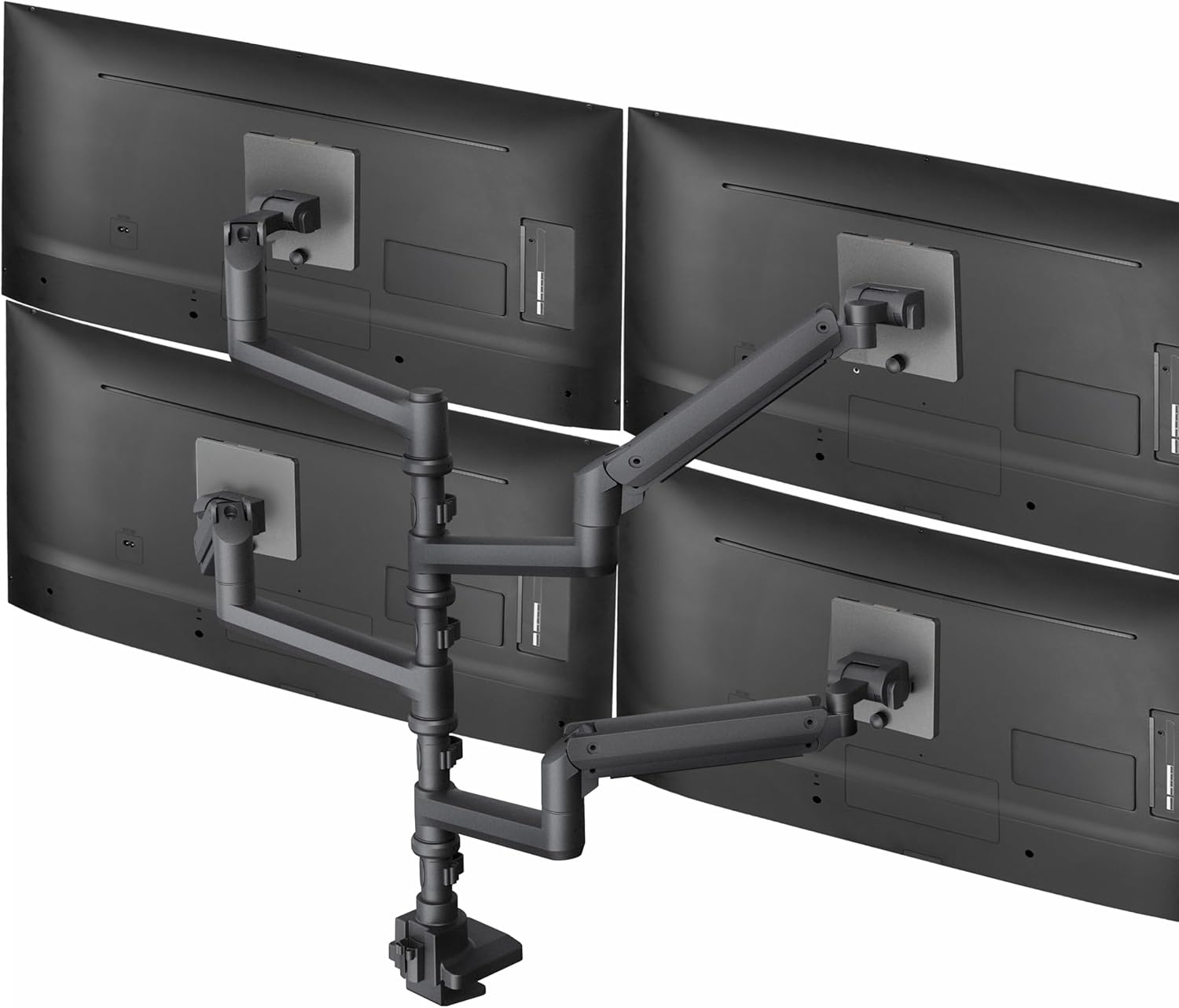
VIVO Pneumatic Arm Quad Ultrawide Monitor Extra Tall Desk Mount (STAND-V400D)
Bottom line: The VIVO Pneumatic Arm Quad Ultrawide Monitor Extra Tall Desk Mount: Four pneumatic arms, each rated 5.5 to 44 lbs; main trade-off: VESA 75x75 and 100x100 only; larger patterns not listed.
As an Amazon Associate, SpecPicks earns from qualifying purchases. Full disclosure →
Pros & Cons
Pros
- ✓ Four pneumatic arms, each rated 5.5 to 44 lbs
- ✓ Holds four ultrawides up to 38 in, or a single screen up to 49 in
- ✓ Cast aluminum clamp base and arms resist scratches and flex
- ✓ +55/-25 deg tilt, 180 deg swivel, 360 deg rotation per screen
- ✓ Detachable VESA plates make hanging heavy monitors easier
Cons
- ✗ VESA 75x75 and 100x100 only; larger patterns not listed
- ✗ Clamp only fits desktops up to 2 in thick
- ✗ Screens under 5.5 lbs fall below the arm's counterbalance range
- ✗ No grommet-mount option listed, only the desk clamp
Manufacturer description
The VIVO STAND-V400D is a quad ultrawide monitor desk mount for a four-screen setup that would crowd out an ordinary multi-monitor arm. Each pneumatic arm holds screens from 5.5 to 44 lbs. With all four arms loaded, it fits ultrawides up to 38 inches, and a single arm takes a screen up to 49 inches. It works with any monitor that has VESA 75x75mm or 100x100mm mounting holes. The clamp base and the arms are cast aluminum, which resists scratches and keeps its shape under load. VIVO uses high-capacity tilt joints so heavier panels don't sag over time. The clamp fits desktops up to 2 inches…
SpecPicks Verdict
SpecPicks has no buyer-rating or benchmark data for VIVO Pneumatic Arm Quad Ultrawide Monitor Extra Tall Desk Mount, so this read rests on the manufacturer's listed specs (how we evaluate). Compare with similarly-priced alternatives in the gaming desks category before committing. On the listing's own facts, the case for it is "Four pneumatic arms, each rated 5.5 to 44 lbs"; the main trade-off is "VESA 75x75 and 100x100 only; larger patterns not listed". If those two points fit how you will use it, put it beside one or two close alternatives in the Compare tool to confirm the price.
Common buyer scenarios for gaming desks: matching surface dimensions to the room footprint and monitor count, checking height-adjustment range for sit-stand setups, verifying cable-management channels for a clean multi-monitor build, and confirming weight capacity for a full tower + dual-monitor load. Review the spec sheet for assembly difficulty before ordering.
Frequently Asked Questions
Can the VIVO STAND-V400D hold four 34-inch ultrawide monitors?
Yes. With all four arms in use, VIVO rates it for ultrawide screens up to 38 inches, as long as each one weighs between 5.5 and 44 lbs.
Will it support a 49-inch super ultrawide monitor?
VIVO says a single arm can hold a screen up to 49 inches, within the 44 lb per-arm limit. The monitor also needs VESA 75x75mm or 100x100mm holes.
What VESA patterns does this mount fit?
It fits VESA 75x75mm and 100x100mm. Check that your monitor has one of these patterns before you buy.
How thick can my desk be for the clamp?
The cast aluminum clamp base fits desktops up to 2 inches thick. Check the product listing for any extra mounting options before you plan a grommet install.
How do the pneumatic arms adjust height?
Gas-spring arms counterbalance each monitor, so you can move a screen up or down with one hand. Each screen also tilts from +55 to -25 degrees, swivels 180 degrees and rotates 360 degrees.
Key Features
Quoted from the manufacturer's listing. Where it differs from the pros and cons above, those note the conditions the listing leaves out.
- Quad Ultrawide Desk Mount: Fits 4 ultra-wide screens (1 up to 49” and 2 up to 38”) with VESA 75x75mm or 100x100mm mounting holes. Holds 5.5 lbs to 44 lbs per arm
- Heavy-Duty Cast Aluminum Construction: Clamp base (fits desktops up to 2” thick) and arms are made of premium cast aluminum for maximum strength, scratch resistance, and durability. High-capacity tilt joints accommodate heavier screens without sagging
- Screen Articulation: Features +55° to -25° tilt, 180° swivel, and 360° rotation for optimal viewing angles and glare reduction
- Pneumatic Height Adjustment: Powerful pneumatic arms counterbalance the weight of your monitors so you can find the ideal screen height at the touch of a hand
- Detachable VESA Plates: Mounting your ultra wide monitors is made easier with the detachable VESA plates, and all instructions and hardware are provided for proper assembly
Full Specifications
| Brand | VIVO |
|---|---|
| Color | Black |
| Material | Aluminum, Steel, Plastic |
| Model Number | STAND-V400D |
| Mounting Type | Tabletop Mount |
| Movement Type | Articulating |
| Mfr Part Number | STAND-V400D |
| Number of Items | 1 |
| Compatible Devices | Monitor |
| Enclosure Material | Aluminum, Steel, Plastic |
| Maximum Tilt Angle | 55 degrees |
| Screen Articulation | Features +55° to -25° tilt, 180° swivel, and 360° rotation for optimal viewing angles and glare reduction |
| Warranty Description | 3 Year Warranty |
| Detachable VESA Plates | Mounting your ultra wide monitors is made easier with the detachable VESA plates, and all instructions and hardware are provided for proper assembly |
| Quad Ultrawide Desk Mount | Fits 4 ultra-wide screens (1 up to 49” and 2 up to 38”) with VESA 75x75mm or 100x100mm mounting holes. Holds 5.5 lbs to 44 lbs per arm |
| Pneumatic Height Adjustment | Powerful pneumatic arms counterbalance the weight of your monitors so you can find the ideal screen height at the touch of a hand |
| Maximum-Supported Screen Size | 49 inches |
| Minimum-Supported Screen Size | 22 inches |
| Full listing title | VIVO Pneumatic Arm Quad Ultrawide Monitor Extra Tall Desk Mount for Up to 49 inch Screens Individual Arm Capacity, Max 38 inch Screens for 4 Ultra Wides Up to 44 lbs, Black, STAND-V400D |
Ready to buy?
VIVO Pneumatic Arm Quad Ultrawide Monitor Extra Tall Desk Mount for Up to 49 inch Screens Individual Arm Capacity, Max 38 inch Screens for 4 Ultra Wides Up to 44 lbs, Black, STAND-V400D is listed on Amazon. Price, availability, shipping and returns are set by Amazon and its sellers — check the listing for current terms. SpecPicks earns a small commission on qualifying purchases — thank you for supporting independent review work.
Related Gaming Desks


More guides & deep dives from the SpecPicks archive
Browse all articles & guides →- Best Budget Gaming PC Build 2026 — ~$1,000 Parts List
- How to Build a Windows 98 Retro PC in 2026
- RTX 4070 Super vs RX 7800 XT — Which to Buy in 2026
- The Complete Voodoo5 5500 AGP Driver Guide (2026 Edition)
- Emulation Hardware in 2026: FPGA, Software, and Cart-Reader Ecosystems
- Best 1440p Gaming GPUs in 2026
- Best Retro Handhelds in 2026: Pocket, Mid-Tier and FPGA Picks
More reviews from the SpecPicks archive
Browse all reviews →- A Practical Look at the PlayStation Architecture — and Why It Still Matters
- Qwen 3.6 27B at 2x tok/s: Luce DFlash on One RTX 3090
- PC Sim Racing Wheels in 2026: Logitech G29, Thrustmaster and HORI Compared
- Cerebras Running GPT-5.4 and 5.5 Internally: What it Means for Local LLM Builders
- Tencent Hunyuan-MT 440MB On-Device Translator: Which Phones and SBCs Can Actually Run It?
- Sound BlasterX G6 for Retro Gaming PC Audio in 2026
- Build a Retro Emulation Handheld on Raspberry Pi Zero W with RetroPie
- Is the RTX 3060 12GB Still Worth It for 1080p and 1440p Gaming in 2026?
- RTX 3060 12GB vs GTX 1050 Ti: What a 4GB Card Runs in 2026
- Best AM4 Gaming CPU in 2026: Ryzen 7 5800X vs 3700X vs 3900X vs Intel i7-9700K
- Best Mechanical Keyboard for Office Work & Productivity (2026)
- Ryzen 5 5600G vs Intel i7-9700K for Budget Gaming in 2026
- RTX 3060 Driver Crashes and Stuttering: Troubleshooting Guide (2026)
- DIY NVIDIA 3D Vision Emitter: Building One with an RP2040
- Best CPU Cooler for AMD Ryzen in 2026
- Jellyfin NVENC Transcodes + a Local LLM on One RTX 3060 12GB
- Qwen 3.6 27B GGUF: BF16 vs Q4_K_M vs Q8_0 Compared
- Raspberry Pi Projects on GitHub: 2025 Guide
- Why Stock GPU Pastes Last Longer Than Aftermarket Ones
- Voodoo3 3000 PCI Install Guide for Win98 SE in 2026
- Raspberry Pi LLM GPU Guide: What Actually Works in 2026
- Late 2000s Windows XP Gaming PC Build: Parts & Setup Guide
- NVFP4 on RTX 50-Series: What llama.cpp's Native FP4 Support Means for Local Inference
- AI-Driven Driver Recovery for SB Live! and Audigy on Win98: How an LLM Watches the Installer
Earliest SpecPicks reviews
Browse full archive →- Best GPU for Llama 3.1 8B (2026)
- Best GPU for Qwen 3 14B (2026)
- Best GPU for Qwen 3 32B (2026)
- Best GPU for Llama 3.1 70B (2026)
- Best GPU for DeepSeek-R1 32B (2026)
- Best GPU for Llama 3.1 405B (2026)
- How to run Llama 3.1 8B on NVIDIA GeForce RTX 5090
- How to run Qwen 3 14B on NVIDIA GeForce RTX 5090
- How to run Qwen 3 32B on NVIDIA GeForce RTX 5090
- How to run Llama 3.1 70B on NVIDIA GeForce RTX 5090
- How to run DeepSeek-R1 32B on NVIDIA GeForce RTX 5090
- How to run Llama 3.1 8B on NVIDIA GeForce RTX 4090