
Dell
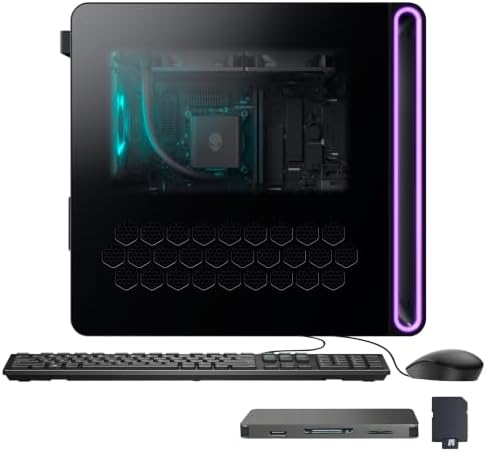
Dell Alienware Aurora Gaming Desktop
Bottom line: The Dell Core Ultra 9 285K / RTX 5080 prebuilt ($5,669.00 on Amazon as of 2026-11-24 21:45 UTC) has 16GB of graphics memory, 64GB of DDR5 RAM and a 3TB SSD.
As an Amazon Associate, SpecPicks earns from qualifying purchases. Full disclosure →
*Price sourced from Amazon.com. Last updated 2026-11-24. Product prices and availability are accurate as of the date/time indicated and are subject to change. Any price and availability information displayed on Amazon.com at the time of purchase will apply to the purchase of this product.
Pros & Cons
Pros
- ✓ Pairs a Core Ultra 9 285K processor with GeForce RTX 5080 16GB graphics
- ✓ 64GB of DDR5 RAM leaves headroom for gaming alongside streaming or creative apps
Cons
- ✗ Price, stock, shipping and returns are set by the retailer and may have changed since this page was last updated
SpecPicks Verdict
SpecPicks scored Dell Alienware Aurora Gaming Desktop using a rating × review-volume × price-fit model applied to our editorial and benchmark analysis across the prebuilt gaming pcs category. Compare with similarly-priced alternatives in the prebuilt gaming pcs category before committing. Its clearest listed strength is "Pairs a Core Ultra 9 285K processor with GeForce RTX 5080 16GB graphics"; check that against the figure your use case actually depends on, then compare close alternatives in the Compare tool.
Before ordering, check the listed dimensions, ports, power requirements and supported devices or systems in the spec table below against how you plan to use it, and confirm them on the retailer's listing. Prices and stock are set by the retailer and may have moved since this page was last updated.
Key Features
Quoted from the manufacturer's listing. Where it differs from the pros and cons above, those note the conditions the listing leaves out.
- 【Intel Core Ultra 9 285K Processor】Boasting 24 cores and up to 5.7GHz max boost clock, this CPU unleashes robust performance for heavy multitasking, AAA gaming and intensive creative tasks.
- 【NVIDIA GeForce RTX 5080 16GB GDDR7】This next-gen GPU supports ray tracing and AI DLSS, bringing stunning, fluid visuals for gaming and creative production.
- 【64GB DDR5 RAM】 Enjoy fast, responsive performance for smooth multitasking and demanding applications.【2TB PCIe SSD】 Enjoy fast load times, quick data access, and ample storage for files, software, and entertainment.
- 【Keyboard & Mouse】Comes with high-responsive matching keyboard and mouse combo, delivering precise control and comfortable operation for immersive gaming, professional office work and daily casual use right out of the box.【Wi-Fi 7】Equipped with latest Wi-Fi 7 technology, offering ultra-fast wireless transmission speed, ultra-low network latency and more stable signal connection, perfectly adapting to competitive online gaming, 4K/8K streaming and multi-task network scenarios.
- 【Windows 11 Home】【Dimensions】16.46" x 7.75" x 18.05", 33.89 lbs. 【Ports】7 x USB-A, 3 x USB-C, 1 x RJ-45, 1 x Global headset jack, 1 x Line In, 1x SPDIF Digital Output (TOSLINK), 1x Line Out. 【Bonus Docking Station Set】1x 7-in-1 Docking Station with 1TB Storage, 1x 32GB MicroSD Card with Adapter, 1x Type-C Data Cable, 1x 3-in-1 Charging Cable, 1x Suede Cleaning Cloth.
Full Specifications
| Full listing title | Dell Alienware Aurora Gaming Desktop, Intel Core Ultra 9 285K, 64GB DDR5, 3TB Storage (2TB SSD+1TB Docking Station Set), NVIDIA GeForce RTX 5080 16GB GDDR7, Keyboard & Mouse, Wi-Fi 7, Win 11, Black |
|---|
Performance Data
View gaming FPS, AI inference throughput, and synthetic scores for the NVIDIA GeForce RTX 5080 — the core hardware component in this product. Benchmarks sourced from TechPowerUp, PassMark, and the r/LocalLLaMA community.
Related benchmarks: Intel Core Ultra 9 285K benchmarks
Which local LLMs fit in 16 GB?
16 GB holds a 20–27B model at Q4 with a modest context window; 30B-class weights need 24 GB.
- ✅ 7–9B models (Llama 3.1 8B, Qwen 3 8B) — fits at Q4
- ✅ 12–14B models (Qwen 3 14B, Phi-4) — fits at Q4
- ❌ 20–27B models (Gemma 3 27B, Mistral Small) — needs 20 GB+
- ❌ 30–35B models (Qwen 3 32B, QwQ 32B) — needs 24 GB+
- ❌ 70B models (Llama 3.3 70B, Qwen 2.5 72B) — needs 48 GB+
Across 7 community runs from 6 sources, the NVIDIA GeForce RTX 5080 generates a median 180 tok/s on 7–9B models at Q4 (per llama.cpp GitHub (CUDA performance scoreboard)).
Ready to buy?
Dell Alienware Aurora Gaming Desktop, Intel Core Ultra 9 285K, 64GB DDR5, 3TB Storage (2TB SSD+1TB Docking Station Set), NVIDIA GeForce RTX 5080 16GB GDDR7, Keyboard & Mouse, Wi-Fi 7, Win 11, Black is listed on Amazon. Price, availability, shipping and returns are set by Amazon and its sellers — check the listing for current terms. SpecPicks earns a small commission on qualifying purchases — thank you for supporting independent review work.
*Price sourced from Amazon.com. Last updated 2026-11-24. Product prices and availability are accurate as of the date/time indicated and are subject to change. Any price and availability information displayed on Amazon.com at the time of purchase will apply to the purchase of this product.
Related Prebuilt Gaming PCs


More guides & deep dives from the SpecPicks archive
Browse all articles & guides →- The Complete Voodoo5 5500 AGP Driver Guide (2026 Edition)
- Best 1440p Gaming GPUs in 2026
- Emulation Hardware in 2026: FPGA, Software, and Cart-Reader Ecosystems
- Best Budget Gaming PC Build 2026 — ~$1,000 Parts List
- How to Build a Windows 98 Retro PC in 2026
- RTX 4070 Super vs RX 7800 XT — Which to Buy in 2026
- Best Retro Handhelds in 2026: Pocket, Mid-Tier and FPGA Picks
More reviews from the SpecPicks archive
Browse all reviews →- How to run Qwen 3 14B on NVIDIA GeForce RTX 3090
- Best Streaming Setup Gear for Beginners in 2026
- GameSir G7 SE vs DualSense for PC Gaming: Which Controller Wins?
- Ryzen 7 5800X vs Core i7-9700K: Best Budget 1080p Gaming CPU in 2026
- Kimi K3 Nears GPT-5.6 at Half the Cost — And What It Means for Home Rigs
- Super Mario 64 Nintendo DS Port Lands With Multiplayer Support
- Best Storage Upgrades for Gaming and Retro PCs in 2026
- 50+ Raspberry Pi Project Ideas for 2025 (By Skill Level)
- Sound Blaster X G6 on a Windows XP Retro Gaming PC: Worth It?
- Best Sim Racing Wheel for Forza on Xbox + PC 2026
- Best Budget 4K Gaming Monitor Under $400 in 2026: SANSUI vs KOORUI Mini-LED
- Building a CompactFlash + IDE Storage Stack for Win98 and WinXP Retro Rigs
- Gemma 4 Stealth Update Fixes Tool Calling: What Changes Locally
- Build a Raspberry Pi Bird-Song Logger with a USB Mic (2026)
- Best CPU Cooler for Ryzen 7 5800X Overclocking (2026)
- Mac Studio AI Model 2025: Performance vs AMD Alternatives
- Crucial BX500 vs Samsung 870 EVO: Best Budget SATA SSD for Upgrades
- Qwen3.6-27B vs Coder-Next: Local Code Accuracy and VRAM on AMD Rigs
- Best Retro Gaming Consoles and Controllers to Buy in 2026
- MSI Raider 16 Max HX Review: Elite Gaming and Creator Power
- Period-Correct Sound for a Modern Retro PC: The Sound Blaster G6 and the EAX Legacy
- Qwen 3.6 35B-A3B on a 16GB GPU: RTX 5060 Ti vs RX 9060 XT Quant Table
- Asus ProArt PA27USD OLED Lands — and What 4K Gamers Can Buy for Less
- Ryzen 7 5800X3D vs Intel Core i7-14700K for DDR4 Gaming
Earliest SpecPicks reviews
Browse full archive →- Best GPU for Llama 3.1 8B (2026)
- Best GPU for Qwen 3 14B (2026)
- Best GPU for Qwen 3 32B (2026)
- Best GPU for Llama 3.1 70B (2026)
- Best GPU for DeepSeek-R1 32B (2026)
- Best GPU for Llama 3.1 405B (2026)
- How to run Llama 3.1 8B on NVIDIA GeForce RTX 5090
- How to run Qwen 3 14B on NVIDIA GeForce RTX 5090
- How to run Qwen 3 32B on NVIDIA GeForce RTX 5090
- How to run Llama 3.1 70B on NVIDIA GeForce RTX 5090
- How to run DeepSeek-R1 32B on NVIDIA GeForce RTX 5090
- How to run Llama 3.1 8B on NVIDIA GeForce RTX 4090