
Thermalright
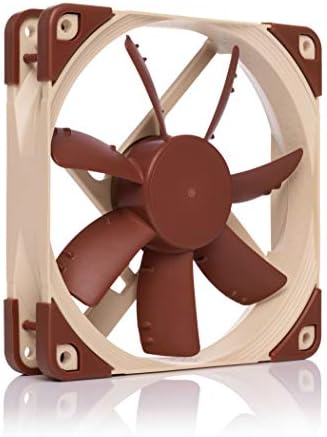
Thermalright TL-C12C X3 CPU Fan
Bottom line: The Thermalright TL-C12C X3 CPU Fan: 66.17 CFM airflow and 1.53 mm H2O static pressure per fan; main trade-off: 1550 RPM ceiling trails high-RPM fans built for thick radiators.
As an Amazon Associate, SpecPicks earns from qualifying purchases. Full disclosure →
Pros & Cons
Pros
- ✓ 66.17 CFM airflow and 1.53 mm H2O static pressure per fan
- ✓ Rated noise ceiling of 25.6 dBA at full 1550 RPM
- ✓ S-FDB bearing curbs blade wobble as PWM speed ramps up
Cons
- ✗ 1550 RPM ceiling trails high-RPM fans built for thick radiators
- ✗ No RGB or ARGB lighting on any of the three fans
- ✗ Silicone corner pads only; no rubber anti-vibration mounting screws
- ✗ 55cm cable may still need extensions in full-tower builds
SpecPicks Verdict
SpecPicks has no buyer-rating or benchmark data for Thermalright TL-C12C X3 CPU Fan, so this read rests on the manufacturer's listed specs (how we evaluate). Compare with similarly-priced alternatives in the cooling & fans category before committing. On the listing's own facts, the case for it is "66.17 CFM airflow and 1.53 mm H2O static pressure per fan"; the main trade-off is "1550 RPM ceiling trails high-RPM fans built for thick radiators". If those two points fit how you will use it, put it beside one or two close alternatives in the Compare tool to confirm the price.
Common buyer scenarios for cooling & fans of this kind: matching it to an existing build, replacing a failing part, or upgrading from a previous-generation equivalent. Check the spec table below against your current setup — particularly socket / form-factor / power-rating fields — and confirm compatibility on the retailer's listing before purchase. Prices and stock are set by the retailer and may have moved since this page was last updated.
Key Features
Quoted from the manufacturer's listing. Where it differs from the pros and cons above, those note the conditions the listing leaves out.
- 【High Performance Cooling Fan】 Automatic speed control of the motherboard through the 4PIN PWM fan cable interface, which can determine the speed according to the temperature of the motherboard, with a maximum speed of 1550RPM. Configured with up to 55cm of cable for PWM series control of fans, ideal for cases and CPU coolers.
- 【Quality Bearings】The carefully developed quality S-FDB bearings solve the problem of pc cooling fan blade shaking in lifting mode, keeping fan noise to a minimum while providing maximum cooling performance when needed and extending the life of the fan.
- 【Vibration Reduction and Low Noise】 The case fan is equipped with four soft material silicone corner pads on all four sides, which can reduce the vibration and friction caused by the rotation of the fan, perfectly reducing noise and allowing low noise operation, so that cooling can be carried out in low noise.
- 【Silent Fan Size】 Model: TL-C12C X3, Size: 120*120*25mm, Speed: 1550RPM±10%, Noise ≤ 25.6dBA Connector: 4pin pwm, Current: 0.20A, Air Pressure: 1.53mm H2O, Air Flow: 66.17CFM, Higher air flow for improved cooling performance.
- 【Perfect Match】The PC fan can be used not only as a case fan, but is also suitable for use with a cpu cooler to create a cooling effect together, which can take away the dry heat from the case and the high temperature generated by the CPU in operation, allowing for maximum cooling; Ideal for cases, radiators and CPU coolers.
Full Specifications
| Brand | Thermalright |
|---|---|
| Model | TL-C12C X3 |
| Voltage | 12 volts_of_direct_current |
| Material | Plastic |
| Unit Count | 1 Count |
| Noise Level | 25.6 db |
| Part Number | TL-C12C X3 |
| Compatibility | PC |
| Material Type | Plastic |
| Cooling Method | Air |
| Number of Items | 1 |
| Vibration/Rumble | Yes |
| Air Flow Capacity | 66.17 cfm |
| Compatible Devices | Desktop |
| Included Components | cpu fan |
| Power Connector Type | 4-Pin |
| Maximum Rotational Speed | 1550 rpm |
| Item Dimensions L x W x H | 4.72"L x 0.98"W x 4.72"H |
| Full listing title | Thermalright TL-C12C X3 CPU Fan, 120mm 4pin PWM Silent Computer Case Cooler Fan,with S-FDB Bearing Included, up to 1550RPM PC Cooling(3 Quantities) |
Benchmark data for other processors
Ready to buy?
Thermalright TL-C12C X3 CPU Fan, 120mm 4pin PWM Silent Computer Case Cooler Fan,with S-FDB Bearing Included, up to 1550RPM PC Cooling(3 Quantities) is listed on Amazon. Price, availability, shipping and returns are set by Amazon and its sellers — check the listing for current terms. SpecPicks earns a small commission on qualifying purchases — thank you for supporting independent review work.
Related Cooling & Fans


More guides & deep dives from the SpecPicks archive
Browse all articles & guides →- Emulation Hardware in 2026: FPGA, Software, and Cart-Reader Ecosystems
- The Complete Voodoo5 5500 AGP Driver Guide (2026 Edition)
- Best Retro Handhelds in 2026: Pocket, Mid-Tier and FPGA Picks
- Best Budget Gaming PC Build 2026 — ~$1,000 Parts List
- Best 1440p Gaming GPUs in 2026
- How to Build a Windows 98 Retro PC in 2026
- RTX 4070 Super vs RX 7800 XT — Which to Buy in 2026
More reviews from the SpecPicks archive
Browse all reviews →- Can You Game While Ollama Runs? RTX 3060 12GB VRAM Contention
- Apple Sues OpenAI Over Alleged Trade-Secret Theft: What It Means
- Forza Horizon 6 on Steam Deck: Best Dock and Controller Setup for 2026
- Best Parts for a Budget Ryzen + RTX 3060 Gaming PC Build in 2026
- Best Streaming Gear for Game Streamers in 2026: 5 Picks
- Best Storage Upgrades for a Legacy or Retro PC in 2026
- DeepSeek on the US Entity List: Running V4 Locally in 2026
- Best Noctua and Quiet-Tier CPU Coolers in 2026
- Best Gaming CPUs for 2026: Why the Ryzen 7 9800X3D Leads the Pack
- CompactFlash as an IDE Boot Drive: The Definitive Win98 Storage Guide
- BENGOO G9000 vs Turtle Beach Recon 50: Best Sub-$40 Wired Headset
- Best GPU for Running 27B-32B Local LLMs in 2026
- Pentium 4 + Radeon 9700 Pro Windows XP Build in 2026
- Best GPU for Training CNNs at Home in 2026: The RTX 3060 12GB Case
- Sound Blaster Audigy FX vs Sound BlasterX G6 for Retro Win98/XP Builds
- Dumping Big-Box CD-ROM Games in 2026 with an IDE-to-USB Adapter
- MLX engine comparison… and oMLX is the top choice.
- Best SSD for Steam Deck and Handheld Emulation in 2026
- Using Claude to Drive Period-Correct Win98 Driver Installs on Voodoo and GeForce 4 Hardware
- Best CPU Cooler for AM4 Ryzen Overclocking in 2026
- Ryzen 7 5800X3D Hard to Find: DDR5 CPU Alternatives Worth It?
- Retro Console Mods UK: Legal Rules & 2025 Options
- Adding USB Storage to a Windows 98 PC With a SATA/IDE Adapter
- CompactFlash as a Win98 Boot Drive: Transcend CF133 + IDE Adapter Walkthrough
Earliest SpecPicks reviews
Browse full archive →- Best GPU for Llama 3.1 8B (2026)
- Best GPU for Qwen 3 14B (2026)
- Best GPU for Qwen 3 32B (2026)
- Best GPU for Llama 3.1 70B (2026)
- Best GPU for DeepSeek-R1 32B (2026)
- Best GPU for Llama 3.1 405B (2026)
- How to run Llama 3.1 8B on NVIDIA GeForce RTX 5090
- How to run Qwen 3 14B on NVIDIA GeForce RTX 5090
- How to run Qwen 3 32B on NVIDIA GeForce RTX 5090
- How to run Llama 3.1 70B on NVIDIA GeForce RTX 5090
- How to run DeepSeek-R1 32B on NVIDIA GeForce RTX 5090
- How to run Llama 3.1 8B on NVIDIA GeForce RTX 4090