
StarTech.com
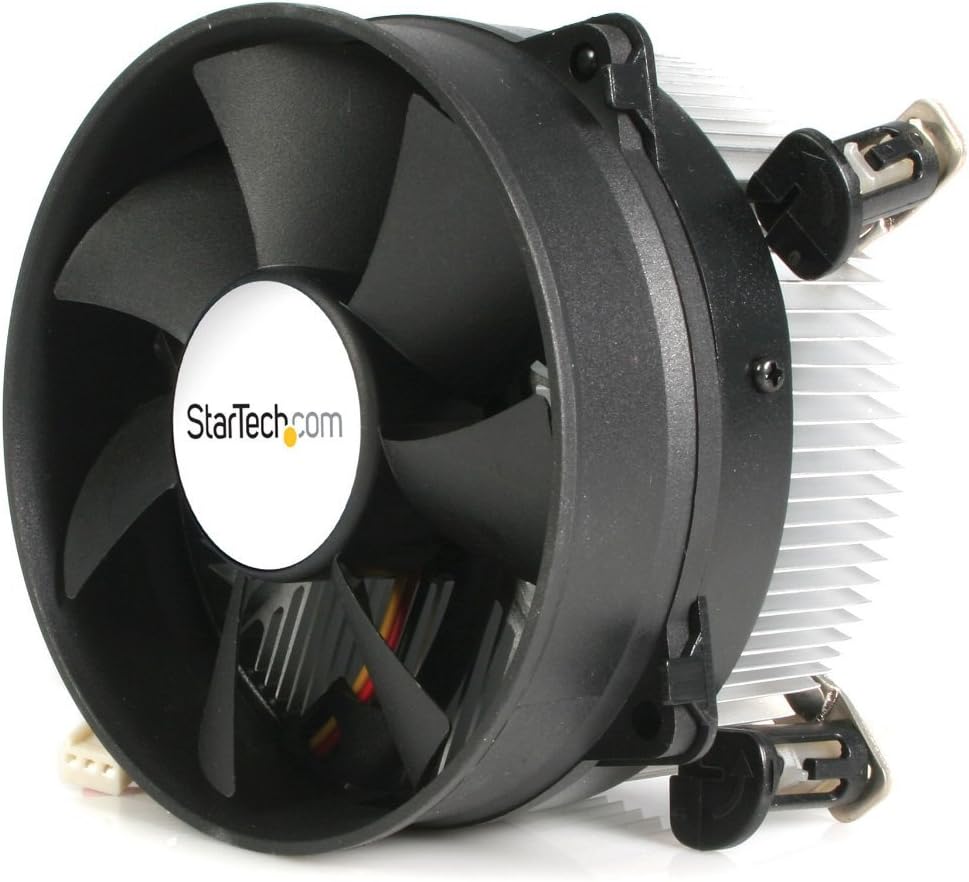
StarTech.com 95mm Socket T 775 CPU Cooler Fan with Heatsink Cooling FAN775E (Black)
Bottom line: The StarTech.com 95mm Socket T 775 CPU Cooler Fan: Fits Intel LGA-775 boards including Core 2 Duo, Core 2 Quad, and Extreme CPUs; main trade-off: LGA-775 only — no fit on modern AM4, AM5, or LGA-1700 sockets.
As an Amazon Associate, SpecPicks earns from qualifying purchases. Full disclosure →
Pros & Cons
Pros
- ✓ Fits Intel LGA-775 boards including Core 2 Duo, Core 2 Quad, and Extreme CPUs
- ✓ 95mm fan moves up to 50 CFM for steady CPU airflow
- ✓ Tool-less push clips install without removing the motherboard
- ✓ Aluminum heatsink spreads heat across a wide fin area
- ✓ Ever-Lubricate bearing fan runs quiet and lasts longer
Cons
- ✗ LGA-775 only — no fit on modern AM4, AM5, or LGA-1700 sockets
- ✗ Aluminum-only heatsink trails copper-base coolers on heat transfer
- ✗ 50 CFM suits stock clocks, leaves little overclocking headroom
- ✗ Push clips can loosen if not seated firmly on all four corners
Manufacturer description
This Socket T/775 cooler is designed specifically for the Intel Socket 775 (Socket T) range of processors, including Intel Core 2 Duo and Intel Core 2 Quad, Core 2 Duo Extreme CPUs. The CPU cooler features a large aluminum heatsink that maximizes dissipation of the heat around the CPU, as well a low-noise 95mm fan that provides up to 50 CFM of air circulation, helping to keep the CPU cooler for optimized performance. The Socket 775/T cooler/fan offers simple installation, providing tool-less clips for easy connection to the motherboard. A dependable, high quality CPU cooling solution, the…
SpecPicks Verdict
SpecPicks has no buyer-rating or benchmark data for StarTech.com 95mm Socket T 775 CPU Cooler Fan, so this read rests on the manufacturer's listed specs (how we evaluate). Compare with similarly-priced alternatives in the cooling & fans category before committing. On the listing's own facts, the case for it is "Fits Intel LGA-775 boards including Core 2 Duo, Core 2 Quad, and Extreme CPUs"; the main trade-off is "LGA-775 only — no fit on modern AM4, AM5, or LGA-1700 sockets". If those two points fit how you will use it, put it beside one or two close alternatives in the Compare tool to confirm the price.
Common buyer scenarios for cooling & fans of this kind: matching it to an existing build, replacing a failing part, or upgrading from a previous-generation equivalent. Check the spec table below against your current setup — particularly socket / form-factor / power-rating fields — and confirm compatibility on the retailer's listing before purchase. Prices and stock are set by the retailer and may have moved since this page was last updated.
Key Features
Quoted from the manufacturer's listing. Where it differs from the pros and cons above, those note the conditions the listing leaves out.
- Compatible with Intel Socket-T/LGA-775 motherboards
- Aluminum heatsink
- 95mm Ever-Lubricate bearing cooling fan
Full Specifications
| Brand | StarTech.com |
|---|---|
| Model | FAN775E |
| Voltage | 12 volts |
| Wattage | 3 watts |
| Material | Aluminum |
| Unit Count | 1 Count |
| Noise Level | 22 db |
| Part Number | FAN775E |
| Material Type | Aluminum |
| Cooling Method | Air |
| Number of Items | 1 |
| Number of Packs | 1 |
| Air Flow Capacity | 49.37 cfm |
| Compatible Devices | Desktop |
| Included Components | 95mm Ever-Lubricate bearing cooling fan, Thermal Compound |
| Power Connector Type | 3-Pin |
| Warranty Description | 2 year warranty |
| Maximum Rotational Speed | 2600 rpm |
| Item Dimensions L x W x H | 0.98"L x 3.74"W x 3.74"H |
| Global Trade Identification Number | 00065030826631 |
Benchmark data for other processors
Ready to buy?
StarTech.com 95mm Socket T 775 CPU Cooler Fan with Heatsink Cooling FAN775E (Black) is listed on Amazon. Price, availability, shipping and returns are set by Amazon and its sellers — check the listing for current terms. SpecPicks earns a small commission on qualifying purchases — thank you for supporting independent review work.
Related Cooling & Fans


More guides & deep dives from the SpecPicks archive
Browse all articles & guides →- Best Budget Gaming PC Build 2026 — ~$1,000 Parts List
- RTX 4070 Super vs RX 7800 XT — Which to Buy in 2026
- Best Retro Handhelds in 2026: Pocket, Mid-Tier and FPGA Picks
- Best 1440p Gaming GPUs in 2026
- Emulation Hardware in 2026: FPGA, Software, and Cart-Reader Ecosystems
- The Complete Voodoo5 5500 AGP Driver Guide (2026 Edition)
- How to Build a Windows 98 Retro PC in 2026
More reviews from the SpecPicks archive
Browse all reviews →- 4K@60fps USB Video Capture on Linux: What Works in 2026
- Grok Imagine Video 1.5 Is #2 — What GPU Runs Local Video Gen?
- Best GPU for i7-13700K at 1440p 180Hz (GTX 1080 Upgrade)
- Best CPU for Gaming in 2026: Intel vs AMD Showdown
- Coral TPU for LLM Inference: What the Specs Really Say
- Best Sim Racing Wheel Under $300 in 2026: Force Feedback That's Worth It
- Voodoo3 3000 Won't POST: Troubleshooting a 1999 Build in 2026
- Qwen 3.6-27B on an RTX 5070 Ti (16GB): What Fits at 50K Context and How Fast
- Strix Halo Gaming Benchmarks: What AMD's APU Can Really Do
- Can the RTX 3060 12GB Run Qwen3-27B Locally in 2026?
- SteamOS Boots on Intel Hardware in Community Hack
- Intel Axes BigDL/IPEX-LLM: Where Local Inference Goes Now
- PCIe Gen2/Gen3 1:2 Analog MUX: Practical Maker Implementation
- Best Budget Gaming PC Parts in 2026: A Ryzen + RTX 3060 Build
- Best GPU for 1440p Gaming Under $300 in 2026
- Ryzen AI Max+ 395 LLM Inference: Specs, Bandwidth, Reality
- Intel Arc A770 LLM Performance: Local Inference Guide
- Grok 4.5 at $0.31 a Task: When Cheap Cloud Beats a Local Build
- ASRock Phantom Gaming 360 LCD Cooler Debuts With Strong Numbers
- Best Controller for Retro Emulation on PC: 8BitDo, GameSir, DualSense
- Started a Homelab Last Month — Is the Ryzen 5 5600G Build Right?
- Best Streaming Setup Gear for Beginners in 2026
- Windows 98 vs Windows 2000 for a GeForce-Era Retro Gaming Build
- Best GPU for 1080p Esports in 2026: High-Refresh Without Overspending
Earliest SpecPicks reviews
Browse full archive →- Best GPU for Llama 3.1 8B (2026)
- Best GPU for Qwen 3 14B (2026)
- Best GPU for Qwen 3 32B (2026)
- Best GPU for Llama 3.1 70B (2026)
- Best GPU for DeepSeek-R1 32B (2026)
- Best GPU for Llama 3.1 405B (2026)
- How to run Llama 3.1 8B on NVIDIA GeForce RTX 5090
- How to run Qwen 3 14B on NVIDIA GeForce RTX 5090
- How to run Qwen 3 32B on NVIDIA GeForce RTX 5090
- How to run Llama 3.1 70B on NVIDIA GeForce RTX 5090
- How to run DeepSeek-R1 32B on NVIDIA GeForce RTX 5090
- How to run Llama 3.1 8B on NVIDIA GeForce RTX 4090