

NZXT
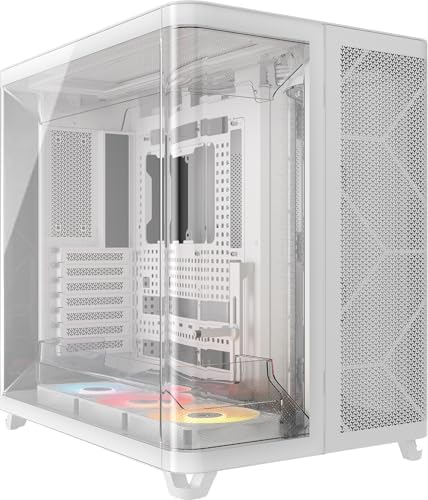
NZXT H9 Flow RGB
Bottom line: The NZXT H9 Flow RGB: Dual-chamber layout hides PSU and drives, freeing the main chamber for airflow; main trade-off: rear F120Q is a 3-pin DC case-version fan, so no PWM speed control.
As an Amazon Associate, SpecPicks earns from qualifying purchases. Full disclosure →
Pros & Cons
Pros
- ✓ Dual-chamber layout hides PSU and drives, freeing the main chamber for airflow
- ✓ Ships with a 420mm F420 RGB Core fan unit plus a 120mm rear fan out of the box
- ✓ Mounts up to a 420mm radiator on both the top and front-right
- ✓ Ten total fan mounts: nine 140mm slots plus one 120mm rear
- ✓ Back-connect ready for ASUS BTF and MSI Project Zero motherboards
Cons
- ✗ Rear F120Q is a 3-pin DC case-version fan, so no PWM speed control
- ✗ Only the front-right fan unit is RGB; the rear fan and remaining mounts are not
- ✗ Wraparound tempered glass shows dust and fingerprints on a white chassis
- ✗ Perforated steel panels trade some noise damping for airflow
Manufacturer description
The H9 Flow RGB (CM-H92FW-R1) is a spacious mid-tower ATX case built for high-performance builds, balancing airflow and aesthetics. Its dual-chamber design improves cooling and cable management, while perforated panels, angled fans, and ample fan and radiator support deliver optimal thermal performance.
SpecPicks Verdict
SpecPicks has no buyer-rating or benchmark data for NZXT H9 Flow RGB, so this read rests on the manufacturer's listed specs (how we evaluate). Compare with similarly-priced alternatives in the pc cases category before committing. On the listing's own facts, the case for it is "Dual-chamber layout hides PSU and drives, freeing the main chamber for airflow"; the main trade-off is "Rear F120Q is a 3-pin DC case-version fan, so no PWM speed control". If those two points fit how you will use it, put it beside one or two close alternatives in the Compare tool to confirm the price.
Common buyer scenarios for pc cases of this kind: matching it to an existing build, replacing a failing part, or upgrading from a previous-generation equivalent. Check the spec table below against your current setup — particularly socket / form-factor / power-rating fields — and confirm compatibility on the retailer's listing before purchase. Prices and stock are set by the retailer and may have moved since this page was last updated.
Key Features
Quoted from the manufacturer's listing. Where it differs from the pros and cons above, those note the conditions the listing leaves out.
- DUAL-CHAMBER DESIGN —Separates main components from the PSU and drives for improved thermal performance and cable management.
- OPTIMIZED AIRFLOW — Perforated steel panels and angled front-right fans ensure efficient cooling for high-performance builds.
- PRE-INSTALLED FANS — Includes one F420 RGB Core single-frame fan unit in the front-right and one F120Q (CV) fan in the rear. CV = Case Version (3-pin DC)
- TEN-FAN CAPACITY — Supports up to nine 140mm fans across the top, front-right, and bottom, plus one 120mm fan in the rear.
- PANORAMIC VIEW — Showcase every detail of your build with seamless, wraparound tempered glass paneling.
- LARGE RADIATORS & GPUS — Fits up to a 420mm radiator on the top and front-right, with plenty of clearance for high-end graphics cards.
Full Specifications
| Brand | NZXT |
|---|---|
| Color | White |
| Fan Size | 42 centimeters |
| Material | Tempered Glass |
| Case Type | Mid Tower |
| Model Name | NZXT H9 |
| Unit Count | 1 Count |
| Light Color | rgb |
| Model Number | CM-H92FW-R1 |
| Compatibility | PC |
| Built-In Media | Item |
| Cooling Method | Air |
| Number of Fans | 2 |
| Mfr Part Number | CM-H92FW-R1 |
| Antenna Location | Gaming |
| Compatible Devices | ASUS BTF, MSI Project Zero, high-end graphics cards, up to nine 140mm fans, one 120mm fan, up to 420mm radiator |
| Enclosure Material | Tempered Glass |
| Total USB 3.0 Ports | 2 |
| Warranty Description | 2 Year Manufacturer |
| Supported Motherboard | ATX |
| Full listing title | NZXT H9 Flow RGB - Dual-Chamber ATX PC Case - White | Dual-chamber flagship with pre-installed 420mm RGB fan unit, 420mm radiator support, and wraparound tempered glass. |
Ready to buy?
NZXT H9 Flow RGB - Dual-Chamber ATX PC Case - White | Dual-chamber flagship with pre-installed 420mm RGB fan unit, 420mm radiator support, and wraparound tempered glass. is listed on Amazon. Price, availability, shipping and returns are set by Amazon and its sellers — check the listing for current terms. SpecPicks earns a small commission on qualifying purchases — thank you for supporting independent review work.
Related PC Cases


More guides & deep dives from the SpecPicks archive
Browse all articles & guides →- Emulation Hardware in 2026: FPGA, Software, and Cart-Reader Ecosystems
- The Complete Voodoo5 5500 AGP Driver Guide (2026 Edition)
- RTX 4070 Super vs RX 7800 XT — Which to Buy in 2026
- Best 1440p Gaming GPUs in 2026
- How to Build a Windows 98 Retro PC in 2026
- Best Retro Handhelds in 2026: Pocket, Mid-Tier and FPGA Picks
- Best Budget Gaming PC Build 2026 — ~$1,000 Parts List
More reviews from the SpecPicks archive
Browse all reviews →- llama.cpp vs vLLM for Single-User Local Chat on a 12GB GPU (2026)
- Best 1440p Monitor for the RTX 3060 12GB (2026)
- Intel Arc B580 LLM Inference: 12GB Battlemage Benchmarks
- ProgramBench: Can LLMs Rebuild Programs From Scratch?
- GLM-5.2 for Local Agents: Can a 12GB RTX 3060 Run Long-Horizon Tasks?
- What Happened to the LLM Training Data Shortage?
- PS3 Emulation Reaches Radeon HD 2000-4000: What It Unlocks
- RTX 3060 12GB vs Arc B580 12GB for Local LLMs in 2026
- Intel IPEX-LLM vs Ollama on AMD: AI Rig Guide 2025
- Best Beginner Racing Wheel in 2026: Logitech G920 vs HORI Racing Wheel Overdrive
- Crucial BX500 1TB vs Samsung 870 EVO: Best SATA SSD for a Budget or Retro Build (2026)
- Intel Arc AI Training in 2026: What Workloads Actually Work
- Logitech G29 vs HORI Force Feedback: Best Beginner Sim-Racing Wheel in 2026
- RTX 3080 vs RTX 5080 — is it time to upgrade?
- Best Budget Streaming Mic + Capture Setup: Blue Yeti vs HyperX QuadCast 2 S
- What Handheld Console Should I Buy in 2026? A Decision Framework
- Best SATA SSD for Retro PC Upgrades in 2026
- Ryzen 5 5600G APU for Local LLM Inference in 2026: What You Can Actually Run
- Best SATA SSD for Gaming and Everyday Upgrades in 2026
- How to run DeepSeek-R1 32B on Apple M3 Ultra
- Best PC Cooling Solutions for AM4 and AM5 Builds in 2026
- SteamOS Boots on Intel Hardware: Enthusiast Hack Lands
- Cheapest 1440p GPU in 2026: Budget Buying Guide
- Anthropic: AI Builds Working Exploits in Hours, Not Weeks
Earliest SpecPicks reviews
Browse full archive →- Best GPU for Llama 3.1 8B (2026)
- Best GPU for Qwen 3 14B (2026)
- Best GPU for Qwen 3 32B (2026)
- Best GPU for Llama 3.1 70B (2026)
- Best GPU for DeepSeek-R1 32B (2026)
- Best GPU for Llama 3.1 405B (2026)
- How to run Llama 3.1 8B on NVIDIA GeForce RTX 5090
- How to run Qwen 3 14B on NVIDIA GeForce RTX 5090
- How to run Qwen 3 32B on NVIDIA GeForce RTX 5090
- How to run Llama 3.1 70B on NVIDIA GeForce RTX 5090
- How to run DeepSeek-R1 32B on NVIDIA GeForce RTX 5090
- How to run Llama 3.1 8B on NVIDIA GeForce RTX 4090